EasyManua.ls Logo

Technics SH-EH50 - Page 3

Technics SH-EH50
20 pages
Print Icon
To Next Page IconTo Next Page
To Previous Page IconTo Previous Page
Loading...
|
SH-EH50
m@
Changing
the
Tone
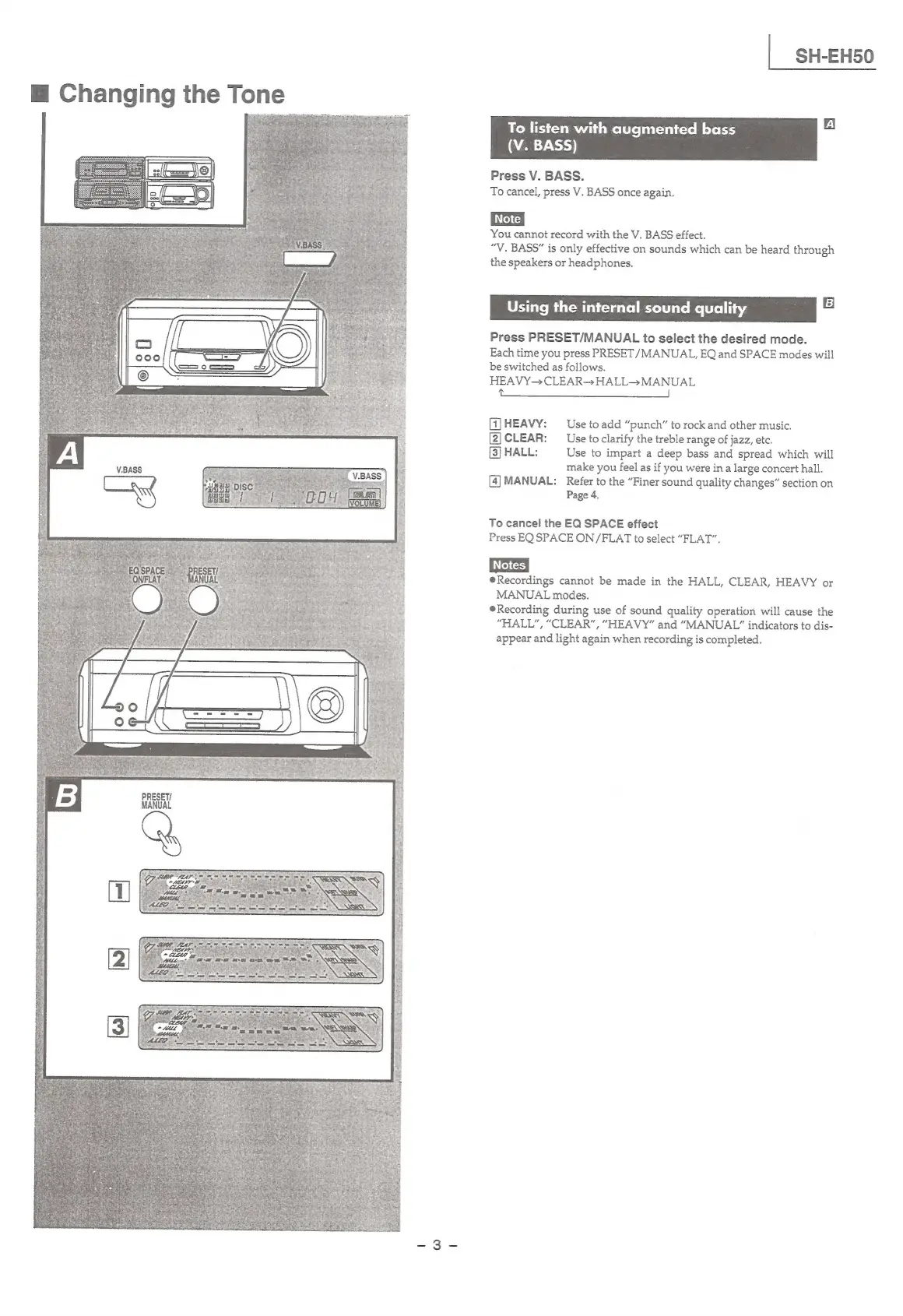
To
listen
with
augmented
bass
WALT.)
Press
V.
BASS.
To
cancel,
press
V.
BASS
once
again.
You
cannot
record
with
the
V.
BASS
effect.
“V.
BASS”
is
only
effective
on
sounds
which
can
be
heard
through
the
speakers
or
headphones.
Using
the
internal
sound
quality
B
Press
PRESET/MANUAL
to
select
the
desired
mode.
Each
time
you
press
PRESET
/MANUAL,
EQ
and
SPACE
modes
will
be
switched
as
follows.
HEAVY—
CLEAR
HALL
MANUAL
ee
ae
ee
|
GJHEAVY:
Use
toadd
“punch”
to
rock
and
other
music.
[2)CLEAR:
Use
to
clarify
the
treble
range
of
jazz,
etc.
[3]
HALL:
Use
to
impart
a
deep
bass
and
spread
which
will
make
you
feel
as
if
you
were
in
a
large
concert
hall.
[4]MANUAL:
Refer
to
the
“Finer
sound
quality
changes”
section
on
Page
4.
To
cancel
the
EQ
SPACE
effect
Press
EQ
SPACE
ON/FLAT
to
select
“FLAT”.
Recordings
cannot
be
made
in
the
HALL,
CLEAR,
HEAVY
or
MANUAL
modes.
Recording
during
use
of
sound
quality
operation
will
cause
the
“HALL”,
“CLEAR”,
“HEAVY”
and
“MANUAL”
indicators
to
dis-
appear
and
light
again
when
recording
is
completed.
PRESET/

Related product manuals