EasyManua.ls Logo

Technics SH-EH50 - Page 4

Technics SH-EH50
20 pages
Print Icon
To Next Page IconTo Next Page
To Previous Page IconTo Previous Page
Loading...
SH-EH50
Middle
register
Ltt
WER
SS
SARE
ee
SL
ee
FETE
t
f
¥
Using
the
acoustic
image
EQ
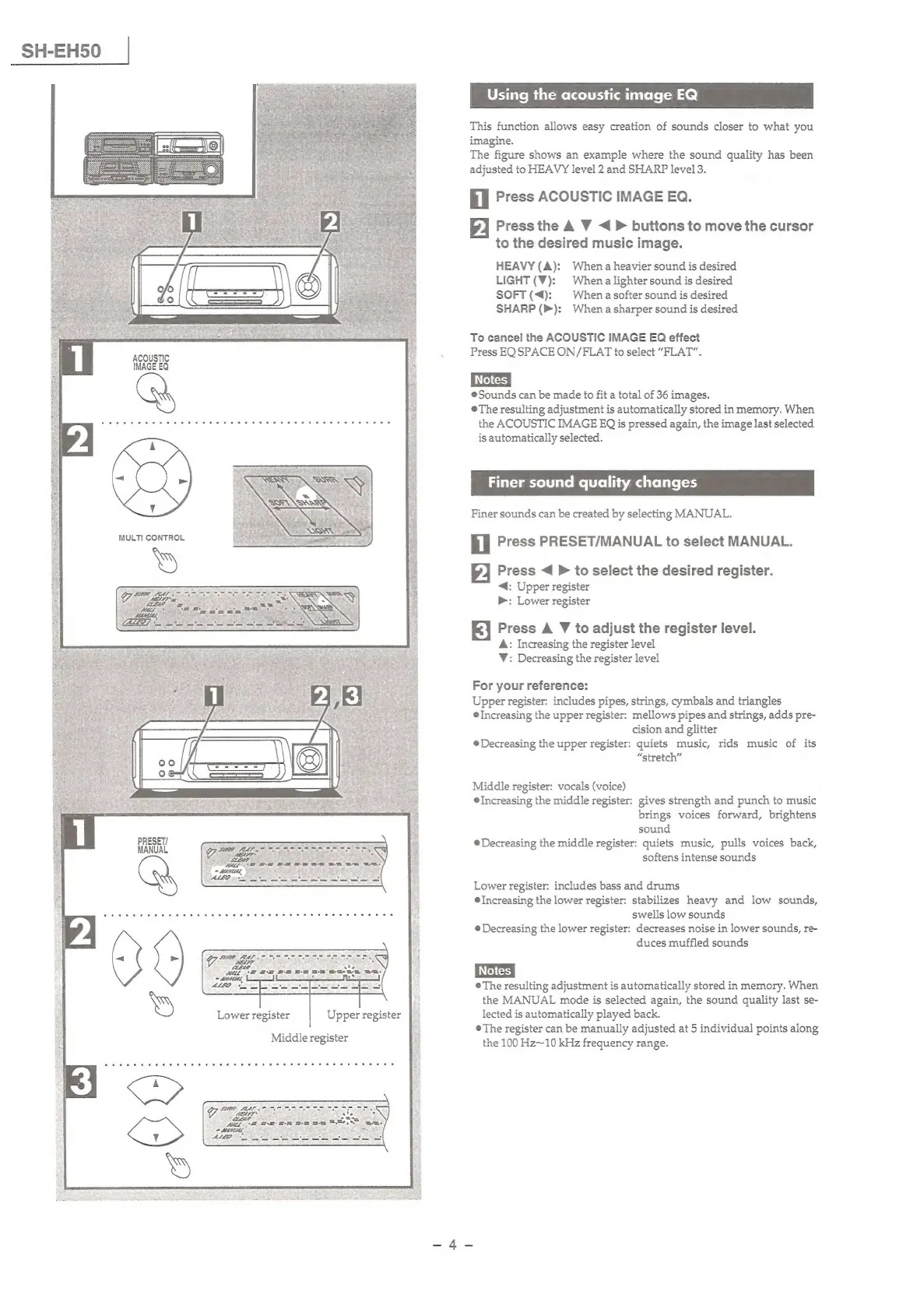
This
function
allows
easy
creation
of
sounds
closer
to
what
you
imagine.
The
figure
shows
an
example
where
the
sound
quality
has
been
adjusted
to
HEAVY
level
2
and
SHARP
level
3.
il
Press
ACOUSTIC
IMAGE
EQ.
2
Press
the
A
VW
<
>
buttons
to
move
the
cursor
to
the
desired
music
image.
HEAVY
(A):
When
a
heavier
sound
is
desired
LIGHT
(¥):
Whena
lighter
sound
is
desired
SOFT
(<4):
|
Whena
softer
sound
is
desired
SHARP
(>):
Whena
sharper
sound
is
desired
To
cancel
the
ACOUSTIC
IMAGE
EQ
effect
Press
EQ
SPACE
ON/FLAT
to
select
“FLAT”.
Sounds
can
be
made
to
fit
a
total
of
36
images.
©The
resulting
adjustment
is
automatically
stored
in
memory.
When
the
ACOUSTIC
IMAGE
EQ
is
pressed
again,
the
image
last
selected
is
automatically
selected.
Finer
sound
quality
changes
Finer
sounds
can
be
created
by
selecting
MANUAL.
il
Press
PRESET/MANUAL
to
select
MANUAL.
Press
<
>
to
select
the
desired
register.
<4:
Upper
register
>:
Lower
register
EF}
Press
A
V
to
adjust
the
register
level.
A:
Increasing
the
register
level
V:
Decreasing
the
register
level
For
your
reference:
Upper
register:
includes
pipes,
strings,
cymbals
and
triangles
@
Increasing
the
upper
register:
mellows
pipes
and
strings,
adds
pre-
cision
and
glitter
©
Decreasing
the
upper
register:
quiets
music,
rids
music
of
its
“stretch”
Middle
register:
vocals
(voice)
@
Increasing
the
middle
register:
gives
strength
and
punch
to
music
brings
voices
forward,
brightens
sound
©
Decreasing
the
middle
register:
quiets
music,
pulls
voices
back,
softens
intense
sounds
Lower
register:
includes
bass
and
drums
©
Increasing
the
lower
register:
stabilizes
heavy
and
low
sounds,
swells
low
sounds
©
Decreasing
the
lower
register:
decreases
noise
in
lower
sounds,
re-
duces
muffled
sounds
©The
resulting
adjustment
is
automatically
stored
in
memory.
When
the
MANUAL
mode
is
selected
again,
the
sound
quality
last
se-
lected
is
automatically
played
back.
©The
register
can
be
manually
adjusted
at
5
individual
points
along
the
100
Hz~10
kHz
frequency
range.

Related product manuals