EasyManua.ls Logo

Technics SH-EH50 - Page 5

Technics SH-EH50
20 pages
Print Icon
To Next Page IconTo Next Page
To Previous Page IconTo Previous Page
Loading...
|
SH-EH50
a
Enjoying
Sound
with
eee
PRO
LOGIC
[For
(GC)
area
only]
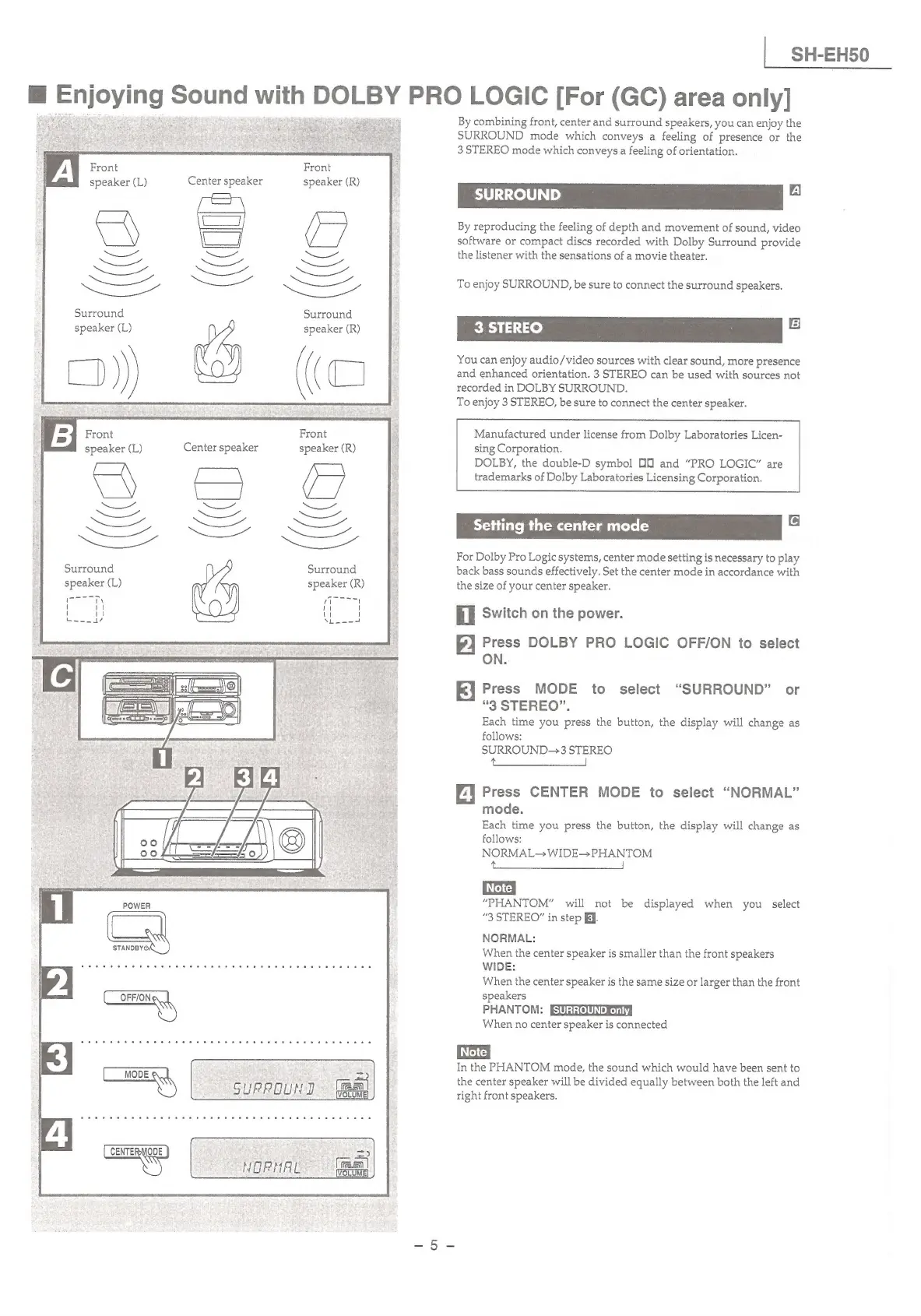
By
combining
front,
center
and
surround
speakers,
you
can
enjoy
the
SURROUND
mode
which
conveys
a
feeling
of
presence
or
the
3
STEREO
mode
which
conveys
a
feeling
of
orientation.
Front
Front
speaker
(L)
Center
speaker
speaker
(R)
;
|
SURROUND
y
By
reproducing
the
feeling
of
depth
and
movement
of
sound,
video
software
or
compact
discs
recorded
with
Dolby
Surround
provide
the
listener
with
the
sensations
of
a
movie
theater.
To
enjoy
SURROUND,
be
sure
to
connect
the
surround
speakers.
Surround
Surround
!
B
You
can
enjoy
audio/video
sources
with
clear
sound,
more
presence
and
enhanced
orientation.
3
STEREO
can
be
used
with
sources
not
recorded
in
DOLBY
SURROUND.
To
enjoy
3
STEREO,
be
sure
to
connect
the
center
speaker.
Front
Front
speaker
(L)
Center
speaker speaker
(R)
Manufactured
under
license
from
Dolby
Laboratories
Licen-
sing
Corporation.
DOLBY,
the
double-D
symbol
DO
and
“PRO
LOGIC”
are
trademarks
of
Dolby
Laboratories
Licensing
Corporation.
Setting
the
center
mode
For
Dolby
Pro
Logic
systems,
center
mode
setting
is
necessary
to
play
Surround
Surround
he
back
bass
sounds
effectively.
Set
the
center
mode
in
accordance
with
speaker
(L)
speaker
(R)
|
the
size
of
your
center
speaker.
il
Switch
on
the
power.
2
Press
DOLBY
PRO
LOGIC
OFF/ON
io
select
ON.
Jk]
Press
MODE
to
select
“SURROUND”
or
“3
STEREO”.
Each
time
you
press
the
button,
the
display
will
change
as
follows:
SURROUND-3
STEREO
tS
4
Press
CENTER
MODE
to
select
“NORMAL”
mode.
Each
time
you
press
the
button,
the
display
will
change
as
follows:
NORMAL
WIDE->PHANTOM
SRE
ae
ee
“PHANTOM”
will
not
be
displayed
when
you
select
“3
STEREO”
in
step
Eq.
NORMAL:
When
the
center
speaker
is
smaller
than
the
front
speakers
WIDE:
When
the
center
speaker
is
the
same
size
or
larger
than
the
front
speakers
PHANTOM:
When
no
center
speaker
is
connected
STANDBY,
In
the
PHANTOM
mode,
the
sound which
would
have
been
sent
to
the
center
speaker
will
be
divided
equally
between
both
the
left
and
right
front
speakers.

Related product manuals