EasyManua.ls Logo

Technics SL-BD21 - Page 5

Technics SL-BD21
16 pages
Print Icon
To Next Page IconTo Next Page
To Previous Page IconTo Previous Page
Loading...
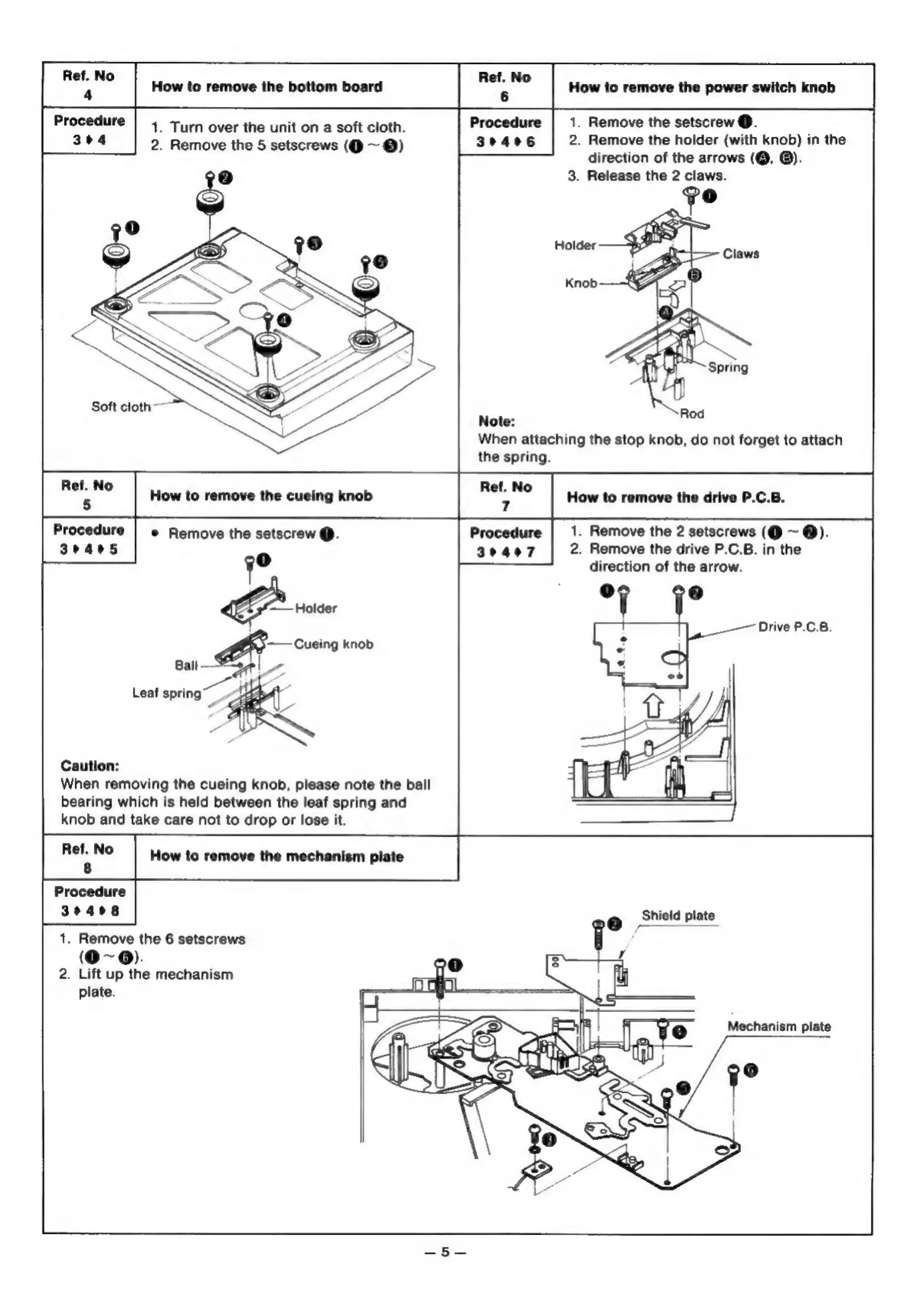
Ref.
No
4
Procedure
304
How
to
remove
the
bottom
board
How
to
remove
the
power
switch
knob
1.
Remove
the
setscrew
@.
2.
Remove
the
holder
(with
knob)
in
the
direction
of
the
arrows
(@,
®).
3.
Release
the
2
claws.
1.
Turn
over
the
unit
on
a
soft
cloth.
2.
Remove
the
5
setscrews
(Q@
~
@)
Soft
cloth
Note:
When
attaching
the
stop
knob,
do
not
forget
to
attach
the
spring.
Ref.
No
Ref.
No
How
to
remove
the
cueing
knob
How
to
remove
the
drive
P.C.B.
Procedure
3405
1.
Remove
the
2
setscrews
(@
~
@).
2.
Remove
the
drive
P.C.B.
in
the
direction
of
the
arrow.
©
Remove
the
setscrew
@.
Drive
P.C.B.
Caution:
When
removing
the
cueing
knob,
please
note
the
ball
bearing
which
is
held
between
the
leaf
spring
and
knob
and
take
care
not
to
drop
or
lose
it.
How
to
remove
the
mechanism
plate
Procedure
30408
1.
Remove
the
6
setscrews
(O~@).
2.
Lift
up
the
mechanism
plate.

Related product manuals