EasyManua.ls Logo

Technics sl-mc410 - Program play; To clear all programmed contents

Technics sl-mc410
32 pages
Print Icon
To Next Page IconTo Next Page
To Previous Page IconTo Previous Page
Loading...
Operations
Program
play
iiiMt^itasi
PROGRAM
PROGRAM
DISC
.
:
LJ
TRACK
:
s:
FRCGRAW
PROGRAM
TRACK
PROGRAM
PROGRAM
W
TRACK
:frtzii*flHI.
The
"AL"
indication
shows
that
ail
the
tracks
on
the
disc
are
selected.
To
program
disc
numbers
only,
repeat
the
above
operation.
(The
count
will
increase
by
one
for
each
operation.)
You
can
select
slot
No.
0.
Press
the
numeric
button(s)
to
specify
the
track.
For
exampie:To
select
track
No.
20
riioi
->rr~u
ron
To
program
another
track
from
the
same
disc,
simply
specify
the
track
No.
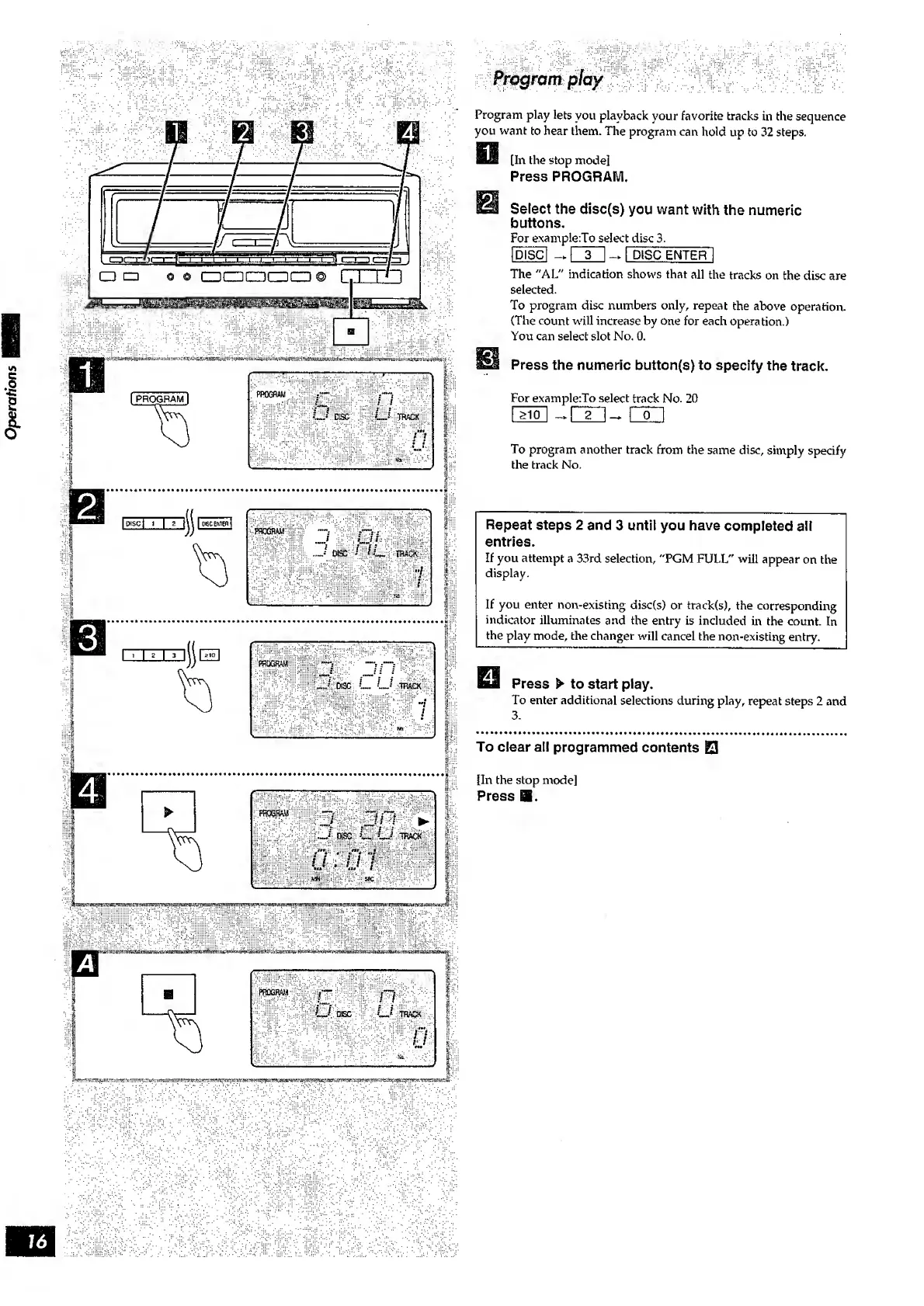
Program
play
lets
you
playback
your
favorite
tracks
in
the
sequence
you
want
to
hear
them.
The
program
can
hold
up
to
32
steps.
[In
the
stop
mode]
Press
PROGRAM.
Select
the
disc(s)
you
want
with
the
numeric
buttons.
For
example:To
select
disc
3.
Repeat
steps
2
and
3
until
you
have
completed
all
entries.
If
you
attempt
a
33rd
selection,
"PGM
FULL"
will
appear
on
the
display.
If
you
enter
non-existing
disc(s)
or
track(s),
the
corresponding
indicator
illuminates
and
the
entry
is
included
in
the
count.
In
the
play
mode,
the
changer
will
cancel
the
non-existing
entry.
=
IIIII11III
Press
>
to
start
play.
To
enter
additional
selections
during
play,
repeat
steps
2
and
3.
To
clear
all
programmed
contents
0
[In
the
stop
mode]
Press
EB.

Related product manuals