EasyManua.ls Logo

Technics SL-P110 - Page 5

Technics SL-P110
36 pages
Print Icon
To Next Page IconTo Next Page
To Previous Page IconTo Previous Page
Loading...
.
m
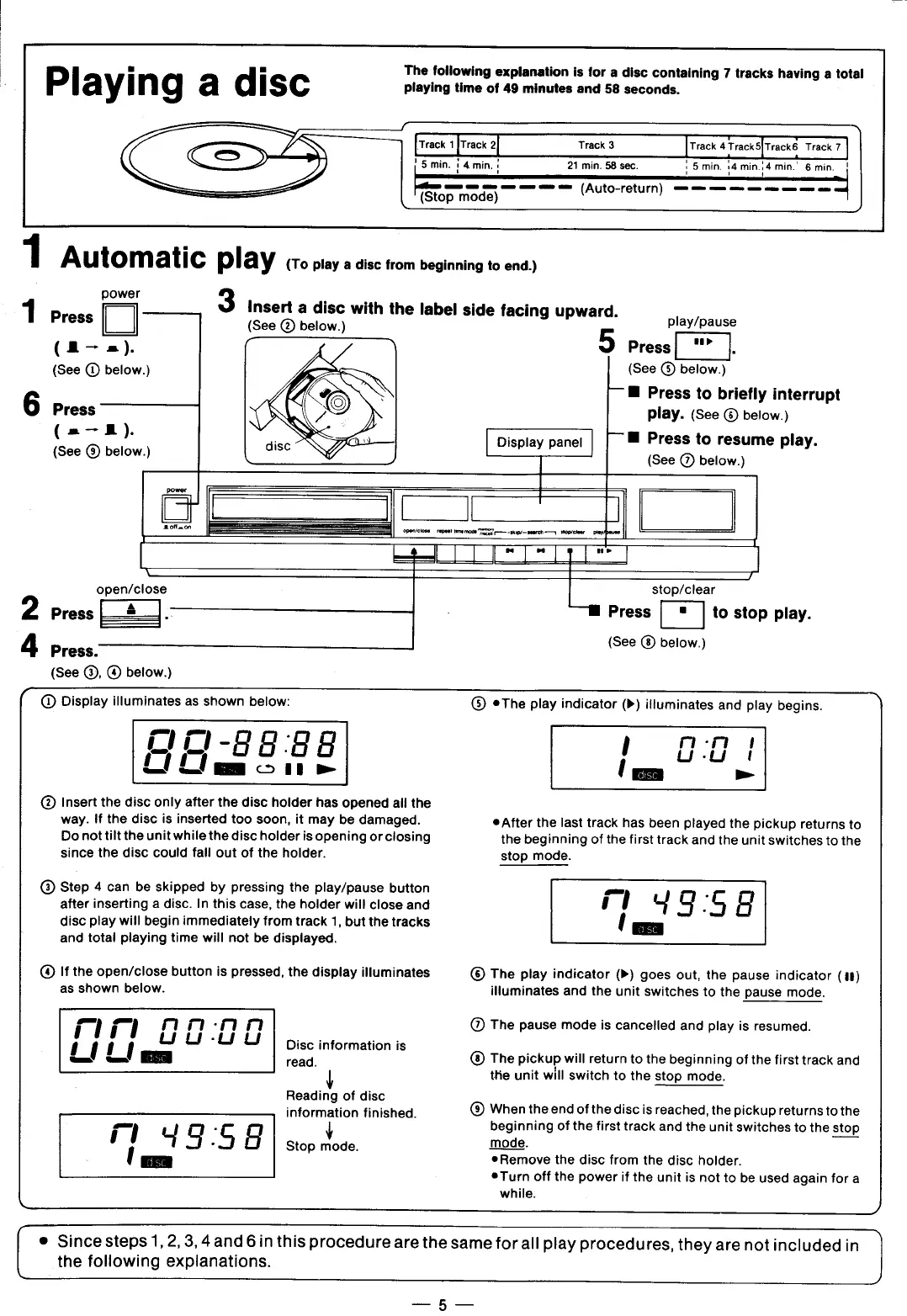
The
following
explanation
is
for
a
disc
containing
7
tracks
having
a
total
P
I
ay‘
n
g
a
d
Isc
playing
time
of
49
minutes
and
58
seconds.
/-
.
Y
[Track
1
ITrack
2[
Track
3
ITrack
4
Track
5[Track6
Track?l
!
5
min.
5
4
min.
21
min.
58
sec.
1
5
min.
E4
min454
min."
6
min.
i
’TSTop_m?d.;)__-—
(Auto-return)
==
=
=
——-—————1
1
Automatic
play
(To
play
a
disc
from
beginning
to
end.)
power
3
Insert
a
disc
with
the
label
side
facing
upward.
1
Press
(See
@
below.)
(A—
=)
(See
(D
below.)
6
Press
|
(See
below.)
play/pause
5
Press
E
(See
®
below.)
B
Press
to
briefly
interrupt
play.
(See
®
below.)
Display
panel
| |
B
Press
to
resume
play.
(See
@
below.)
=
1
Ll
[
[=T=Ts0™
]
-
IJ
open/close
stop/clear
2
Press
%
:
—M
Press
E
to
stop
play.
4
(See
below.)
Press.
(See
(®,
®
below.)
f
Q@
Display
illuminates
as
shown
below:
eThe
play
indicator
(»)
itluminates
and
play
begins.
R
1-88
88
|
04!
-
-
Ll
'u
'
Lillem
cn
e
{
-
@
Insert
the
disc
only
after
the
disc
holder
has
opened
all
the
way.
If
the
disc
is
inserted
too
soon,
it
may
be
damaged.
e
After
the
last
track
has
been
played
the
pickup
returns
to
Do
nottilt
the
unit
while
the
disc
holder
is
opening
or
closing
the
beginning
of
the
first
track
and
the
unit
switches
to
the
since
the
disc
could
fall
out
of
the
holder.
stop
mode.
Step
4
can
be
skipped
by
pressing
the
play/pause
button
o
.
after
inserting
a
disc.
In
this
case,
the
holder
will
close
and
!
'
L')’
g
.
S
E’
disc
play
will
begin
immediately
from
track
1,
but
the
tracks
and
total
playing
time
will
not
be
displayed.
(@
1f
the
open/close
button
is
pressed,
the
display
illuminates
The
play
indicator
(»)
goes
out,
the
pause
indicator
(1)
as
shown
below.
illuminates
and
the
unit
switches
to
the
pause
mode.
—'
‘-’
aan-nn
The
pause
mode
is
cancelled
and
play
is
resumed.
111
u
u
u
.
.
1
'
/]
'
Disc
information
is
-’
'
B
read.
®
The
pickup
will
return
to
the
beginning
of
the
first
track
and
the
unit
will
switch
to
the
stop
mode.
Reading
of
disc
.
)
information
finished.
®
When
the
end
ofthe
discis
reached,
the
pickup
returnsto
the
.—'
'_"
.
¢
beginning
of
the
first
track
and
the
unit
switches
to
the
stop
!
9
.
S
8
Stop
mode.
mode.
i
'
®Remove
the
disc
from
the
disc
holder.
®Turn
off
the
power
if
the
unit
is
not
tc
be
used
again
for
a
while.
-
J
(o
Since
steps
1,2,
3,4and
6 in
this
procedure
are
the
same
for
all
play
procedures,
they
are
not
included
in
the
following
explanations.
.._5_

Related product manuals