EasyManua.ls Logo

Technics SL-P110 - Page 6

Technics SL-P110
36 pages
Print Icon
To Next Page IconTo Next Page
To Previous Page IconTo Previous Page
Loading...
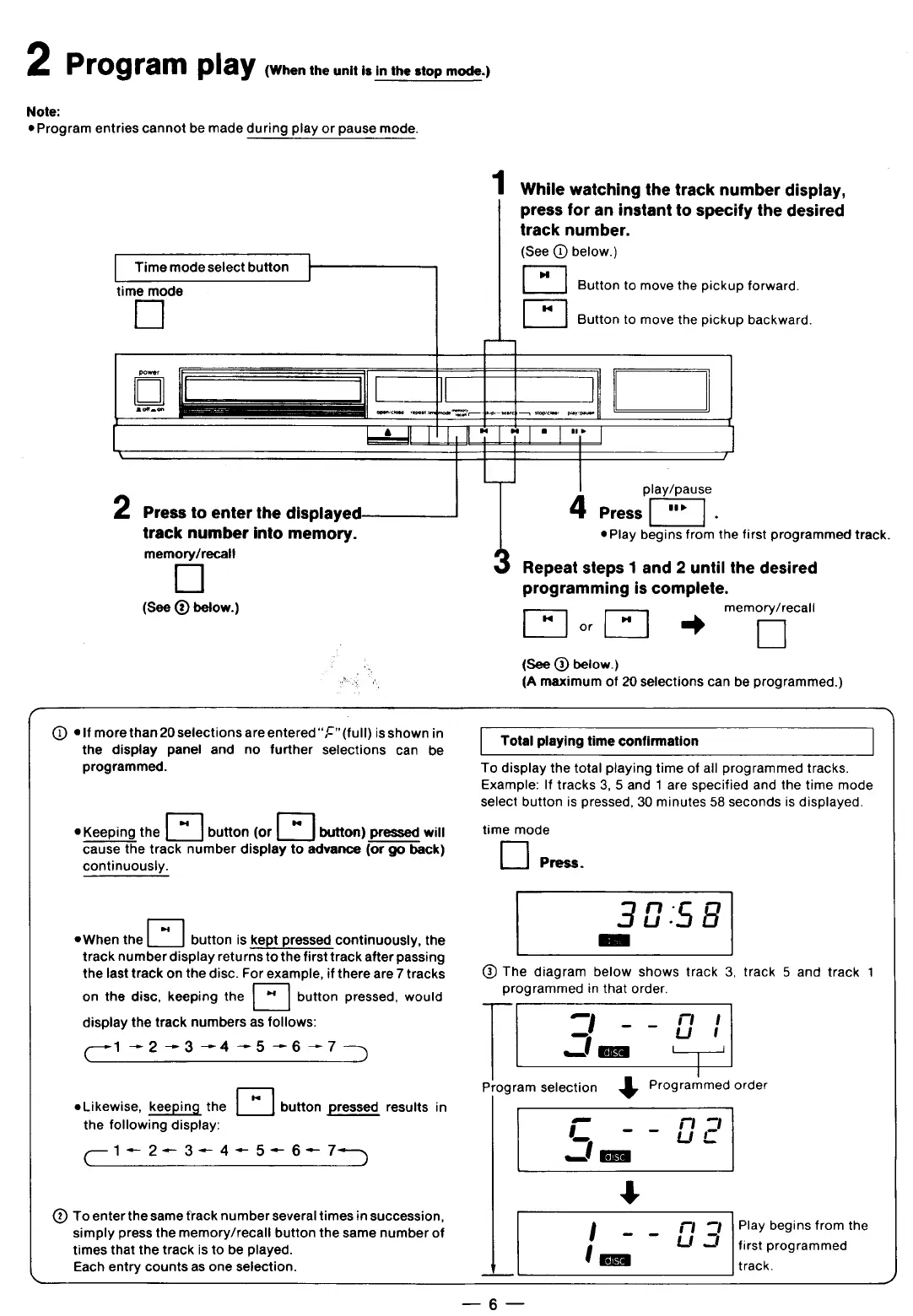
2
PI’Og
ram
play
(When
the
unit
is
in
the
stop
mode.)
Note:
e
Program
entries
cannot
be
made
during
play
or
pause
mode.
1
While
watching
the
track
number
display,
press
for
an
instant
to
specify
the
desired
track
number.
1
(See
(D
below.)
|
Time
mode
select
button
[
time
mode
[II
Button
to
move
the
pickup
forward.
E
Button
to
move
the
pickup
backward.
power
/|
]
%[
I
'
"
L]
-
l
e
l
"
I
J
—_
7
play/pause
2
Press
to
enter
the
displayed—
|
4
Press
track
number
into
memory.
®Play
begins
from
the
first
programmed
track.
memory/recal!
[:l
Repeat
steps
1
and
2
until
the
desired
programming
is
complete.
(See
@@
below.)
memory/recall
[
]
Lo
[™]
=
]
{See
@)
below.)
(A
maximum
of
20
selections
can
be
programmed.)
Q@
eIf
more
than
20
selections
are
entered
“£”
(full)
is
shown
in
the
display
panel
and
no
further
selections
can
be
programmed.
Total
playing
time
confirmation
To
display
the
total
playing
time
of
all
programmed
tracks.
Example:
If
tracks
3, 5
and
1
are
specified
and
the
time
mode
select
button
is
pressed,
30
minutes
58
seconds
is
displayed.
®Keeping
the
E]
button
(or
E
button)
pressed
will
time
mode
cause
the
track
number
display
to
advance
(or
go
back)
D
continuously.
Press.
n
-
5
i
3058
eWhen
the
E
button
is
kept
pressed
continuously,
the
[
-]
track
number
display
returns
to
the
first
track
after
passing
the
last
track
on
the
disc.
For
example,
if
there
are
7
tracks
®
The
diagram
below
shows
track
3,
track
5
and
track
1
on
the
disc,
keeping
the
E
button
pressed,
would
programmed
in
that
order.
display
the
track
numbers
as
follows:
‘-'
-
-
E’I
l’
(_.1_.2_.3_.4_.5_.5_.7__)
_’
|
Program
selection
,‘
Programmed
order
ra
elikewise,
keeping
the
l
Ibutton
pressed
results
in
the
following
display:
,‘:
- -
L‘I
EI
(—1<—2<-3'—4<-5<-6<-7‘-3
O‘SC
(@
Toenter
the
same
track
number
several
times
in
succession,
simply
press
the
memory/recall
button
the
same
number
of
'
-
-
E"
EI’
F.>|ay
begins
from
the
times
that
the
track
is
to
be
played.
'
first
programmed
L
Each
entry
counts
as
one
selection.
EED
track.
)

Related product manuals