EasyManua.ls Logo

Technics SL-P110 - Page 7

Technics SL-P110
36 pages
Print Icon
To Next Page IconTo Next Page
To Previous Page IconTo Previous Page
Loading...
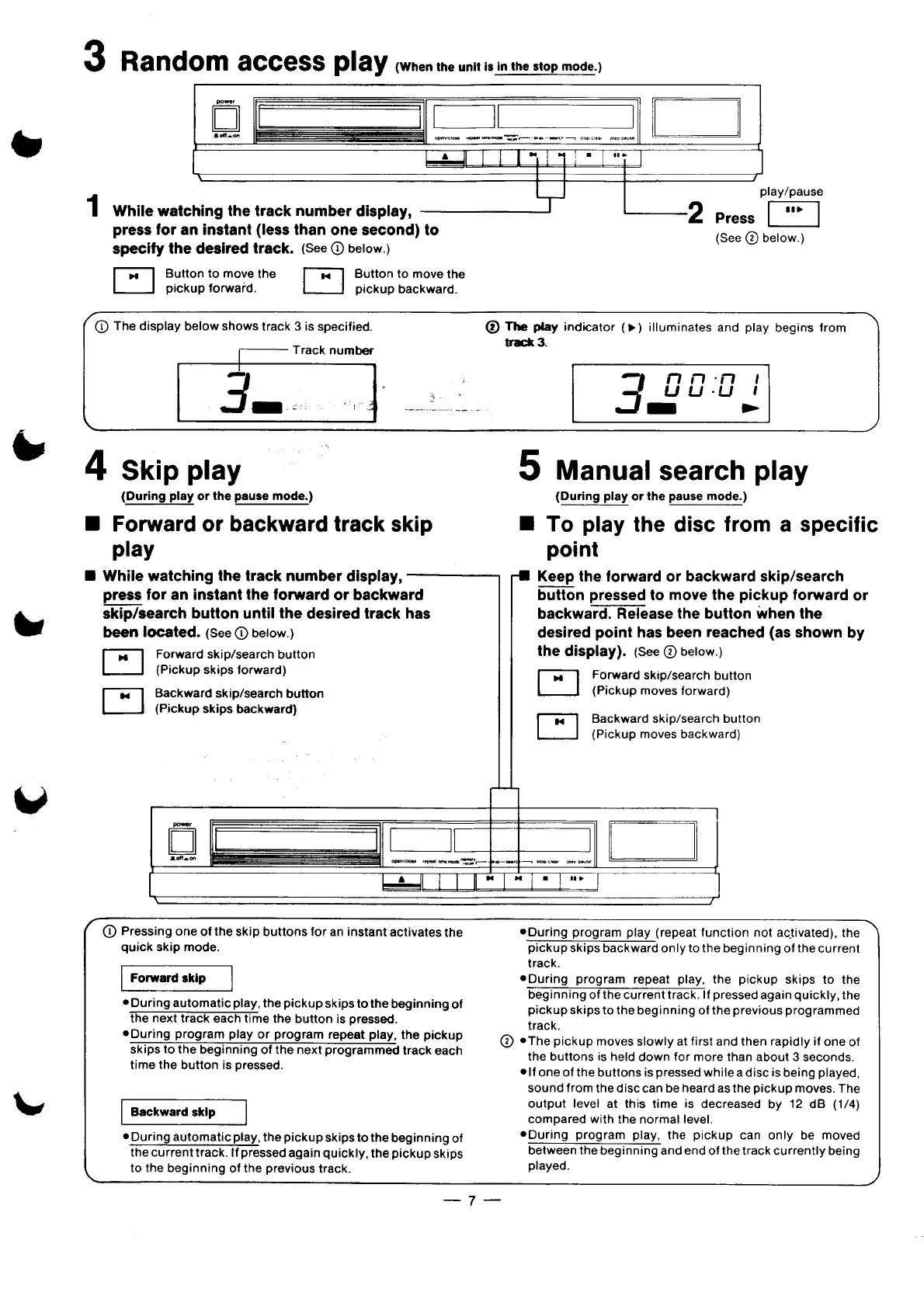
3
Random
access
play
{(When
the
unit
is
in
the
stop
mode.)
N
L
|
)\
-
7/
play/pause
1
While
watching
the
track
number
display,
press
for
an
instant
(less
than
one
second)
to
specify
the
desired
track.
(See
D
below.)
_—“‘2
Press
(See
@
below.)
Button
to
move
the
Button
to
move
the
pickup
forward.
pickup
backward.
(D
The
display
below
shows
track
3
is
specified.
@
The
play
indicator
(»)
illuminates
and
play
begins
from
——
Track
number
3
I
:
3
000
Ju
s
4
Skip
play
(During
play
or
the
pause
mode.)
B
Forward
or
backward
track
skip
play
B
While
watching
the
track
number
display,
press
for
an
instant
the
forward
or
backward
skip/search
button
until
the
desired
track
has
been
located.
(See
@)
beiow.)
Forward
skip/search
button
(Pickup
skips
forward)
Backward
skip/search
button
(Pickup
skips
backward)
5
Manual
search
play
{During
play
or
the
pause
mode.)
B
To
play
the
disc
from
a
specific
point
~#
Keep
the
forward
or
backward
skip/search
button
pressed
to
move
the
pickup
forward
or
backward.
Release
the
button
when
the
desired
point
has
been
reached
(as
shown
by
the
display).
(See
@
below.)
E
Forward
skip/search
button
(Pickup
moves
forward)
Backward
skip/search
button
(Pickup
moves
backward)
|
]
——
| \
=
=]
]
(
(D
Pressing
one
of
the
skip
buttons
for
an
instant
activates
the
quick
skip
mode.
Forward
skip
®During
automatic
play,
the
pickup
skips
to
the
beginning
of
the
next
track
each
time
the
button
is
pressed.
eDuring
program
play
or
program
repeat
play,
the
pickup
skips
to
the
beginning
of
the
next
programmed
track
each
time
the
button
is
pressed.
|
Backward
skip
—I
¢
During
automatic
play,
the
pickup
skips
to
the
beginning
of
the
current
track.
If
pressed
again
quickly,
the
pickup
skips
L
to
the
beginning
of
the
previous
track.
®During
program
play
(repeat
function
not
activated),
the
pickup
skips
backward
only
to
the
beginning
of
the
current
track.
eDuring
program
repeat
play,
the
pickup
skips
to
the
beginning
of
the
current
track.
If
pressed
again
quickly,
the
pickup
skips
to
the
beginning
of
the
previous
programmed
track.
@
eThe
pickup
moves
slowly
at
first
and
then
rapidly
if
one
of
the
buttons
is
held
down
for
more
than
about
3
seconds.
e
|fone
of
the
buttons
is
pressed
while
adisc
is
being
played,
sound
from
the
disc
can
be
heard
as
the
pickup
moves.
The
output
level
at
this
time
is
decreased
by
12
dB
(1/4)
compared
with
the
normal
level.
eDuring
program
play,
the
pickup
can
only
be
moved
between
the
beginning
and end
of
the
track
currently
being
played.
..._.7__

Related product manuals