EasyManua.ls Logo

Technics SL-P110 - Page 9

Technics SL-P110
36 pages
Print Icon
To Next Page IconTo Next Page
To Previous Page IconTo Previous Page
Loading...
B
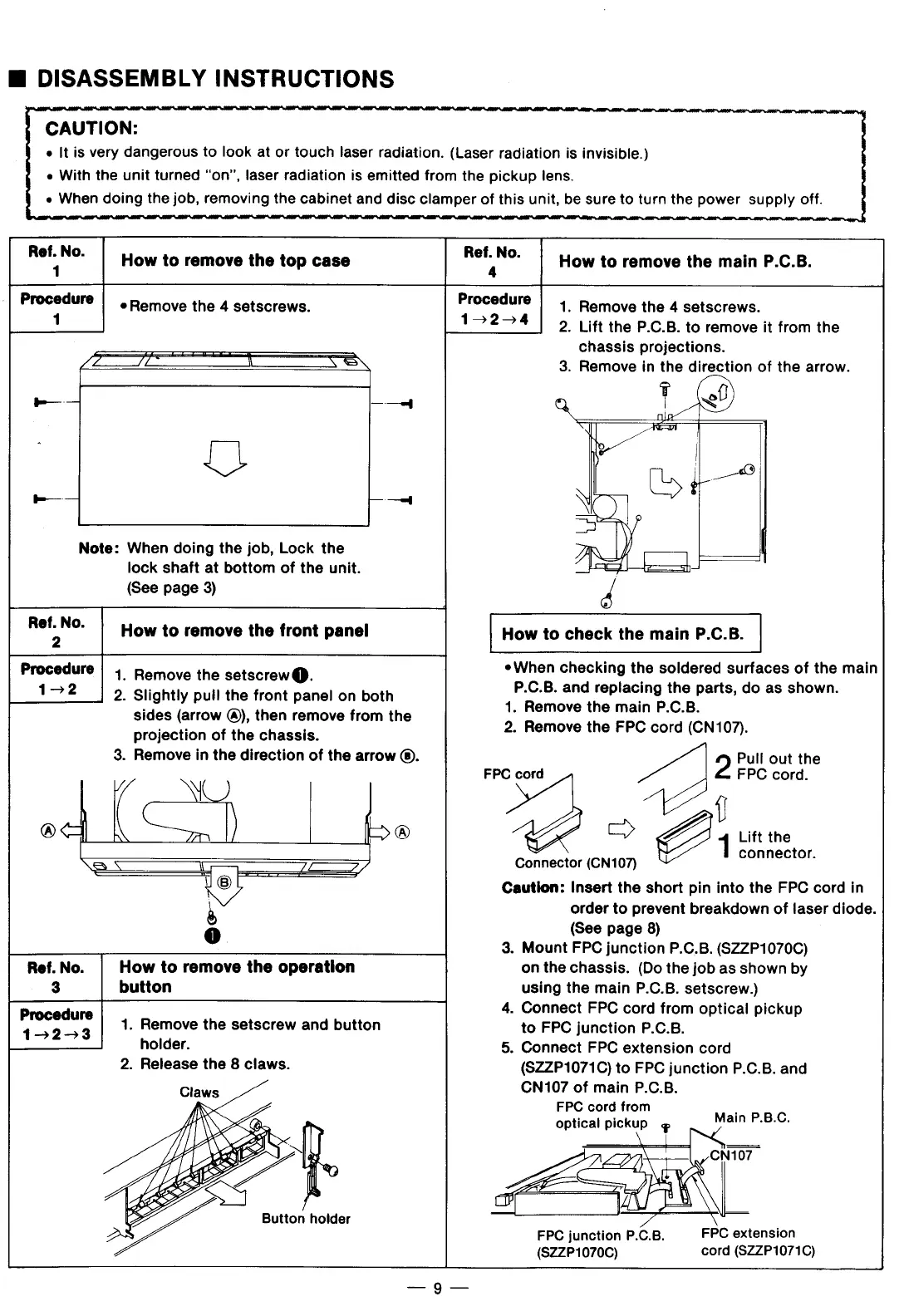
DISASSEMBLY
INSTRUCTIONS
CAUTION:
——_
«
It
is
very
dangerous
to
look
at
or
touch
laser
radiation.
(Laser
radiation
is
invisible.)
o
With
the
unit
turned
“on”,
laser
radiation
is
emitted
from
the
pickup
lens.
«
When
doing
the
job,
removing
the
cabinet
and
disc
clamper
of
this
unit,
be
sure
to
turn
the
power
supply
off.
-
e~
Note:
When
doing
the
job,
Lock
the
lock
shaft
at
bottom
of
the
unit.
(See
page
3)
R"'2N°'
How
to
remove
the
front
panel
Procedure
|
|
Romove
the
setscrew
@.
1-2
2.
Slightly
puil
the front
panel
on
both
sides
(arrow
@),
then
remove
from
the
projection
of
the
chassis.
®
(éj%))
=
®
.
Remove
in
the
direction
of
the
arrow
®.
[
Y——
!
o
Ref.
No.
How
to
remove
the
operation
3
button
Procedure
1.
Remove
the
setscrew
and
button
15253
holder.
2.
Release
the
8
claws.
R";N“
How
to
remove
the
top
case
Ream"
How
to
remove
the
main
P.C.B.
Procedure
|
Remove
the
4
setscrews.
Procedure
1.
Remove
the
4
setscrews.
1
1024
2.
Lift
the
P.C.B.
to
remove
it
from
the
chassis
projections.
£
/L
!
AN
3.
Remove
in
the
direction
of
the
arrow.
.
-
f
g
It
.
e
S
\q
i)
y
How
to
check
the
main
P.C.B.
*When
checking
the
soldered
surfaces
of
the
main
P.C.B.
and
replacing
the
parts,
do
as
shown.
1.
Remove
the
main
P.C.B.
2.
Remove
the
FPC
cord
(CN107).
Pull
out
the
FPC
cord.
FPC
cord
=
Connector
(CN107)
Caution:
Insert
the
short
pin
into
the
FPC
cord
in
order
to
prevent
breakdown
of
laser
diode.
(See
page
8)
3.
Mount
FPC
junction
P.C.B.
(SZ2ZP1070C)
on
the
chassis.
(Do
the job
as
shown
by
using
the
main
P.C.B.
setscrew.)
.
Connect
FPC
cord
from
optical
pickup
to
FPC
junction
P.C.B.
.
Connect
FPC
extension
cord
(SZZP1071C)
to
FPC
junction
P.C.B.
and
CN107
of
main
P.C.B.
FPC
cord
from
optical
pickup
¢
\
Lift
the
connector.
E-S
o
Main
P.B.C.
CN107
FPC
extension
cord
(S2ZP1071C)
FPC
junction
P.C.B.
(82ZP1070C)

Related product manuals