EasyManua.ls Logo

Technics SL-P111 - Page 8

Technics SL-P111
25 pages
Print Icon
To Next Page IconTo Next Page
To Previous Page IconTo Previous Page
Loading...
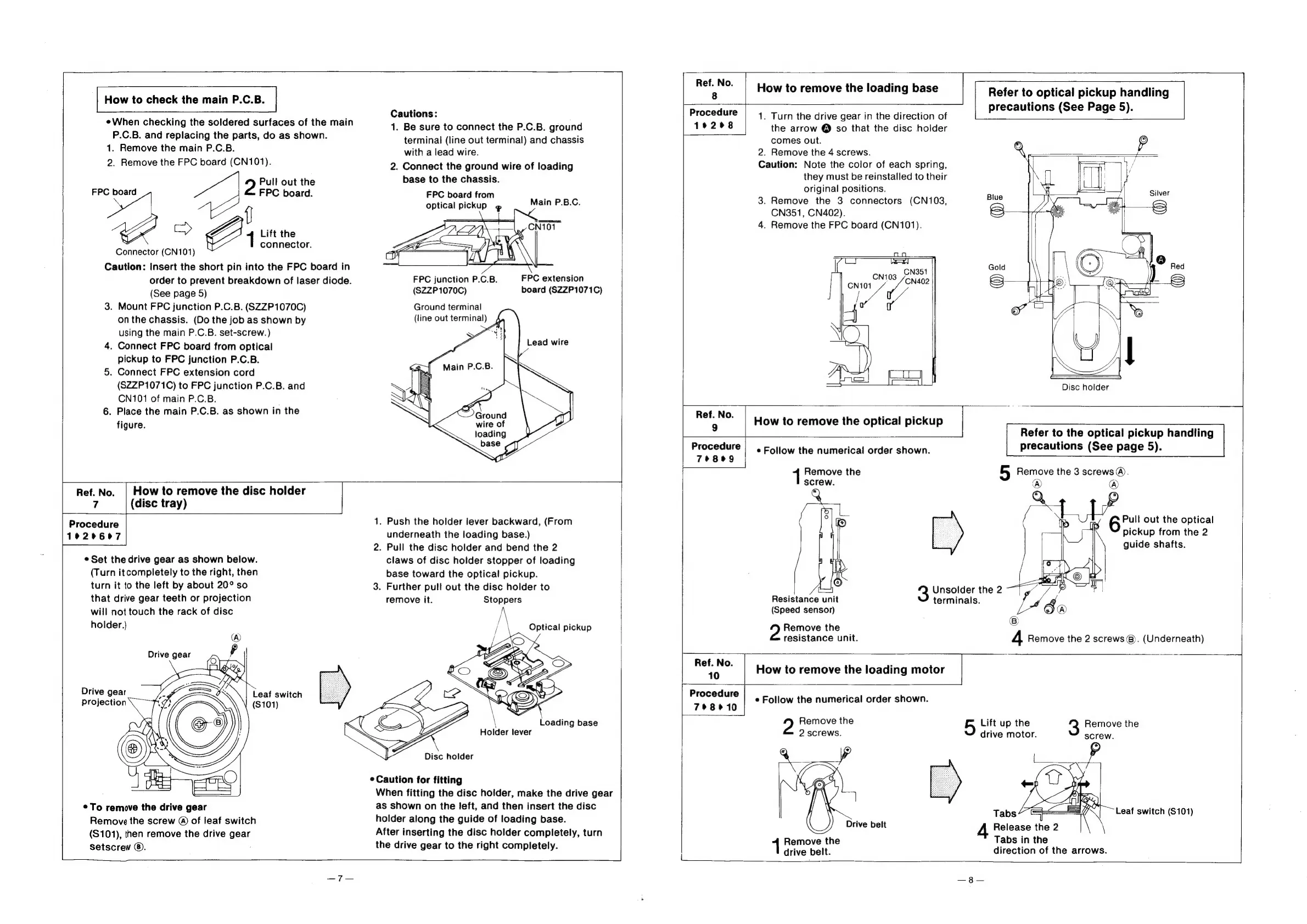
How
to
check
the
main
P.C.B.
¢When
checking
the
soldered
surfaces
of
the
main
P.C.B.
and
replacing
the
parts,
do
as
shown.
1.
Remove
the
main
P.C.B.
2.
Remove
the
FPC
board
(CN101).
Pull
out
the
FPC
board.
E>
Lift
the
connector.
Connector
(CN101)
Caution:
Insert
the
short
pin
into
the
FPC
board
in
order
to
prevent
breakdown
of
laser
diode.
(See
page
5)
3.
Mount
FPC
junction
P.C.B.
(SZZP1070C)
onthe
chassis.
(Do
the
job
as
shown
by
using
the
main
P.C.B.
set-screw.)
4.
Connect
FPC
board
from
optical
pickup
to
FPC
junction
P.C.B.
5.
Connect
FPC
extension
cord
(SZZP1071C)
to
FPC
junction
P.C.B.
and
CN101
of
main
P.C.B.
6.
Place
the
main
P.C.B.
as
shown
in
the
figure.
FPC
board
Ref.
No.
|
How
to
remove
the
disc
holder
7
(disc
tray)
Procedure
1920667
e
Set
the
drive
gear
as
shown
below.
(Turn
it
completely
to
the
right,
then
turn
it
to
the
left
by
about
20°
so
that
drive
gear
teeth
or
projection
will
not
touch
the
rack
of
disc
holder.}
Drive
gear
projection
Leaf
switch
($101)
*To
remove
the
drive
gear
Remove
the
screw
@
of
leaf
switch
($101),
then
remove
the
drive
gear
setscrew
©.
Cautions:
1.
Be
sure
to
connect
the
P.C.B.
ground
terminal
(line
out
terminal)
and
chassis
with
a
lead
wire.
2.
Connect
the
ground
wire
of
loading
base
to
the
chassis.
FPC
board
from
optical
pickup
»
Main
P.B.C.
FPC
extension
board
(SZZP1071C)
FPC
junction
P.C.B.
(SZZP1070C)
Ground
terminal
(line
out
terminal)
4
Lead
wire
loading
base
1.
Push
the
holder
lever
backward,
(From
underneath
the
loading
base.)
2.
Pull
the
disc
holder
and
bend
the
2
claws
of
disc
holder
stopper
of
loading
base
toward
the
optical
pickup.
3.
Further
pull
out
the
disc
holder
to
remove
it.
Stoppers
\
Loading
base
Holder
lever
¢
Caution
for
fitting
When
fitting
the
disc
holder,
make
the
drive
gear
as
shown
on
the
left,
and
then
insert
the
disc
holder
along
the
guide
of
loading
base.
After
inserting
the
disc
holder
completely,
turn
the
drive
gear
to
the
right
completely.
Ref.
No.
8
Procedure
How
to
remove
the
loading
base
|
1.
Turn
the
drive
gear
in
the
direction
of
Refer
to
optical
pickup
handling
precautions
(See
Page
5).
19298
the
arrow
@
so
that
the
disc
holder
comes
out.
2.
Remove
the
4
screws.
Caution:
Note
the
color
of
each
spring,
they
must
be
reinstalled
to
their
original
positions.
3.
Remove
the
3
connectors
(CN103,
CN351,
CN402).
4.
Remove
the
FPC
board
(CN101).
|
LJ
es
CN351
CN103
ape
ee
4
vf
\
Ad
|
Disc
holder
How
to
remove
the
optical
pickup
Procedure
|
.
Eoliow
the
numerical
order
shown.
78089
Unsolder
the
2
terminals.
®)
®
Resistance
unit
(Speed
sensor)
Remove
the
resistance
unit.
Ref.
No.
10
Procedure
798010
How
to
remove
the
loading
motor
|
e
Follow
the
numerical
order
shown.
Remove
the
5
Lift
up
the
2
screws.
drive
motor.
Drive
belt
Release
the
2
Tabs
in
the
direction
of
the
arrows.
Remove
the
drive
belt.
Refer
to
the
optical
pickup
handling
precautions
(See
page
5).
Remove
the
5
Remove
the
3
screws
@).
screw.
@)
@)
©
6rul
out
the
optical
pickup
from
the
2
guide
shafts.
4
Remove
the
2
screws
@).
(Underneath)
3
Remove
the
screw.
Leaf
switch
(S101)

Related product manuals