EasyManua.ls Logo

Technics SL-P111 - Page 9

Technics SL-P111
25 pages
Print Icon
To Next Page IconTo Next Page
To Previous Page IconTo Previous Page
Loading...
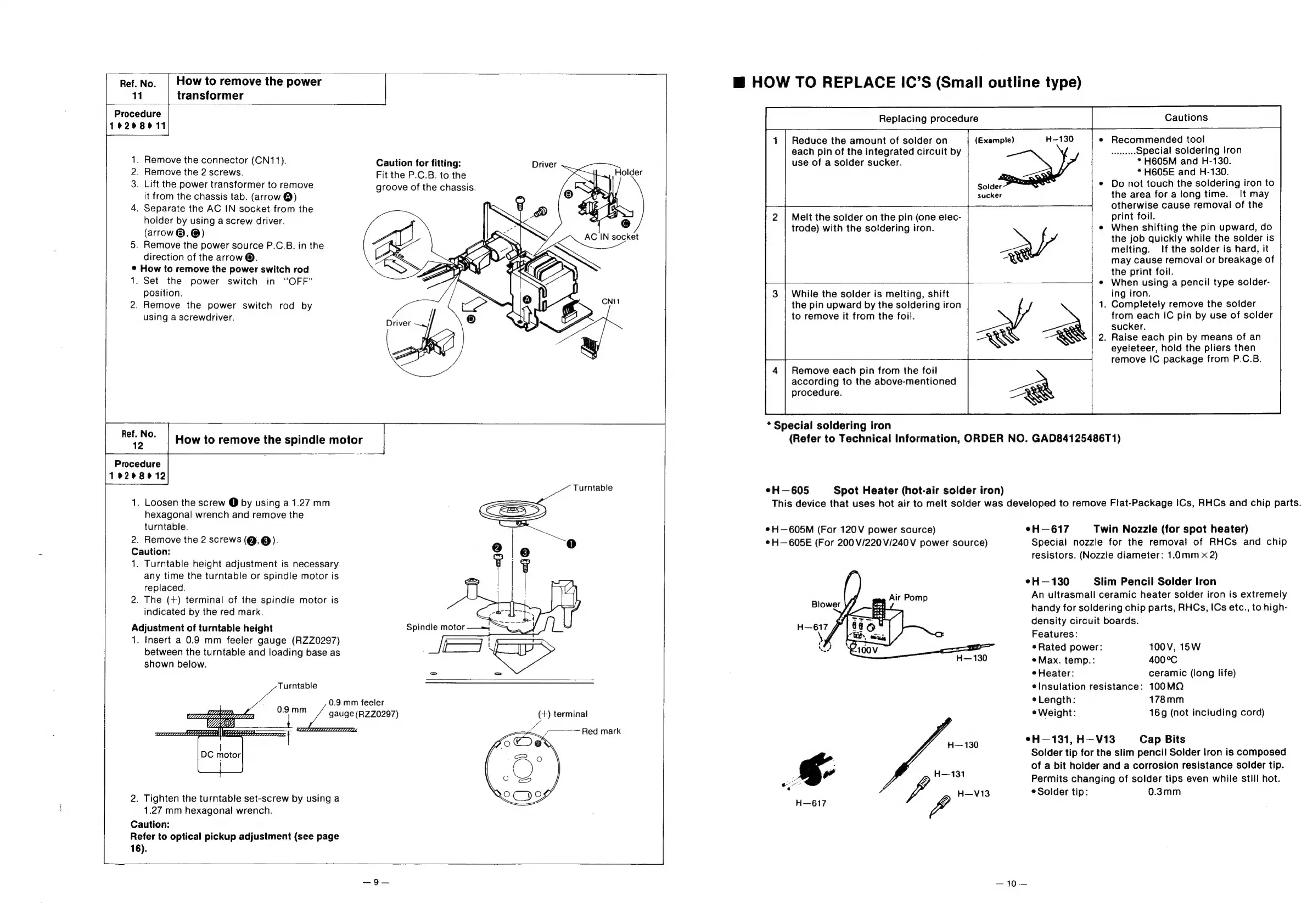
Ref.No.
|
How
to
remove
the
power
11
transformer
Procedure
19208011
1.
Remove
the
connector
(CN11).
2.
Remove
the
2
screws.
3.
Lift
the
power
transformer
to
remove
it
from
the
chassis
tab.
(arrow
@)
4.
Separate
the
AC
IN
socket
from
the
holder
by
using
a
screw
driver.
(arrow
®,
@)
5.
Remove
the
power
source
P.C.B.
in
the
direction
of
the
arrow
®.
©
How
to
remove
the
power
switch
rod
1.
Set
the
power
switch
in
“OFF”
position.
2.
Remove
the
power
switch
rod
by
using
a
screwdriver.
Caution
for
fitting:
Driver
Fit
the
P.C.B.
to
the
groove
of
the
chassis.
Driver
How
to
remove
the
spindle
motor
zi
Procedure
19268912
Turntable
1.
Loosen
the
screw
@
by
using
a
1.27
mm
hexagonal
wrench
and
remove
the
turntable.
2.
Remove
the
2
screws
(@,@).
Caution:
1.
Turntable
height
adjustment
is
necessary
any
time
the
turntable
or
spindle
motor
is
replaced.
2.
The
(+)
terminal
of
the
spindle
motor
is
indicated
by
the
red
mark.
Adjustment
of
turntable
height
Spindle
motor
——j
SS
1.
Insert
a
0.9
mm
feeler
gauge
(RZZ0297)
H
:
between
the
turntable
and
loading
base
as
=
:
shown
below.
~~
Turntable
cobb
=
2
/
gauge
(RZz0297)
(+)
terminal
2.
Tighten
the
turntable
set-screw
by
using
a
1.27
mm
hexagonal
wrench.
Caution:
Refer
to
optical
pickup
adjustment
(see
page
L
16).
@
HOW
TO
REPLACE
IC’S
(Small
outline
type)
Replacing
procedure
Cautions
Recommended
tool
Special
soldering
iron
*
H605M
and
H-130.
*
H605E
and
H-130.
Solder
Do
not
touch
the
soldering
iron
to
sucker
the
area
for
along
time.
It
may
otherwise
cause
removal
of
the
Melt
the
solder
on
the
pin
(one
elec-
print
foil.
trode)
with
the
soldering
iron.
When
shifting
the
pin
upward,
do
the
job
quickly
while
the
solder
is
%
melting.
If
the
solder
is
hard,
it
may
cause
removal
or
breakage
of
the
print
foil.
——
ae
When
using
a
pencil
type
solder-
While
the
solder
is
melting,
shift
ing
iron.
the
pin
upward
by
the
soldering
iron
.
Completely
remove
the
solder
to
remove
it
from
the
foil.
from
each
IC
pin
by
use
of
solder
sucker.
.
Raise
each
pin
by
means
of
an
eyeleteer,
hold
the
pliers
then
remove
IC
package
from
P.C.B.
Reduce
the
amount
of
solder
on
(Exampie)
each
pin
of
the
integrated
circuit
by
use
of
a
solder
sucker.
Remove
each
pin
from
the
foil
according
to
the
above-mentioned
procedure.
*
Special
soldering
iron
(Refer
to
Technical
Information,
ORDER
NO.
GAD84125486T1)
eH—605
Spot
Heater
(hot-air
solder
iron)
This
device
that
uses
hot
air
to
melt
solder
was
developed
to
remove
Flat-Package
ICs,
RHCs
and
chip
parts.
*H—605M
(For
120V
power
source)
eH—617
Twin
Nozzle
(for
spot
heater)
e
H—605E
(For
200
V/220V/240V
power
source)
Special
nozzle
for
the
removal
of
RHCs
and
chip
resistors.
(Nozzle
diameter:
1.0mm
x
2)
eH—130
Slim
Pencil
Solder
Iron
An
ultrasmall
ceramic
heater
solder
iron
is
extremely
handy
for
soldering
chip
parts,
RHCs,
ICs
etc.,
to
high-
density
circuit
boards.
Features:
Rated
power:
100V,
15W
Max.
temp.:
400°C
¢
Heater:
ceramic
(long
life)
¢Insulation
resistance:
100MQ
Length:
178mm
eWeight:
16g
(not
including
cord)
eH—131,
H—V13
Cap
Bits
Solder
tip
for
the
slim
pencil
Solder
lron
is
composed
a
of
a
bit
holder
and
a
corrosion
resistance
solder
tip.
o”
Permits
changing
of
solder
tips
even
while
still
hot.
io
;
7
W
H—V13
©
Solder
tip:
0.3mm
H—617

Related product manuals