EasyManua.ls Logo

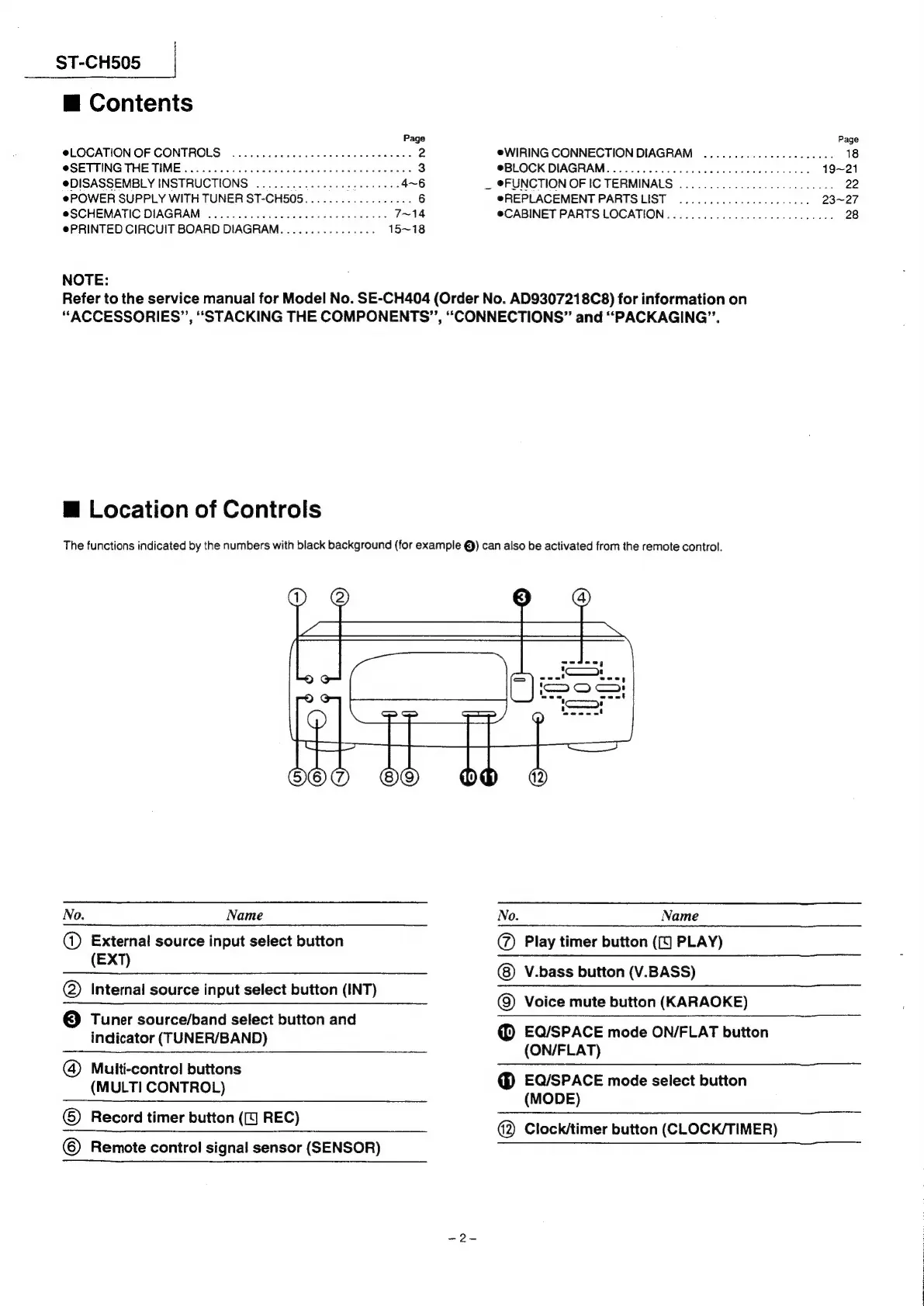
Technics ST-CH505 - Unit Control Locations

Technics ST-CH505
24 pages
Print Icon
To Next Page IconTo Next Page
To Previous Page IconTo Previous Page
Loading...
ST-CH505
m@
Contents
Page
Page
@LOCATION
OF
CONTROLS
.............
00
0eeeee
eee
anaes
2
eWIRING
CONNECTION
DIAGRAM
..............--..-05.
18
@SETTING
THE
TIME
0.000.000
ccc
cc
ccc
eee
e
eect
eee
anes
3
@BLOCK
DIAGRAM.........000
0000.
c
cece
cee
ee
eee
ees
19~21
@DISASSEMBLY
INSTRUCTIONS
.........
atthe
hdc
ohda’
4~6
_
FUNCTION
OF
IC
TERMINALS
.............0.00-.0000
00:
22
ePOWER
SUPPLY
WITH
TUNER
ST-CH505..................
6
@REPLACEMENT
PARTSLIST
............20000-0-00
23~27
@SCHEMATIC
DIAGRAM
2.0.0.0...
ccc
cece
cece
ees
7~14
@CABINET
PARTS
LOCATION
....0.........0000eeceeee
ees
28
@PRINTED
CIRCUIT
BOARD
DIAGRAM.
...............
15~18
NOTE:
Refer
to
the
service
manual
for
Model
No.
SE-CH404
(Order
No.
AD9307218C8)
for
information
on
“ACCESSORIES”,
“STACKING
THE
COMPONENTS”,
“CONNECTIONS”
and
“PACKAGING”.
H
Location
of
Controls
The
functions
indicated
by
the
numbers
with
black
background
(for
example
@)
can
also
be
activated
from
the
remote
control.
R
imer
button
(J
REC
Scord
ner
orven
(Ree
@
Clock/timer
button
(CLOCK/TIMER)
No.
Name
No.
Name
a
External
source
input
select
button
@)
Play
timer
button
(({]
PLAY)
(EXT)
V.bass
button
(V.BASS)
@)
Internal
source
input
select
button
(INT)
-
©)
Voice
mute
button
(KARAOKE)
©
Tuner
source/band
select
button
and
indicator
(TUNER/BAND)
®
EQ/SPACE
mode
ON/FLAT
button
(ON/FLAT)
(4)
Multi-control
buttons
MULTI
CONTROL
@
EQ/SPACE
mode
select
button
(
)
(MODE)
©
©
Remote
control
signal
sensor
(SENSOR)

Related product manuals