EasyManua.ls Logo

Technics SU-C03 - Page 4

Technics SU-C03
14 pages
Print Icon
To Next Page IconTo Next Page
To Previous Page IconTo Previous Page
Loading...
‘su-co3
&
mw
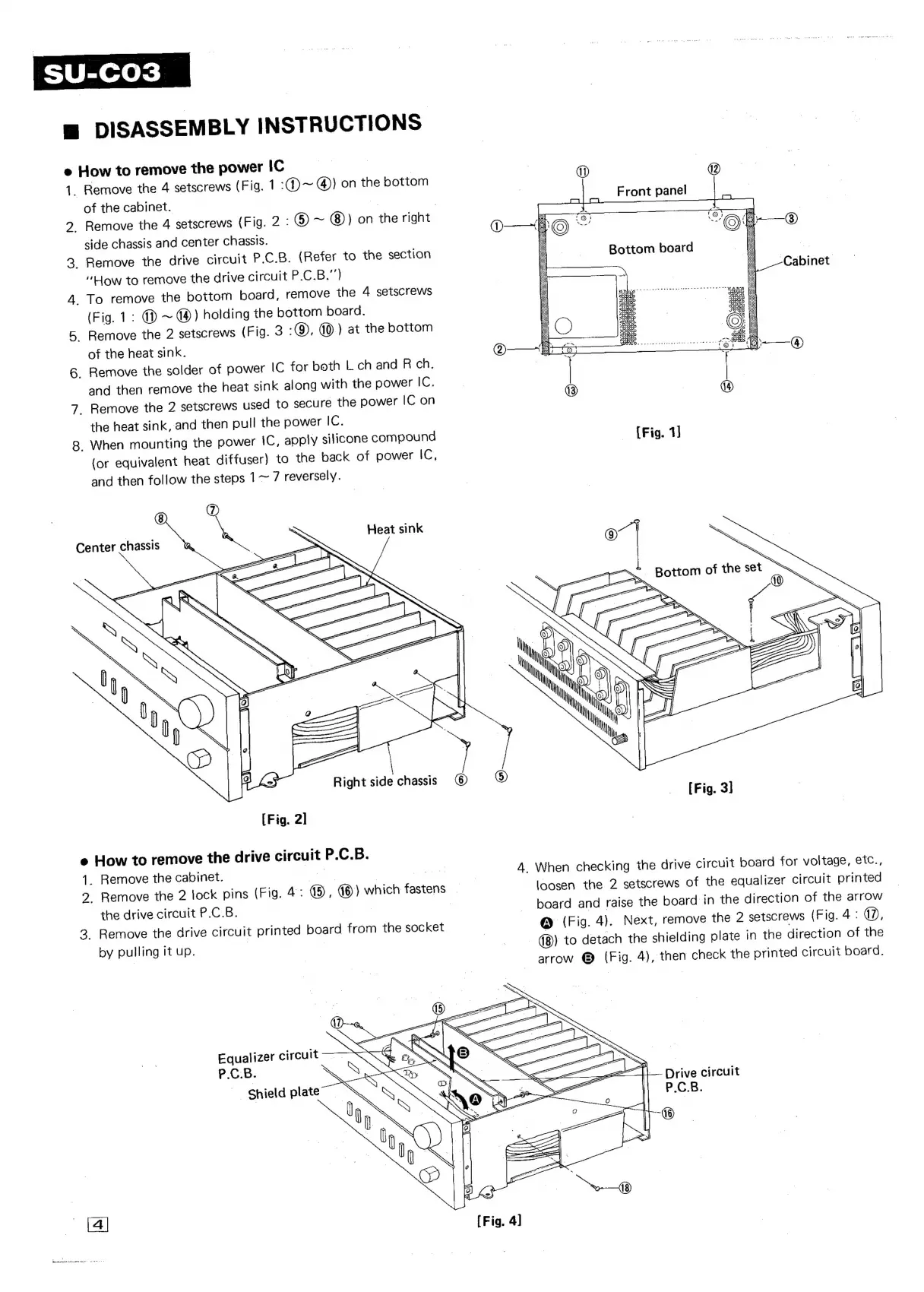
DISASSEMBLY
INSTRUCTIONS
e
How
to
remove
the
power
IC
vs
ze
2
Remove
the
4
setscrews
(Fig.
1
:@)~
@)
on
the
bottom
of
the
cabinet.
,
Remove
the
4
setscrews
(Fig.
2:
@
~
(8))
on
the
right
side
chassis
and
center
chassis.
_
Remove
the
drive
circuit
P.C.B.
(Refer
to
the
section
“Low
to
remove
the
drive
circuit
P.C.B.")
_
To
remove
the
bottom
board,
remove
the
4
setscrews
(Fig.
1:
()
~
@)
holding
the
bottom
board.
-
Remove
the
2
setscrews
(Fig.
3
-),
1.)
at
the
bottom
of
the
heat
sink.
-
Remove
the
solder
of
power
IC
for
both
L
ch
and
R
ch.
and
then
remove
the
heat
sink
along
with
the
power
IC.
_
Remove
the
2
setscrews
used
to
secure
the
power
IC
on
the
heat
sink,
and
then
pull
the
power
iG:
_
When
mounting
the
power
iC,
apply
silicone
compound
(or
equivalent
heat
diffuser)
to
the
back
of
power
iC.
and
then
follow
the
steps
1~
/
reversely.
Heat
sink
[Fig.
2]
e
How
to
remove
the
drive
circuit
P.C.B.
1.
7
2.
Remove
the
cabinet.
Remove
the
2
lock
pins
(Fig.
4:
®
®)
which
fastens
_
the
drive
circuit
P.C.B.
Remove
the
drive
circuit
printed
board
from
the
socket
by
pulling
it
up.
| |
Equalizer
circuit
P.C.B.
Shield
plate
[Fig.
1]
oa]
oe
|
|
ae
Is,
Bottom
0
a
ae
4
SS
©)
.
3
5
d
.
©
i
ine
My
My
|
Meas
[Fig.
3]
4.
When
checking
the
drive
circuit
board
for
voltage,
efc.,
loosen
the
2
setscrews
of
the
equalizer
circuit
printed
board
and
raise
the
board
in
the
direction
of
the
arrow
@
(Fig.
4).
Next,
remove
the
2
setscrews
(Fig.
4
:
d?),
-
@®)
to
detach
the
shielding
plate
in
the
direction
of
the
arrow
©
(Fig.
4),
then
check
the
printed
circuit
board.
rive
circuit
2
a
©

Related product manuals