EasyManua.ls Logo

Technics SX-KN1600 - Page 19

Technics SX-KN1600
72 pages
Print Icon
To Next Page IconTo Next Page
To Previous Page IconTo Previous Page
Loading...
()
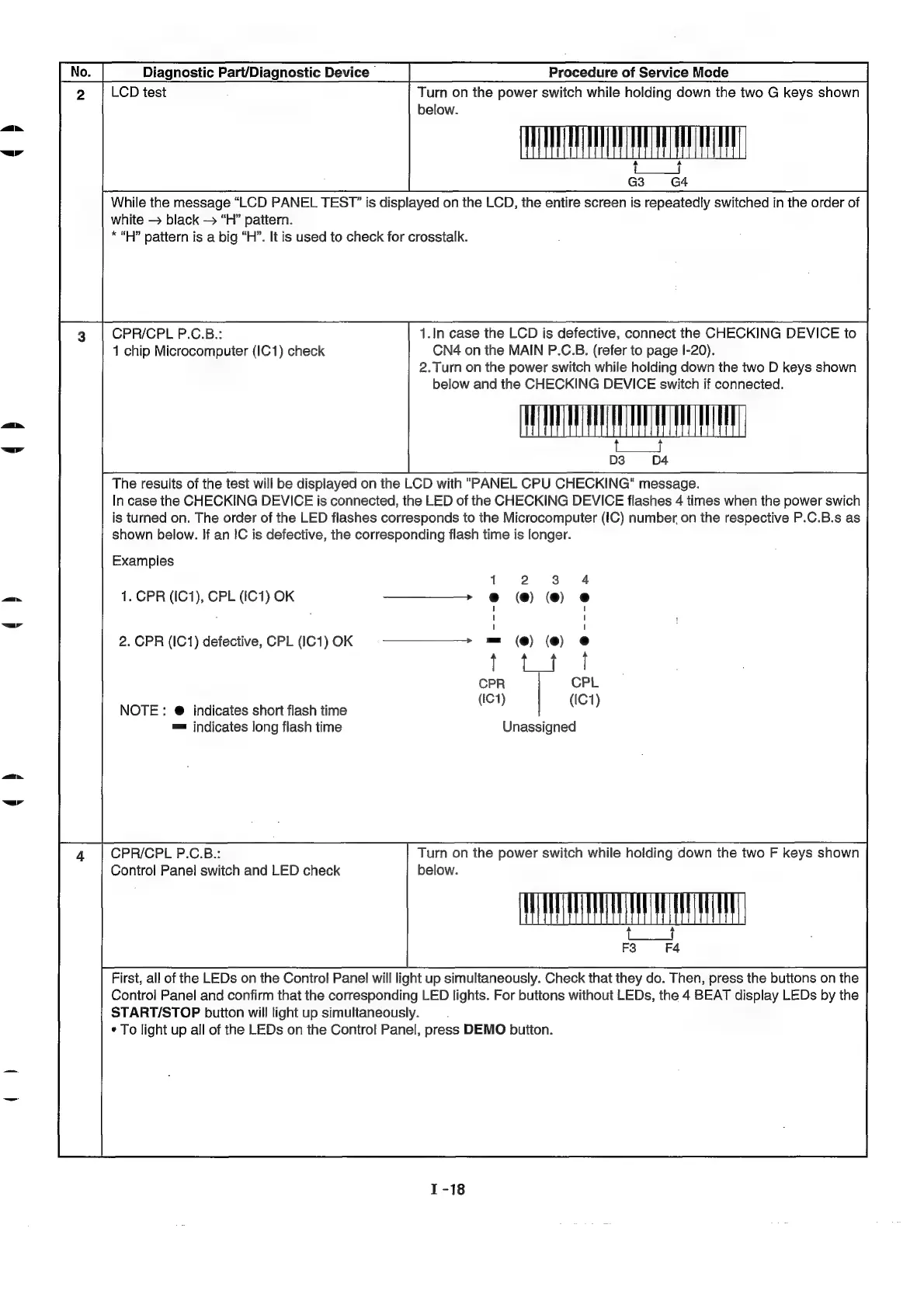
Diagnostic
Part/Diagnostic
Device
Procedure
of
Service
Mode
LCD
test
Turn
on
the
power
switch
while
holding
down
the
two
G
keys
shown
below.
a a
G3
G4
While
the
message
“LCD
PANEL
TEST”
is
displayed
on
the
LCD,
the
entire
screen
is
repeatedly
switched
in
the
order
of
white
black
“H”
pattern.
*“H?”
pattern
is
a
big
“H”.
It
is
used
to
check
for
crosstalk.
CPR/CPL
P.C.B.:
1.In
case
the
LCD
is
defective,
connect
the
CHECKING
DEVICE
to
1
chip
Microcomputer
(IC1)
check
CN4
on
the
MAIN
P.C.B.
(refer
to
page
I-20).
2.Turn
on
the
power
switch
while
holding
down
the
two
D
keys
shown
below
and
the
CHECKING
DEVICE
switch
if
connected.
S|
D3 D4
The
results
of
the
test
will
be
displayed
on
the
LCD
with
"PANEL
CPU
CHECKING"
message.
In
case
the
CHECKING
DEVICE
is
connected,
the
LED
of
the
CHECKING
DEVICE
flashes
4
times
when
the
power
swich
is
turned
on.
The
order
of
the
LED
flashes
corresponds
to
the
Microcomputer
(IC)
number
on
the
respective
P.C.B.s
as
shown
below.
If
an
IC
is
defective,
the
corresponding
flash
time
is
longer.
Examples
1
2
3
1.
CPR
(IC1),
CPL
(IC1)
OK
——————
e@
(@)
(@)
2.
CPR
(IC1)
defective,
CPL
(IC1)OK
§=
——¥W¥—W\—>
=
(@)
(@)
ie
ee
CPR
CPL
a
;
(IC1)
(IC1)
NOTE
:
@
indicates
short
flash
time
™=
indicates
long
flash
time
Unassigned
CPR/CPL
P.C.B.::
Turn
on
the
power
switch
while
holding
down
the
two
F
keys
shown
Control
Panel
switch
and
LED
check
below.
F4
a
F3
First,
all
of
the
LEDs
on
the
Control
Panel
will
light
up
simultaneously.
Check
that
they
do.
Then,
press
the
buttons
on
the
Control
Panel
and
confirm
that
the
corresponding
LED
lights.
For
buttons
without
LEDs,
the
4
BEAT
display
LEDs
by
the
START/STOP
buiton
will
light
up
simultaneously.
:
¢
To
light
up
all
of
the
LEDs
on the
Control
Panel,
press
DEMO
button.

Related product manuals