EasyManua.ls Logo

Technics SX-KN1600 - Arrangement of Control Panel

Technics SX-KN1600
72 pages
Print Icon
To Next Page IconTo Next Page
To Previous Page IconTo Previous Page
Loading...
_
ARRANGEMENT
OF
CONTROL
PANEL
DEMO
HAW
VOLUME
=
AYTOSETTS
BANK
(4)
faales
PERFORMANCE
PADS
2
ms
EP
etn
rer
=——
LILI
[LE]
STOP
FADE
8
com
‘ae
e
MPO/O|
iM
RECCRD
wesc
sme
‘TEI
4
OPROGRAI
IN
Our
t=]
Aa
an
o
ce]
ao
ES
|
|
VAXATIONS
MSA
KLIN
INTRO
&
ENDING
O11
02
@
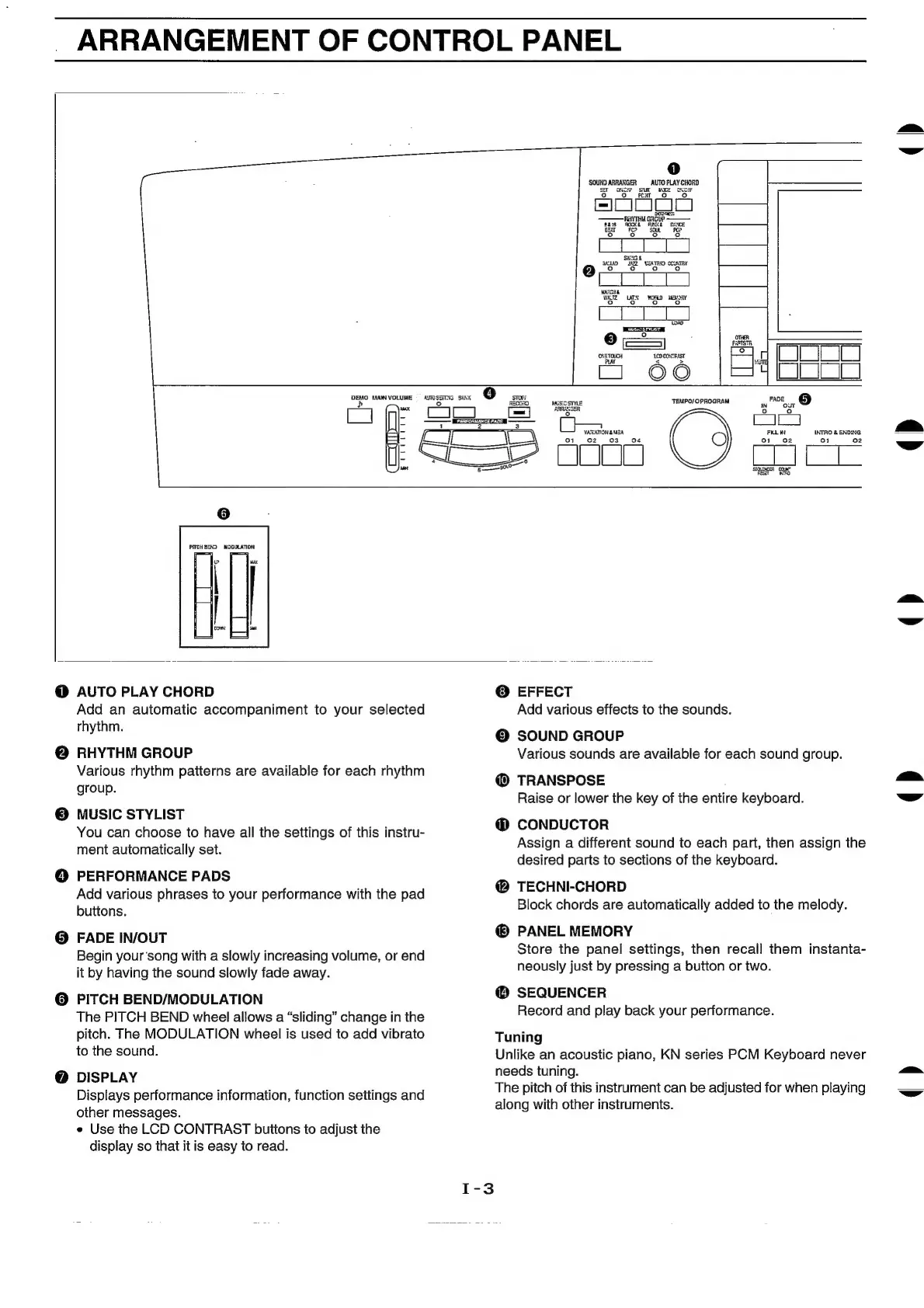
AUTO
PLAY
CHORD
Add
an
automatic
accompaniment
to
your
selected
rhythm.
@
RHYTHM
GROUP
Various
rhythm
patterns
are
available
for
each
rhythm
group.
©
MUSIC
STYLIST
You
can
choose
to
have
all
the
settings
of
this
instru-
ment
automatically
set.
©
PERFORMANCE
PADS
Add
various
phrases
to
your
performance
with
the
pad
buttons.
@
FADE
IN/OUT
Begin
your‘song
with
a
slowly
increasing
volume,
or
end
it
by
having
the
sound
slowly
fade
away.
@
PITCH
BEND/MODULATION
The
PITCH
BEND
wheel
allows
a
“sliding”
change
in
the
pitch.
The
MODULATION
wheel
is
used
to
add
vibrato
to
the
sound.
@
DISPLAY
Displays
performance
information,
function
settings
and
other
messages.
e
Use
the
LCD
CONTRAST
buttons
to
adjust
the
display
so
that
it
is
easy
to
read.
©
EFFECT
Add
various
effects
to
the
sounds.
©
SOUND
GROUP
Various
sounds
are
available
for
each
sound
group.
@
TRANSPOSE
Raise
or
lower
the
key
of
the
entire
keyboard.
@
CONDUCTOR
Assign
a
different
sound
to
each
part,
then
assign
the
desired
parts
to
sections
of
the
keyboard.
@
TECHNI-CHORD
Block
chords
are
automatically
added
to
the
melody.
PANEL
MEMORY
Store
the
panel
settings,
then
recall
them
instanta-
neously
just
by
pressing
a
button
or
two.
@
SEQUENCER
Record
and
play
back
your
performance.
Tuning
Unlike
an
acoustic
piano,
KN
series
PCM
Keyboard
never
needs
tuning.
The
pitch
of
this
instrument
can
be
adjusted
for
when
playing
along
with
other
instruments.
()
()

Related product manuals