EasyManua.ls Logo

Technics SX-KN1600 - Page 5

Technics SX-KN1600
72 pages
Print Icon
To Next Page IconTo Next Page
To Previous Page IconTo Previous Page
Loading...
()
LILI]
LIL
IL
IL]
|
|
STARTISTOP
——SYRGEAOA
thE
O1
02
03
O4
FEAT
‘TAP
TEMPO
TRANSPOSE
10}
i,
+
ts)
EFFECT
CIGTAL
05?
DSTAL
ACOUSTIC
SUSTAN
EFFECT EFFECT
REVERS
LLUS
ON
Ke) ce)
o
io)
°
OOOO
SOUND
GROUP,
rg
oma
von
ba
ORGS
|
SAKE
SYMTHE
LTA
OFCHSERG
ACORN
WOODS
DANCE
o.oo
OO
(9)
DRUM
GM
SPECIAL
BASS
KITS
MEMCAY
ce)
Le]
°
(]
DIGITAL
DRAWBAR
io}
PANEL
MEMORY:
SEQUENCER
Page
PART
SELECT
PLAY
EASY
FE
Bet
ol
$F
A
©
a1
o2
Os
SET
a
LF
aw
LI]
LJ
C)
Tas
(|
LJ
fe
L]
maya
a
RGaT2
Re
i
;
O5
O85
o7
os
2
Ee
DISK=-———-O1SKin
USE
sO)
Of
cer
LOAD
OO
®
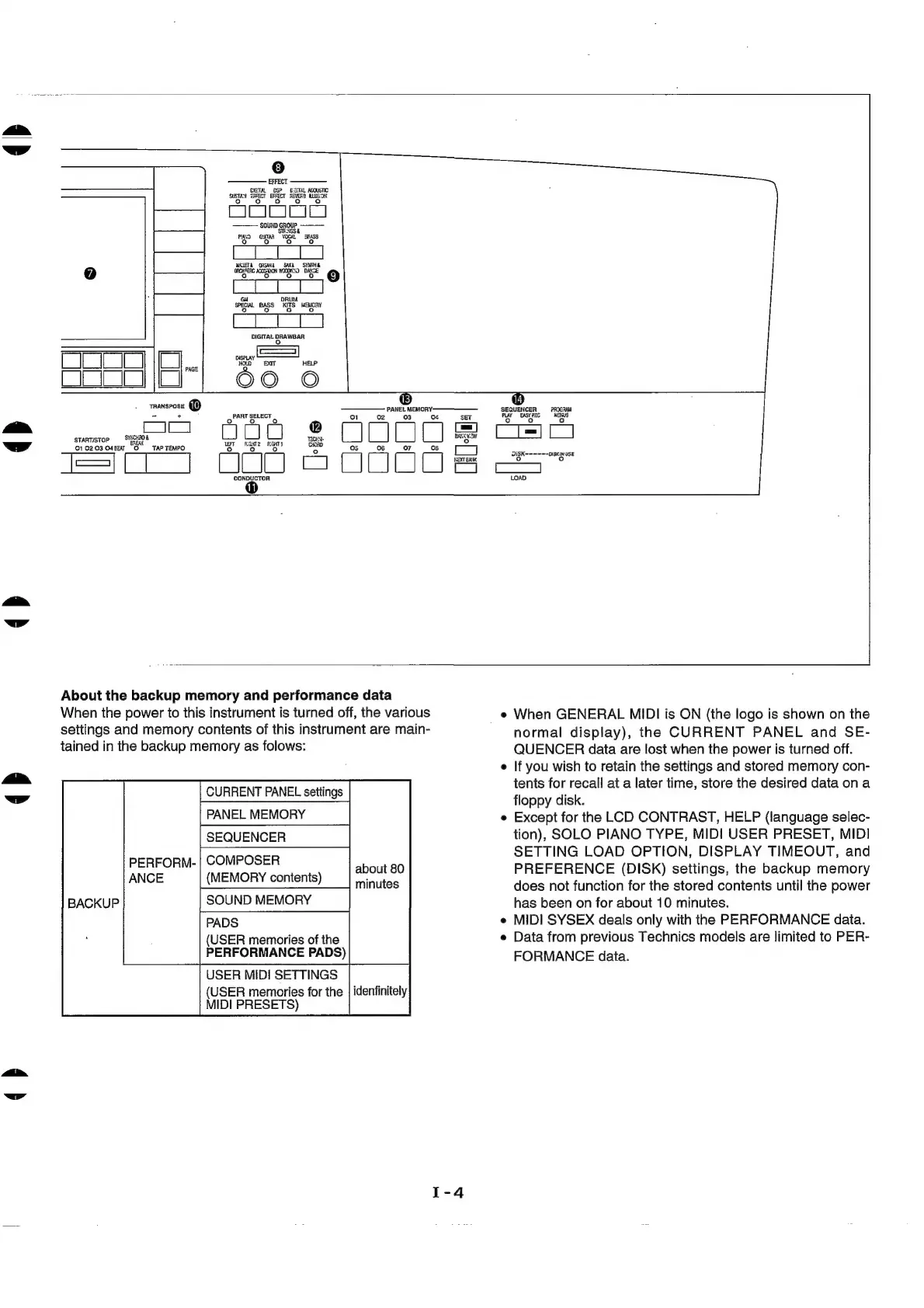
About
the
backup
memory
and
performance
data
When
the
power
to
this
instrument
is
turned
off,
the
various
settings
and
memory
contents
of
this
instrument
are
main-
tained
in
the
backup
memory
as
folows:
PERFORN-
ANCE
e
When
GENERAL
MIDI
is
ON
(the
logo
is
shown
on
the
normal
display),
the
CURRENT
PANEL
and
SE-
QUENCER
data
are
lost
when
the
power
is
turned
off.
e
If
you
wish
to
retain
the
settings
and
stored
memory
con-
tents
for
recall
at
a
later
time,
store
the
desired
data
ona
floppy
disk.
e
Except
for
the
LCD
CONTRAST,
HELP
(language
selec-
tion),
SOLO
PIANO
TYPE,
MIDI
USER
PRESET,
MIDI
SETTING
LOAD
OPTION,
DISPLAY
TIMEOUT,
and
PREFERENCE
(DISK)
settings,
the
backup
memory
does
not
function
for
the
stored
contents
until
the
power
has
been
on
for
about
10
minutes.
e
MIDI
SYSEX
deals
only
with
the
PERFORMANCE
data.
e
Data
from
previous
Technics
models
are
limited
to
PER-
FORMANCE
data.
CURRENT
PANEL
settings
PANEL
MEMORY
SEQUENCER
COMPOSER
(MEMORY
contents)
SOUND
MEMORY
PADS
(USER
memories
of
the
PERFORMANCE
PADS)
USER
MIDI
SETTINGS
(USER
memories
for
the
MIDI
PRESETS)
idenfinitely

Related product manuals