EasyManua.ls Logo

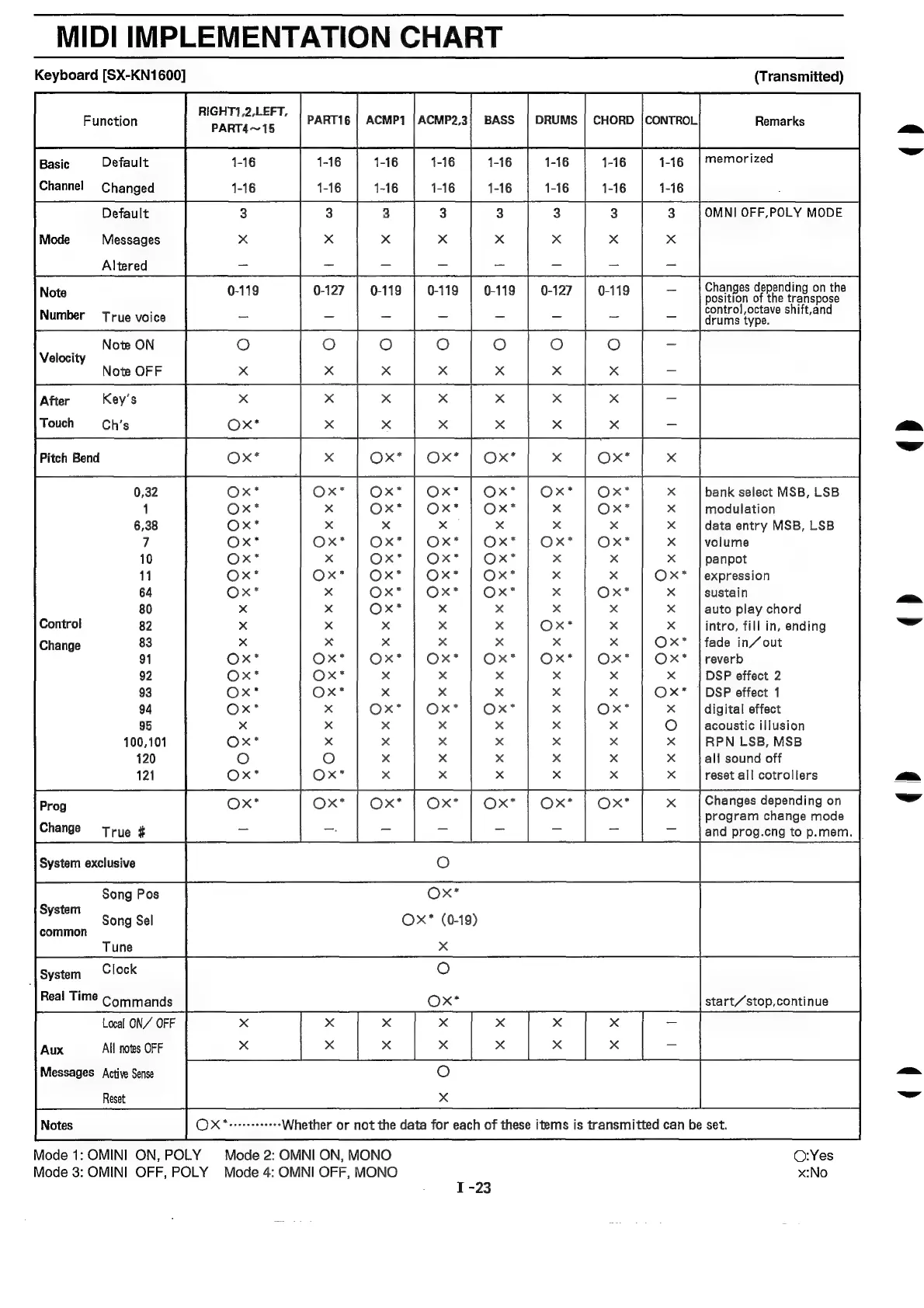
Technics SX-KN1600 - MIDI Implementation Chart

Technics SX-KN1600
72 pages
Print Icon
To Next Page IconTo Next Page
To Previous Page IconTo Previous Page
Loading...
MIDI
IMPLEMENTATION
CHART
Keyboard
[SX-KN1600]
(Transmitted)
ra]
sc
urs}
sas
owns
|e
owes]
me
Basic
Default
1-16 1-16
1-16
1-16
1-16 1-16
1-16
|
memorized
Changed
1-16 1-16
1-16
1-16
1-16 1-16
3
3
3
3
3.
|OMNI
OFF,POLY
MODE
x
x
x
x
x
Default
0-119 0-119
0-127
RIGHT1,2,LEFT,
PART4~15
Messages
Altered
Changes
depending
on
the
position
of
the
transpose
control,octave
shift,and
drums
type.
Pitch
Bend
x x
bank
select
MSB,
LSB
x
x
modulation
x x
data
entry
MSB,
LSB
Ox*
x
volume
10
x x
panpot
11
x
OxX*
|expression
64
x
Xx
sustain
80
x x
auto
play
chord
Control
82
Ox*
x
intro,
fill
in,
ending
Change
83
x
Ox*
|fade
in/out
91
Ox*
OxX*
|reverb
92
x
Xx
DSP
effect
2
93
x
O©xX*
|
DSP
effect
1
94
x
x
digital
effect
95
x
oO
acoustic
illusion
100,101
x x
RPN
LSB,
MSB
120
x x
all
sound
off
121
x
x
reset
all
cotrollers
Changes
depending
on
program
change
mode
and
prog.cng
to
p.mem.
Ox*
Ox*
(0-19)
Song
Pos
System
Song
Sel
common
Tune
x
System
Clock
O
Real
Time
Commands
O~x*
start/stop,continue
Local
ON//
OFF
x
x x
x x
Xx
x
Reset
x
OX
*errerseeeees
Whether
or
not
the
data
for
each
of
these
items
is
transmitted
can
be
set.
Mode
1:
OMINI
ON,
POLY
Mode
2:
OMNI
ON,
MONO
O:Yes
Mode
3:
OMINI
OFF,
POLY
Mode
4:
OMNI
OFF,
MONO
x:No
.
I-23
()
q)
()
()
()

Related product manuals