EasyManua.ls Logo

Technics SX-KN1600 - Page 2

Technics SX-KN1600
72 pages
Print Icon
To Next Page IconTo Next Page
To Previous Page IconTo Previous Page
Loading...
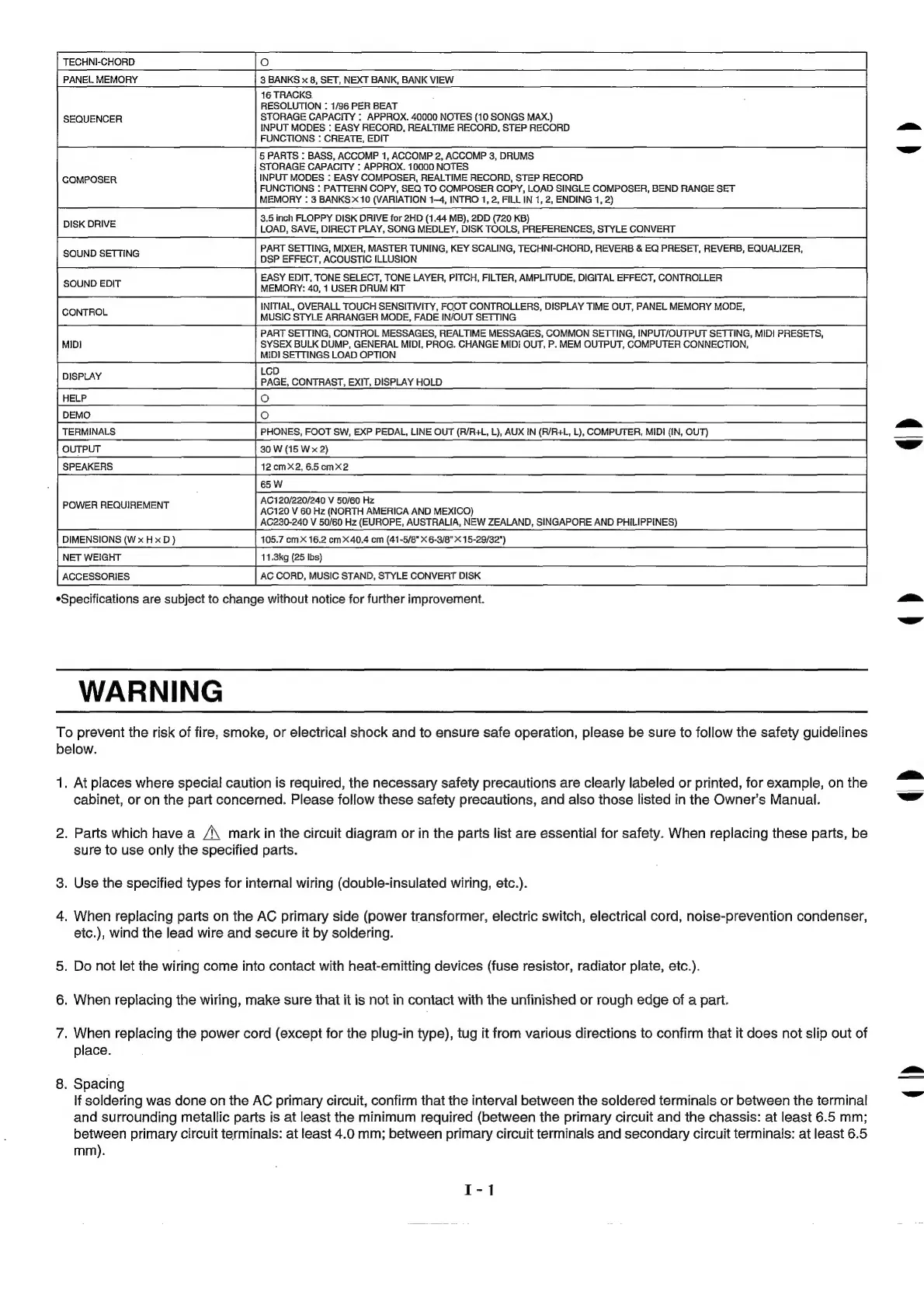
PANEL
MEMORY
3
BANKS
x
8,
SET,
NEXT
BANK,
BANK
VIEW
16
TRACKS.
RESOLUTION
:
1/96
PER
BEAT
SEQUENCER
STORAGE
CAPACITY
:
APPROX.
40000
NOTES
(10
SONGS
MAX.)
INPUT
MODES
:
EASY
RECORD,
REALTIME
RECORD,
STEP
RECORD
FUNCTIONS
:
GREATE,
EDIT
5
PARTS
:
BASS,
ACCOMP
1,
ACCOMP
2,
ACCOMP
3,
DRUMS
STORAGE
CAPACITY
:
APPROX.
10000
NOTES
COMPOSER
INPUT
MODES
:
EASY
COMPOSER,
REALTIME
RECORD,
STEP
RECORD
FUNCTIONS
:
PATTERN
COPY,
SEQ
TO
COMPOSER
COPY,
LOAD
SINGLE
COMPOSER,
BEND
RANGE
SET
MEMORY
:
3
BANKS
10
(VARIATION
1-4,
INTRO
1,
2,
FILL
IN
1,
2,
ENDING
4,
2)
anaes
3.5
inch
FLOPPY
DISK
DRIVE
for
2HD
(1.44
MB),
2DD
(720
KB)
LOAD, SAVE,
DIRECT
PLAY,
SONG
MEDLEY,
DISK
TOOLS,
PREFERENCES,
STYLE
CONVERT
Sain
SERANE
PART
SETTING,
MIXER,
MASTER
TUNING,
KEY
SCALING,
TECHNI-CHORD,
REVERB
&
EQ
PRESET,
REVERB,
EQUALIZER,
DSP
EFFECT,
ACOUSTIC
ILLUSION
eae
EASY
EDIT,
TONE
SELECT,
TONE
LAYER,
PITCH,
FILTER,
AMPLITUDE,
DIGITAL
EFFECT,
CONTROLLER
MEMORY:
40,
1
USER
DRUM
KIT
tetas
INITIAL,
OVERALL
TOUCH
SENSITIVITY,
FOOT
CONTROLLERS,
DISPLAY
TIME
OUT,
PANEL
MEMORY
MODE,
MUSIC
STYLE
ARRANGER
MODE,
FADE
IN/OUT
SETTING
PART
SETTING,
CONTROL
MESSAGES,
REALTIME
MESSAGES,
COMMON
SETTING,
INPUT/OUTPUT
SETTING,
MIDI
PRESETS,
SYSEX
BULK
DUMP,
GENERAL
MIDI,
PROG.
CHANGE
MIDI
OUT,
P.
MEM
OUTPUT,
COMPUTER
CONNECTION,
MIDI
SETTINGS
LOAD
OPTION
LoD
DISPLAY
PAGE,
CONTRAST,
EXIT,
DISPLAY
HOLD
ee
eS
Oe
ee
ee
ee
ee
DEMO
Oo
PHONES,
FOOT
SW,
EXP
PEDAL,
LINE
OUT
(A/R+L,
L),
AUX
IN
(A/R+L,
L),
COMPUTER,
MIDI
(IN,
OUT)
20
W
(6
Wa
AC120/220/240
V
50/60
Hz
AC120
V
60
Hz
(NORTH
AMERICA
AND
MEXICO)
AC230-240
V
50/60
Hz
(EUROPE,
AUSTRALIA,
NEW
ZEALAND,
SINGAPORE
AND
PHILIPPINES)
DIMENSIONS
(WxHxD)
105.7
omX
16.2
cmX40.4
cm
(41-5/8"X
6-3/8"
X
15-29/32")
NET
WEIGHT
11.3kg
(25
Ibs)
ACCESSORIES
AC
CORD,
MUSIC
STAND,
STYLE
CONVERT
DISK
*Specifications
are
subject
to
change
without
notice
for
further
improvement.
POWER
REQUIREMENT
WARNING
To
prevent
the
risk
of
fire,
smoke,
or
electrical
shock
and
to
ensure
safe
operation,
please
be
sure
to
follow
the
safety
guidelines
below.
1.
At
places
where
special
caution
is
required,
the
necessary
safety
precautions
are
clearly
labeled
or
printed,
for
example,
on
the
cabinet,
or
on the
part
concerned.
Please
follow
these
safety
precautions,
and
also
those
listed
in
the
Owner’s
Manual.
2.
Parts
which
have
a
/\
mark
in
the
circuit
diagram
or
in
the
parts
list
are
essential
for
safety.
When
replacing
these
parts,
be
sure
to
use
only
the
specified
parts.
3.
Use
the
specified
types
for
internal
wiring
(double-insulated
wiring,
etc.).
4.
When
replacing
parts
on
the
AC
primary
side
(power
transformer,
electric
switch,
electrical
cord,
noise-prevention
condenser,
eic.),
wind
the
lead
wire
and
secure
it
by
soldering.
5.
Do
not
let
the
wiring
come
into
contact
with
heat-emitting
devices
(fuse
resistor,
radiator
plate,
etc.).
6.
When
replacing
the
wiring,
make
sure
that
it
is
not
in
contact
with
ithe
unfinished
or
rough
edge
of
a
pari.
7.
When
replacing
the
power
cord
(except
for
the
plug-in
type),
tug
it
from
various
directions
to
confirm
that
it
does
not
slip
out
of
place.
8.
Spacing
If
soldering
was
done
on
the
AC
primary
circuit,
confirm
that
the
interval
between
the
soldered
terminals
or
between
the
terminal
and
surrounding
metallic
parts
is
at
least
the
minimum
required
(between
the
primary
circuit
and
the
chassis:
at
least
6.5
mm;
between
primary
circuit
terminals:
at
least
4.0
mm;
between
primary
circuit
terminals
and
secondary
circuit
terminals:
at
least
6.5
mm).
()
q)
()
()
Es
~~

Related product manuals