EasyManua.ls Logo

Technics SX-KN1600 - Page 8

Technics SX-KN1600
72 pages
Print Icon
To Next Page IconTo Next Page
To Previous Page IconTo Previous Page
Loading...
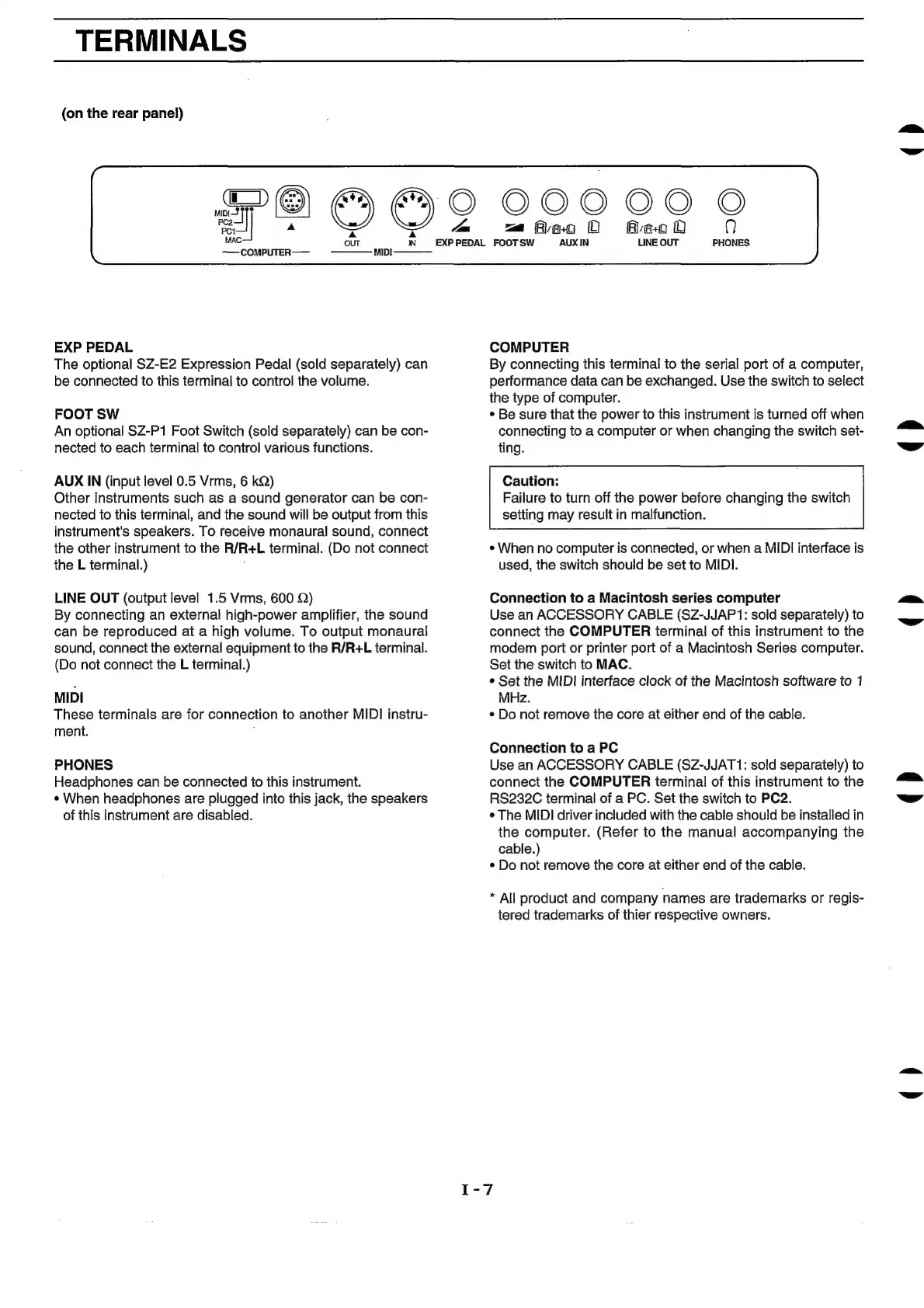
TERMINALS
(on
the
rear
panel)
Ea]
Pe
€)
¢
é)
O
MAC
~
——
COMPUTER——
MIDI————_
000
OO
O
wm
Aeao
O
AeoO
?)
Rs
PEDAL
FOOTSW
AUXIN
LINE
OUT
PHONES
EXP
PEDAL
The
optional
SZ-E2
Expression
Pedal
(sold
separately)
can
be
connected
to
this
terminal
to
control
the
volume.
FOOT
SW
An
optional
SZ-P1
Foot
Switch
(sold
separately)
can
be
con-
nected
to
each
terminal
to
control
various
functions.
AUX
IN
(input
level
0.5
Vrms,
6 kQ)
Other
instruments
such
as
a
sound
generator
can
be
con-
nected
to
this
terminal,
and
the
sound
will
be
output
from
this
instrument's
speakers.
To
receive
monaural
sound,
connect
the
other
instrument
to
the
R/R+L
terminal.
(Do
not
connect
the
L
terminal.)
LINE
OUT
(output
level
1.5
Vrms,
600
Q)
By
connecting
an
external
high-power
amplifier,
the
sound
can
be
reproduced
at
a
high
volume.
To
output
monaural
sound,
connect
the
external
equipment
to
the
R/R+L
terminal.
(Do
not
connect
the
L
terminal.)
MIDI
These
terminals
are
for
connection
to
another
MIDI
instru-
ment.
PHONES
Headphones
can
be
connected
to
this
instrument.
¢
When
headphones
are
plugged
into
this
jack,
the
speakers
of
this
instrument
are
disabled.
COMPUTER
By
connecting
this
terminal
to
the
serial
port
of
a
computer,
performance
data
can
be
exchanged.
Use
the
switch
to
select
the
type
of
computer.
¢
Be
sure
that
the
power
to
this
instrument
is
turned
off
when
connecting
to
a
computer
or
when
changing
the
switch
set-
ting.
Caution:
Failure
to
turn
off
the
power
before
changing
the
switch
setting
may
result
in
malfunction.
*
When
no
computer
is
connected,
or
when
a
MIDI
interface
is
used,
the
switch
should
be
set
to
MIDI.
Connection
to
a
Macintosh
series
computer
Use
an
ACCESSORY
CABLE
(SZ-JJAP1:
sold
separately)
to
connect
the
COMPUTER
terminal
of
this
instrument
to
the
modem
port
or
printer
port
of
a
Macintosh
Series
computer.
Set
the
switch
to
MAC.
¢
Set
the
MIDI
interface
clock
of
the
Macintosh
software
to
1
MHz.
¢
Do
not
remove
the
core
at
either
end
of
the
cable.
Connection
to
a
PC
Use
an
ACCESSORY
CABLE
(SZ-JJAT1:
sold
separately)
to
connect
the
COMPUTER
terminal
of
this
instrument
to
the
RS232C
terminal
of
a
PC.
Set
the
switch
to
PC2.
¢
The
MIDI
driver
included
with
the
cable
should
be
installed
in
the
computer.
(Refer
to
the
manual
accompanying
the
cable.)
¢
Do
not
remove
the
core
at
either
end
of
the
cable.
*
All
product
and
company
names
are
trademarks
or
regis-
tered
trademarks
of
thier
respective
owners.
(>)
()
()
()
()

Related product manuals