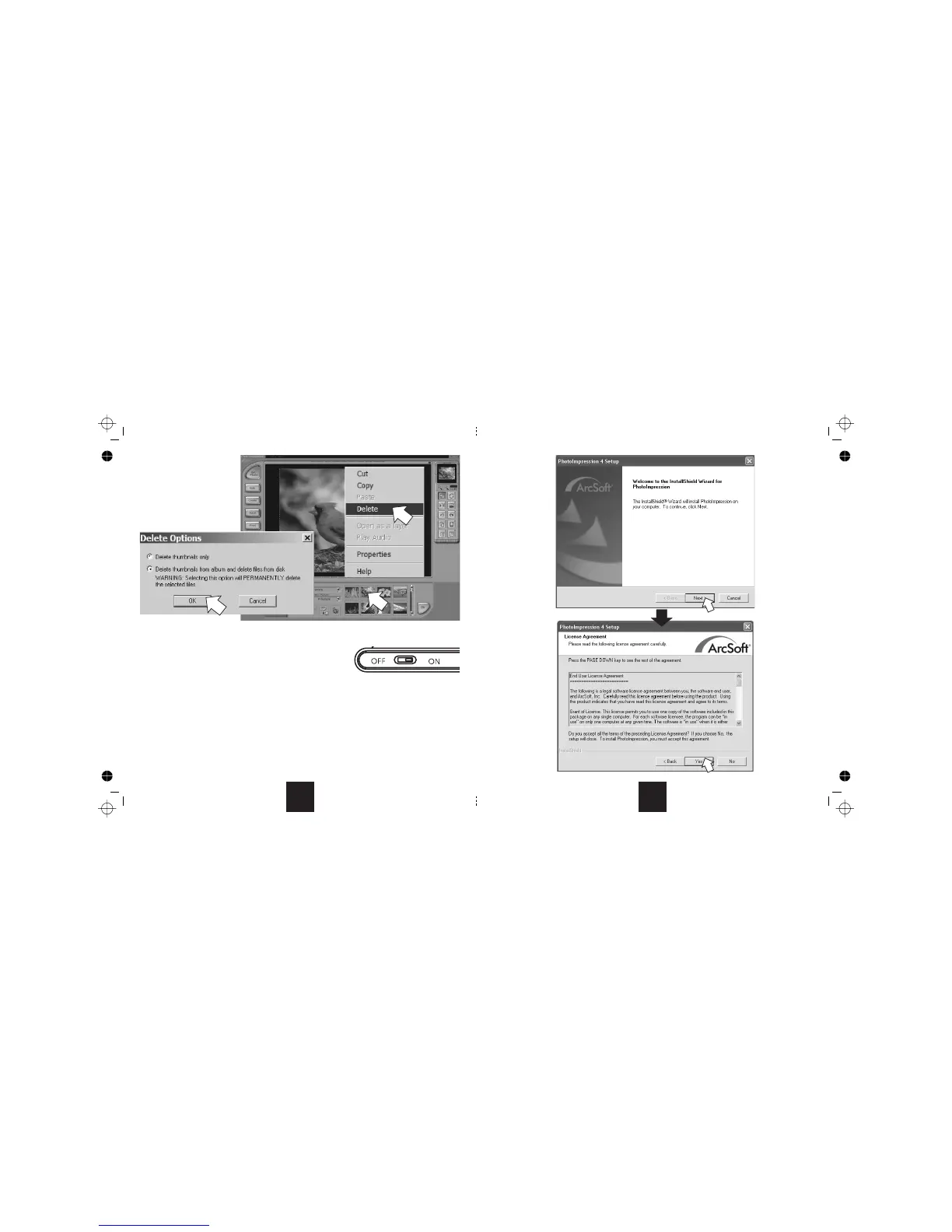
To delete a file from the list:
1:
Right-click
2. Delete
3.
OK
Deletingortransferringfileswillnotdeletethemfromthecamera.
Afterdeletingthefiles:
PhotoImpression
FunHouse
Placeyourmousearrowonthepicture
onthe picture.
Click .
Selectthe Deleteoptionand
Click todeletethefile.
After uploading the files to your PC you may delete them from the Camera.
UnplugtheUSBleadfromthecameraandthePC.
NowswitchthecameraoffviathePowerON/OFF switch.
TwoPhoto manipulation utilities are provided on the CD to help you make the most of your camera.
is a powerful image editing and processing program. Youcan import images from a wide range of peripherals
including CDs and TWAIN supported scanners. File management and editing are straightforward and there is a wide range of
templatessothatyoucanmakeyourowngreetingcards,invitations,etc.
isasimpleimageeditorandmanipulator,againwitharangeofenhancementtoolsandtemplates.
Full instruction manuals are provided for both programs in the "User Manuals" folder of the disc. An electronic copy of this User
Guideisalsoavailableonthedisc.TheseguidesareinPDFform-acopyofAcrobat Reader is provided if you need one.



 To Next Page