INSTALLING THE SOFTWARE
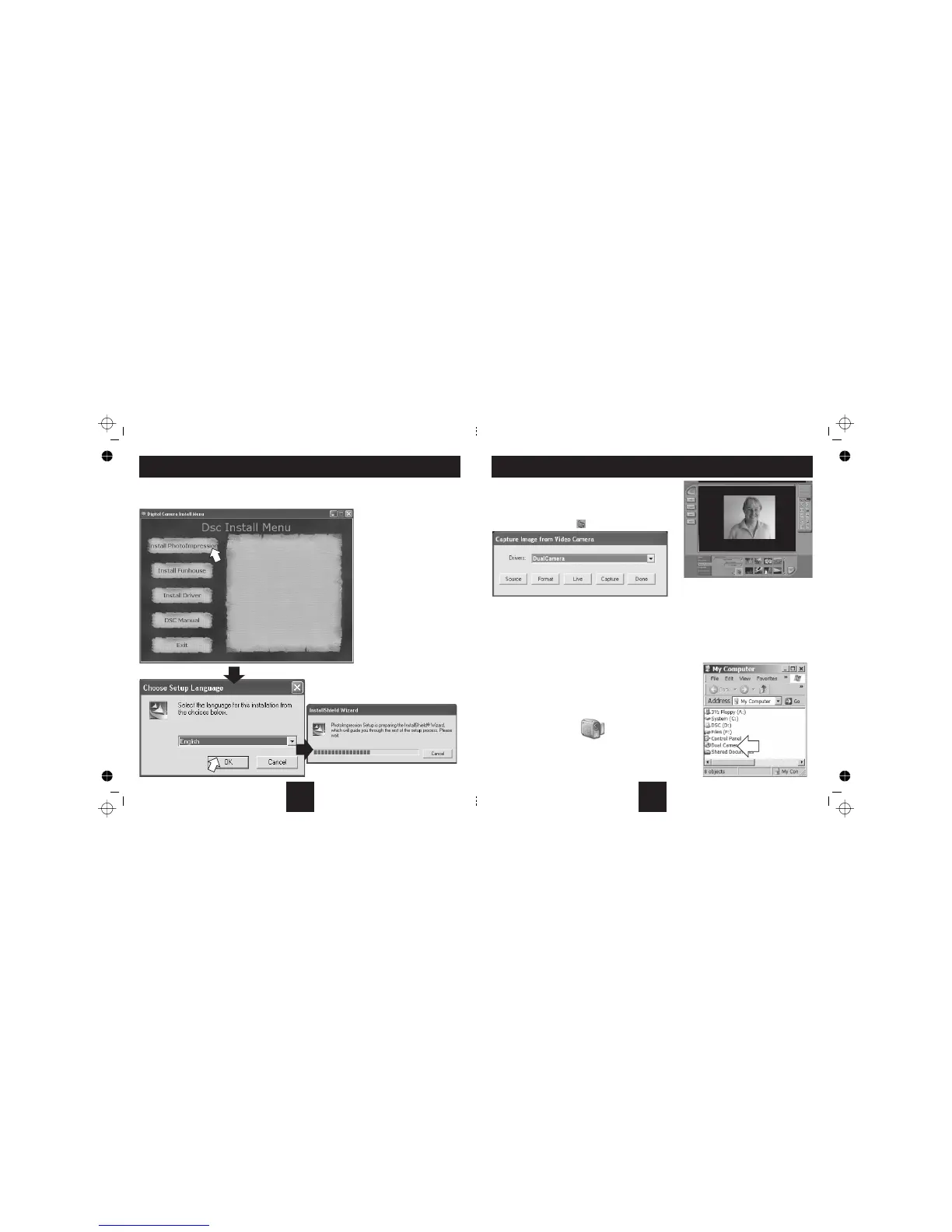
• Loadthesoftwarediscintoyourcomputer.Theinstallmenudisplays
• Click ‘InstallPhotoImpression’.Followthepromptsasbelowtoinstallthesoftware
•
•IftheCDdoesnotautostart:
ClickSTART/RUN
In the box enter D:\autorun.exe(where
DistheCD-ROMdriveletter).
Followthedirections.
Donotconnectthecamera!!
1:
2:
3:
4
1.Connectyourcameratothecomputer.
2.Double-clickthePhotoImpressionicononyourdesktop.
3.ClicktheiconCamera/Scanner.
4.ClicktheVideoCamerasymbol. Thisdialogboxwilldisplay
Alterthebrightnessandotherscreenfeaturesofthecamera-wesuggestyouusetheDefaultSetting.
Adjusttheresolutionandthecolormodeofimages-wesuggest[RGB-24].
transformsthecameraintoavideostreamingdevice- thevideostreamappearsasinthescreendisplayabove.
Pressthistocaptureanimagefromthevideostream.Youcan capture several images in this way.
Savethemas shownonpage13and14.
Whenyouhavefinishedbrowsing,click
Thescreenwillgoblankandyoucannowexittheprogram
Connectyourcameratothecomputer.
NavigatetoMyComputer
Clickonthe icon.
Source:
Format:
Live:Live
Capture:
Done: Done.
1.
2.
3. DualCamera
Using the camera as a Webcam in Windows XP
USING THE DC30 AS A WEBCAM
3
17



 To Next Page