7. OK.
8. Save.
Selectthephotoyouwanttoviewandclick
Click
Thiswillsavethepicturetoyourharddrive.
7
Dual Camera
8
14
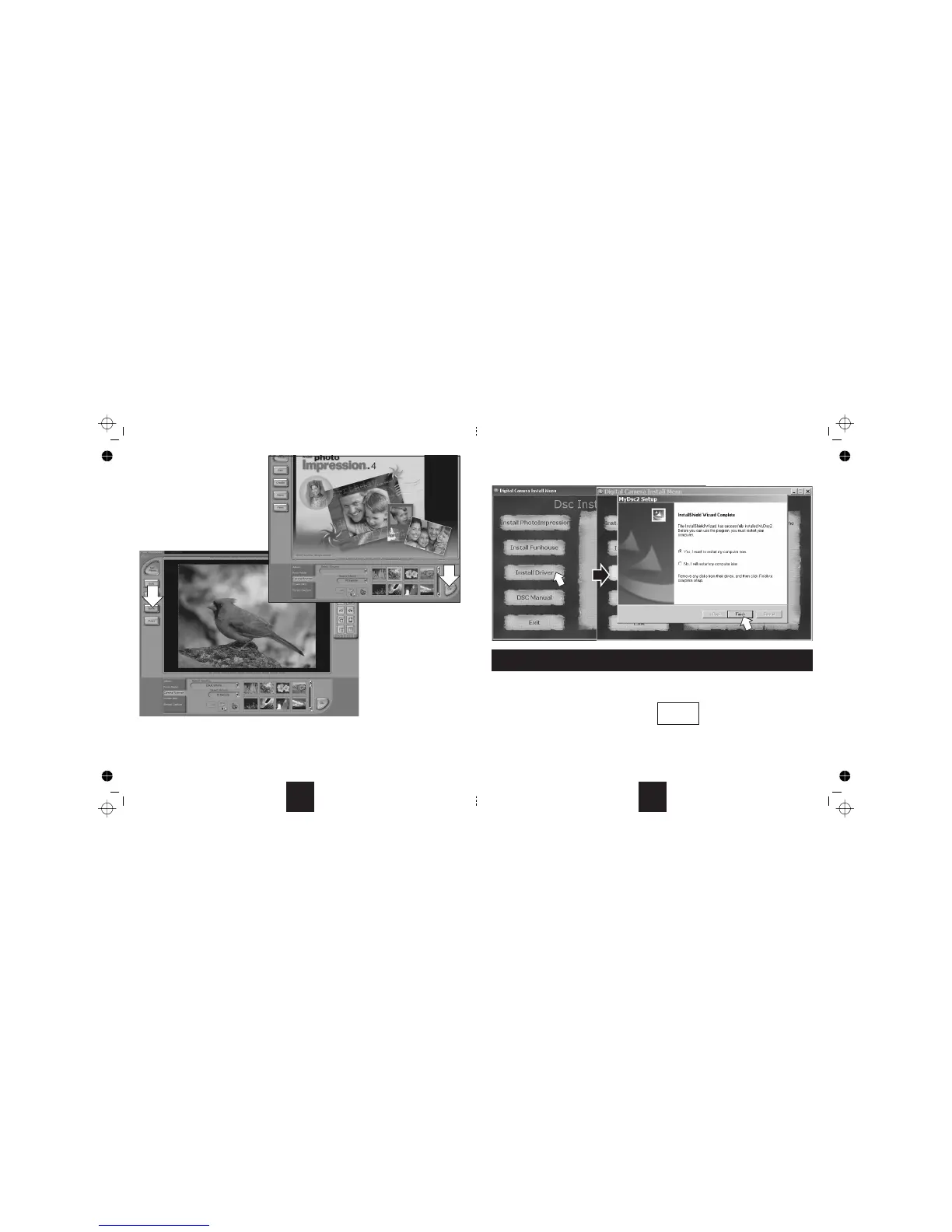
• Click .Followthepromptsasbelowtoinstallthesoftware
• Removethedisc; select“ ”andclick“ ”tore-bootthesystem.
• UnwrapthesuppliedUSBcable.
ConnectthecameratoafreeUSBportonthecomputerwiththesuppliedcable.
Youwillseethisscreen
• Whenthecameraischargingthechargelightis
• After about four hours the light will go andthecameraisreadyforuse.
• NowunplugtheUSBcablefromthecameraandthePC.Thecamerasupports “hotswapping”.
After the first use, charging will take about 3 hours. If there is residual charge in the battery, charging time will be shorter.
ThecameraisfullyoperationalwhenitisconnectedtothePC.ThecameraON/OFFswitchisbypassedinPCconnectionmode.
‘InstallDriver’
Afterinstallation: YesIwanttorestartmycomputer Finish
•
• TheCamerawillnowswitchon.
red
green
Note:
CHARGING THE CAMERA BATTERY
000
HI
7



 To Next Page