28
CONNECTING A GAMES CONSOLE
Connecting a games console can
sometimes seem very difficult. We have
simplified it to three options depending
on the cables that you have.
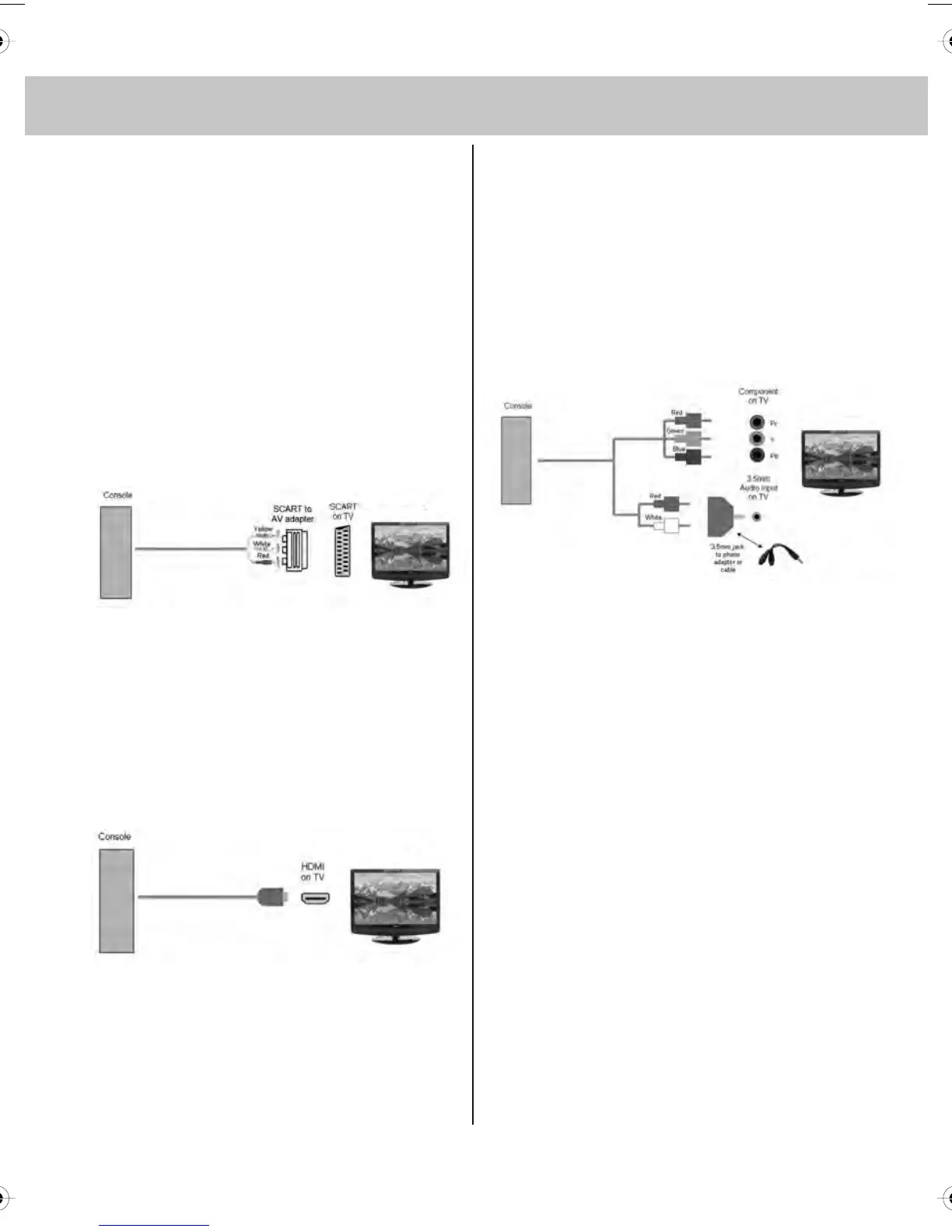
Option 1 – Connecting via Scart
to AV adapter
If you are supplied with a cable from the
console which has YELLOW,
RED & WHITE connectors you must
connect via a SCART to AV adapter
(Some console include this)
TV source should be set to SCART.
Option 2 – Connecting via HDMI cable
If you are supplied with a HDMI cable is
the easiest option. A HDMI cable can
output both video and audio and enables
you to enjoy digital-quality video and
audio with minimal loss of picture quality.
TV Source should be set to HDMI.
Option 3 – Connecting via Component
cable
If you are supplied with a cable from the
console which has RED, GREEN, BLUE,
RED & WHITE connectors you must
connect via Component (for picture)
and by 3.5mm to phono cable (for sound).
TV Source should be set to Component.
*Available separately
tesco english manual 19_22_14 paPage 1 30. 4. 2009 14:04:57


 To Next Page