COPYING FILES TO AND FROM A PC
• SwitchtheframeOFF
Remove any USB drive from the frame. The USB host drive is not
available when the frame is connected with a PC.
• ConnecttheSD/CFetc.cardsasrequired
• SwitchtheframeON
• PlugtheUSBcableintotheframeandconnectittothePC.
• LetthePCinstallthedrivers(automatic).
When the drivers have loaded:
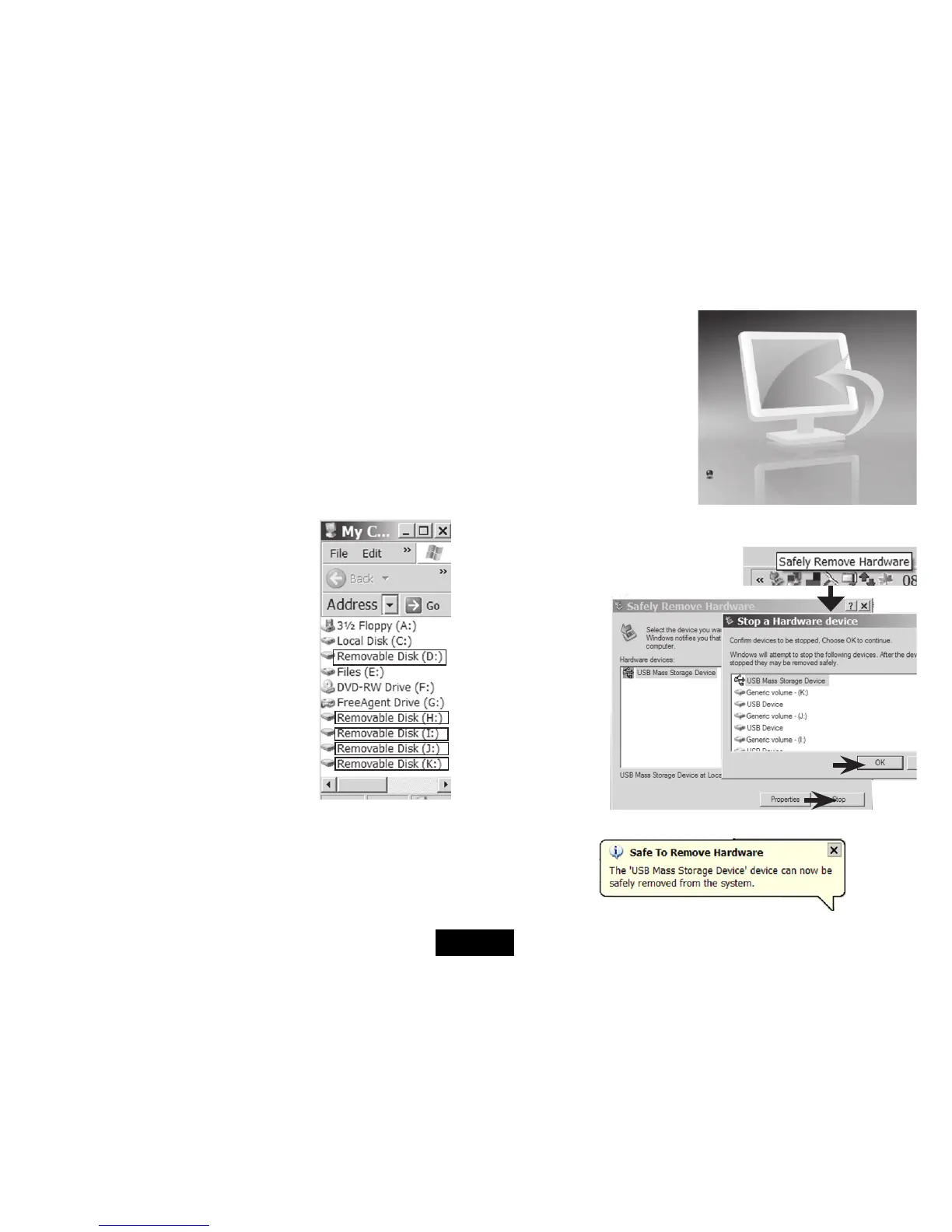
Navigateto‘MyComputer’.Thedrivesappear
as ‘Removeable Disks’. The actual drive letters
depend on drives already installed on your PC.
The drive order is:
CF:
SD/MMC:
Not used on this model:
MS:
Nand (frame internal memory).
Younowcandraganddroplesfromthecomputertoanycardonthe
frame,andviceversa.Youcanalsocopybetweendrives.
If you see a message ‘Please insert a disk into drive...’ and there is a
card connected you will need to format the card to proceed further.
When connected to the PC the
screen on the Frame will display
the message ‘PC CONNECTED’
and the screen on the right.
If you do not see this screen:
RemovetheUSBdriveandre-
start the copying process
Disconnecting the Frame from the PC:
• Clickon‘SafelyRemoveHardware’
at the right of the PC taskbar.
1. Click Stop
2.ClickOK
When you see this message:
• UnplugtheframefromthePC
2
1
Page 17


 To Next Page