GETTING STARTED
HANDSET PREPARATION
Remove the protective strip from the battery compartment to activate
the battery. The handset is now ready for use.
If the handset behaves erratically or fails to
operate the battery should be replaced.
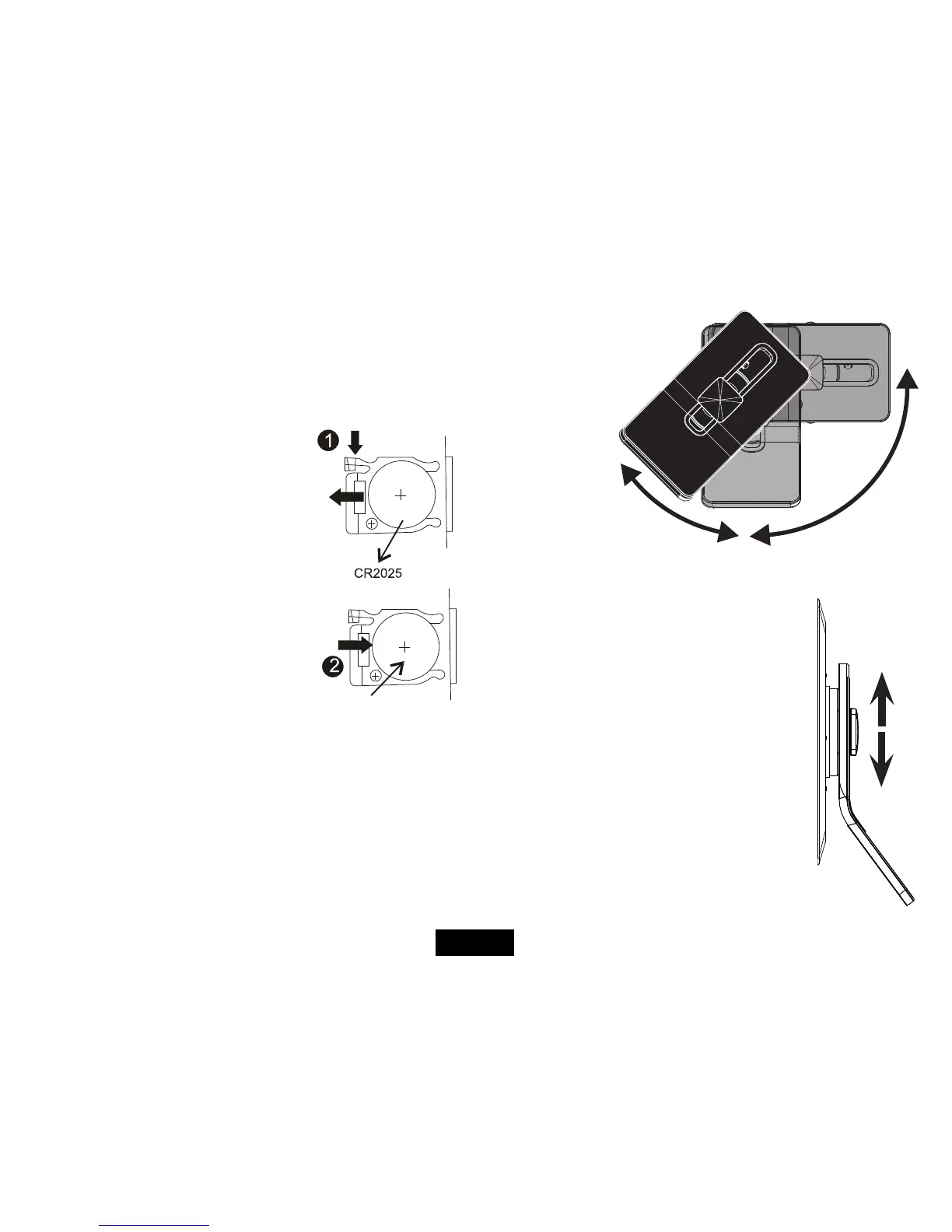
1: Press the catch at the side of the battery
compartment. Slide out the battery cage
2: Remove the old battery. Place the new bat-
tery in the cage with the polarity as shown.
Close the cage.
There is a risk of re and burns if the battery
is handled improperly. Do not disassemble,
crush, puncture, short external contacts, or
dispose of in re or water.
Do not attempt to open or service the battery. Replace only with the
battery designated for this product. Discard used batteries in accord-
ance with recycling regulations in force in your area.
PLACEMENT
Locate the stand in the slot at the rear. Rotate the stand once to put
the frame into horizontal (landscape) view. Rotate once more to put
the frame into vertical (portrait) view.
Note:TheON/OFF
switch is obscured
by the stand in
Portrait mode.
Stand the frame on a level solid surface where it is unlikely to fall or
get knocked over.
Movethestandupanddowntosetacomfort-
able viewing angle. Do not push the stand to its
extreme upper or lower settings as the frame could
overbalance.
SwitchtheON/OFFswitchontheframetoOFF.
The frame can be wall mounted via the slots in the
rear but this is not recommended. Wall mounting
should only be used as a last resort.
Page 7


 To Next Page