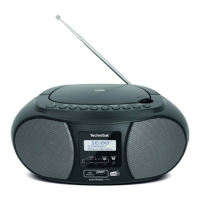
This document is an instruction manual for the TechniSat DigitRadio 215, a portable digital radio capable of receiving DAB/DAB+ and FM broadcasts.
Function Description
The TechniSat DigitRadio 215 is designed for listening to digital and analog radio stations. It supports DAB/DAB+ for high-quality digital radio and FM for traditional analog broadcasts. The radio features a clear display for station information, signal strength, and menu navigation. It includes dual alarms, a sleep timer, and an equalizer for customized audio. The device can be powered via a DC adapter or AA batteries, making it suitable for both home and portable use.
Important Technical Specifications
- Description: DAB/DAB+ and FM Digital Radio
- Frequency Range:
- FM: 87.5-108 MHz
- DAB/DAB+: 174.928-239.200 MHz
- Power Adapter:
- AC Input: 100-240V~, 50/60 Hz
- DC Output: 6V, 500mA (provided adapter)
- Audio Output Power: 1W rms
- Power Consumption:
- Operation: 3W (Max)
- Standby: < 1W
- Dimensions (W x H x D): 205mm x 115mm x 46mm
- Battery Type: 4 x AA batteries (not supplied)
Usage Features
Controls and Interface
The radio features a user-friendly interface with several buttons:
- DIRECT PRESET buttons P1-P6: Used to save and recall up to six favorite DAB/DAB+ or FM stations. Press and hold to save, press to recall.
- POWER/STANDBY button: Toggles the radio between on and standby modes. Press and hold to switch off completely.
- MODE button: Switches between DAB and FM radio modes.
- MENU button: Displays station information, and when pressed and held, accesses the main menu for settings.
- SWR4 button: A dedicated button to listen to the SWR4 preset station, if available in the broadcasting area.
- ← button: Confirms selections in menus.
- VOLUME - / VOLUME + buttons: Adjust the audio volume.
- ▲ / ▼ buttons: Navigate through options and station lists.
- Display: Shows current station, time, signal strength, and menu options.
DAB/DAB+ Mode
- Initial Scan: Upon first use, the radio automatically performs a full scan to find and store all available DAB/DAB+ stations in alphanumeric order.
- Full Scan: Users can manually initiate a full scan to update the station list, recommended every few months to find new broadcasts.
- Station List: Browse and select stations from the stored list using the navigation buttons.
- Secondary Service: Some DAB/DAB+ stations offer secondary services (indicated by ">>"), which provide additional content related to the primary station.
- Manual Tune: Allows for manual tuning to specific DAB/DAB+ channels and frequencies.
- Prune Invalid: Removes unavailable stations from the station list.
- DRC (Dynamic Range Control): Adjusts the audio dynamic range (high, low, or off) to optimize listening in noisy environments, making quiet sounds louder and loud sounds quieter.
- Viewing Station Information: Repeatedly pressing the MENU button cycles through information like DLS (Dynamic Label Segment), Program Type, Ensemble, Frequency, Signal Quality, Signal Strength, Bitrate, Codec, and Date. It also supports slide show display for stations that broadcast it.
- Signal Strength Indicator: A bar on the display shows the signal strength, helping users optimize antenna positioning.
FM Mode
- Selecting FM Mode: Press the MODE button to switch to FM. The radio will start at 87.50MHz or the last listened FM station.
- Manual Tuning: Adjust the FM frequency in 0.05MHz steps using the navigation buttons.
- Automatic Scan: Automatically scans for the next available FM station by pressing the navigation buttons.
- Scan Setting: Choose to scan for "Strong Stations Only" (stops at stations with good signal strength) or "All Stations" (stops at any available station, potentially including weak signals with hiss).
- Audio Setting: Allows users to force mono playback for weak stations to reduce hiss, overriding the automatic stereo/mono switching.
- Viewing Station Information: Repeatedly pressing the MENU button displays information such as Radio Text, Program Type, Program Name, Audio info, and Date.
Preset Stations
- Storing Presets: The radio can store up to 6 favorite DAB/DAB+ or FM stations. While a program is playing, press and hold one of the DIRECT PRESET buttons (P1-P6) until "Preset # stored" appears.
- Recalling Presets: Simply press the corresponding DIRECT PRESET button (P1-P6) to instantly tune to a stored station. "Preset Empty" will be displayed if a preset slot is unallocated.
General Operations
- Setting Alarm: The radio features dual alarms. Users can set the alarm time, frequency (daily, once, weekends, weekdays), wake-up source (Buzz, Digital Radio, or FM), duration, and volume. An alarm icon appears on the display when an alarm is active.
- Snooze Function: When an alarm sounds, pressing the ← button activates snooze, with adjustable periods of 5, 10, 15, or 30 minutes depending on the alarm duration.
- Sleep Timer: Configures the radio to automatically switch to standby after a set period (Off, 15, 30, 45, 60, or 90 minutes). A sleep timer icon appears on the display when active.
- Setting Equalizer: Choose from predefined sound equalization profiles (Normal, Classic, Jazz, Pop, Rock, Speech) or customize a "My EQ" setting for treble and bass.
- Setting Time/Date: Manually set the time and date or use auto-update from DAB, FM, or any source. Supports 12-hour or 24-hour format and various date formats (DD-MM-YYYY or MM-DD-YYYY).
- Setting Backlight: Adjusts the display brightness level (On level and Dim level) and the backlight timeout period.
- Setting Language: Change the menu language.
- Factory Reset: Resets all user-defined settings, including time/date, DAB station list, and preset stations, to their original default values.
- Viewing Software Version: Displays the current software version, useful for technical support.
Maintenance Features
- Battery Installation: Requires 4 AA batteries. Instructions emphasize correct polarity, not mixing battery types, and removing batteries for extended storage to prevent damage.
- Cleaning: The unit should be cleaned only with a dry cloth.
- Antenna Adjustment: The antenna should be fully extended for optimal reception in both DAB and FM modes. Repositioning the radio or antenna may be necessary to improve signal quality.
- Troubleshooting: A dedicated section provides solutions for common issues such as no power, unresponsive buttons, poor radio reception (checking antenna, electrical interference), and desired station not found (weak signal, manual search).
- Safety Instructions: Comprehensive safety guidelines are provided, including warnings against electric shock, exposure to rain/moisture, blocking ventilation, placing heavy loads, and using damaged power cords. It also advises against self-servicing and recommends professional technicians for repairs.
- Disposal Information: The manual includes a CE symbol, indicating that the product should be disposed of separately from household waste at the end of its life, in accordance with local regulations.

 Need help?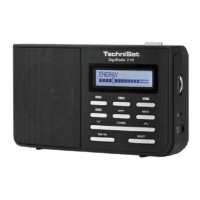








 To Next Page
 General