EN
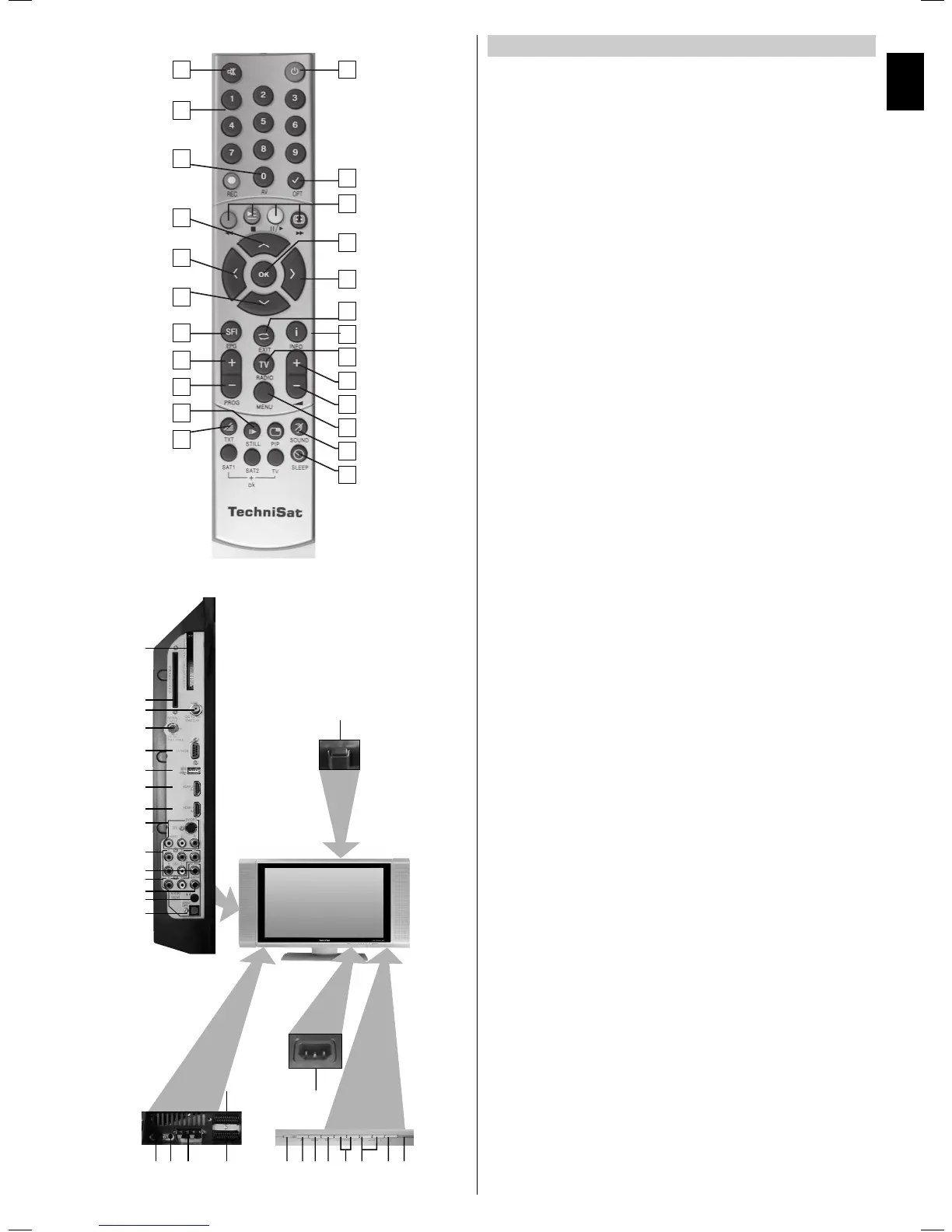
Mains power
1 Power switch
2 Mains power socket
Connections:
3 SCART socket (AV1)
4 SCART socket (AV2)
5 Loudspeaker connection
6 VGA connection
7 Audio IN (VGA)
8 Common interface
9 Card reader
10 LNB input (DVB-S)
11 Antenna input (DVB-C, DVB-T, analogue)
12 RS 232 interface
13 USB connection
14 HDMI connection 2
15 HDMI connection 1
16 Video input, S-Video input and audio input
17 Component inputs (Y, U, V and audio)
18 Subwoofer output
19 Audio output (R, L)
20 Digital audio output (SPDIF, electrical)
21 Headphone output (3.5 mmjack socket)
22 Digital audio output (SPDIF, optical)
Local controls:
23 LED
24 AV
2 Diagrams
Remote control
Remote control option:
Switching the remote control option allows you to use this remote
control to operate two TechniSat receivers and a TechniSat television
with the same coding.
> To switch the remote control option, press the desired button
(SAT1, SAT2 or TV) and OK at the same time!!!
1 Sound on/off
2 Numerical keypad
3 0/AV
4 Arrow button up, Program +
5 Arrow button left, Volume –
6 Arrow button down, Program –
7 SFI
8 Program +
9 Program –
0 Stop
qa Teletext on/off*
qs On/standby
qd
Option* In TV mode:
Audio/subtitle selection, special functions
In radio mode:
Station selection by switching between audio subcarriers
qf Multifunction buttons
qg OK, Program list on/off
qh Arrow button right, Volume +
qj Back
qk Info
ql TV/radio mode
w/ Volume +
wa Volume –
ws Menu on/off
wd Language selection*
wf Sleep timer
* This function is only available if the appropriate data are broadcast for the channel
you have selected.
23 24 25 26 27 28 29 30
2
1
6 75 3
4
8
9
10
11
12
13
14
15
22
21
20
16
17
19
18
1
2
3
4
5
6
7
8
9
10
11
12
13
14
15
16
17
19
20
21
22
23
24
18


 To Next Page
 Loading...