TP4-20 - User Manual Signaling
2-1
1
LED off
LED blinking quickly
LED blinking slowly
LED on
Program in stand-by
Program in arming phase
Program partset
Program armed
LED off
LED blinking
LED on
No alarm
Program alarm active
Alarm stored (alarm memory)
4
LED blinking quickly Open direct or delayed (T2) zones
6
LED off
LED blinking
LED on
No alarm
General alarm active
Alarm stored (alarm memory)
LED off
LED on
Console in stand-by (no key pressed)
Console in use (keystroke)
LED off
LED blinking
LED on
No alarm
Tamper alarm active
Alarm stored (alarm memory)
LED off
LED on
Serial bus badly connected or defect
Serial bus connected and ok
LED off
LED blinking
LED on
No alarm
Power failure (230V AC)
Alarm stored (alarm memory)
LED off
LED blinking
LED on
No alarm
Insufficient battery voltage
Alarm stored (alarm memory)
2
11
12
3
7
5
9
8
10
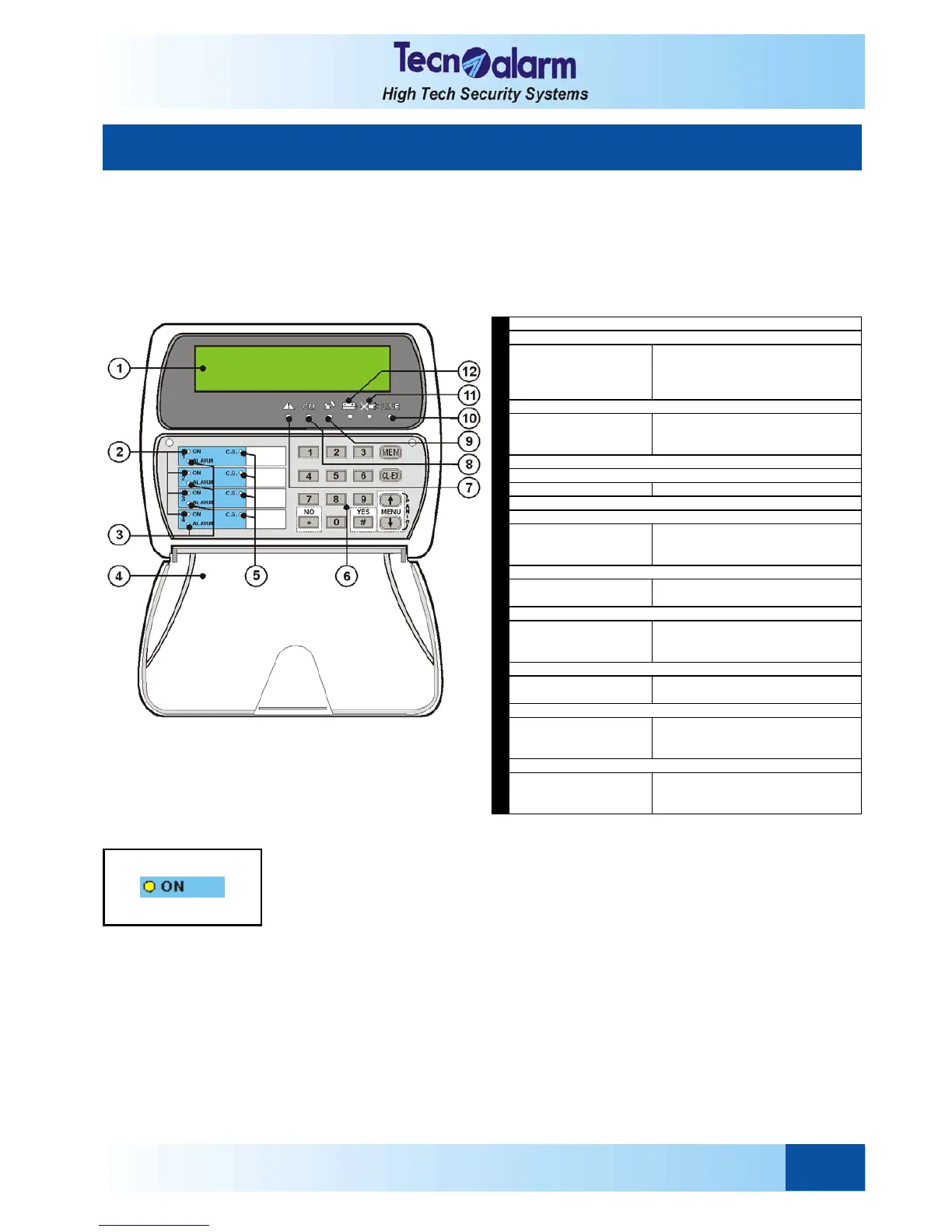
MAINS LED (POWER FAILURE)
BATTER LED
TAMPER ALARM LED
GENERAL ALARM LED
DISPLAY
Indicates date/time or active parameter
LINE LED (RS485 SERIAL BUS)
OCG LED (GENERAL CONTROL)
COMMAND MODE LED
KEYPAD
SCREW COVE
PROGRAM ALARM LED
PROGRAM STATUS LED
2. SIGNALING
System status signaling is made by the leds of the control units and perhaps through the indications on the LCD
display of the consoles that possess it.
2.1 CONSOLE LCD020
This kind of console permits program status signaling through coloured leds and an LCD display. It does not provide
signaling of the status of the individual zones.
2.1.1 PROGRAM STATUS LED
(YELLOW)
The yellow program status led signals program status (1 to 4):
z Led blinking quickly = program during arming phase
The arming phase is the lapse of time from entering the code
until actual arming of the control panel. It depends on the
exit time programed (if the system contains delayed zones).
z Led blinking slowly = program partset
z Led on = program armed
The led remains lit until disarming of the program.
z Led off = program disarmed
The events, arming, disarming and bypass, are stored in the
event buffer of the control panel with indication of date and time.


 To Next Page