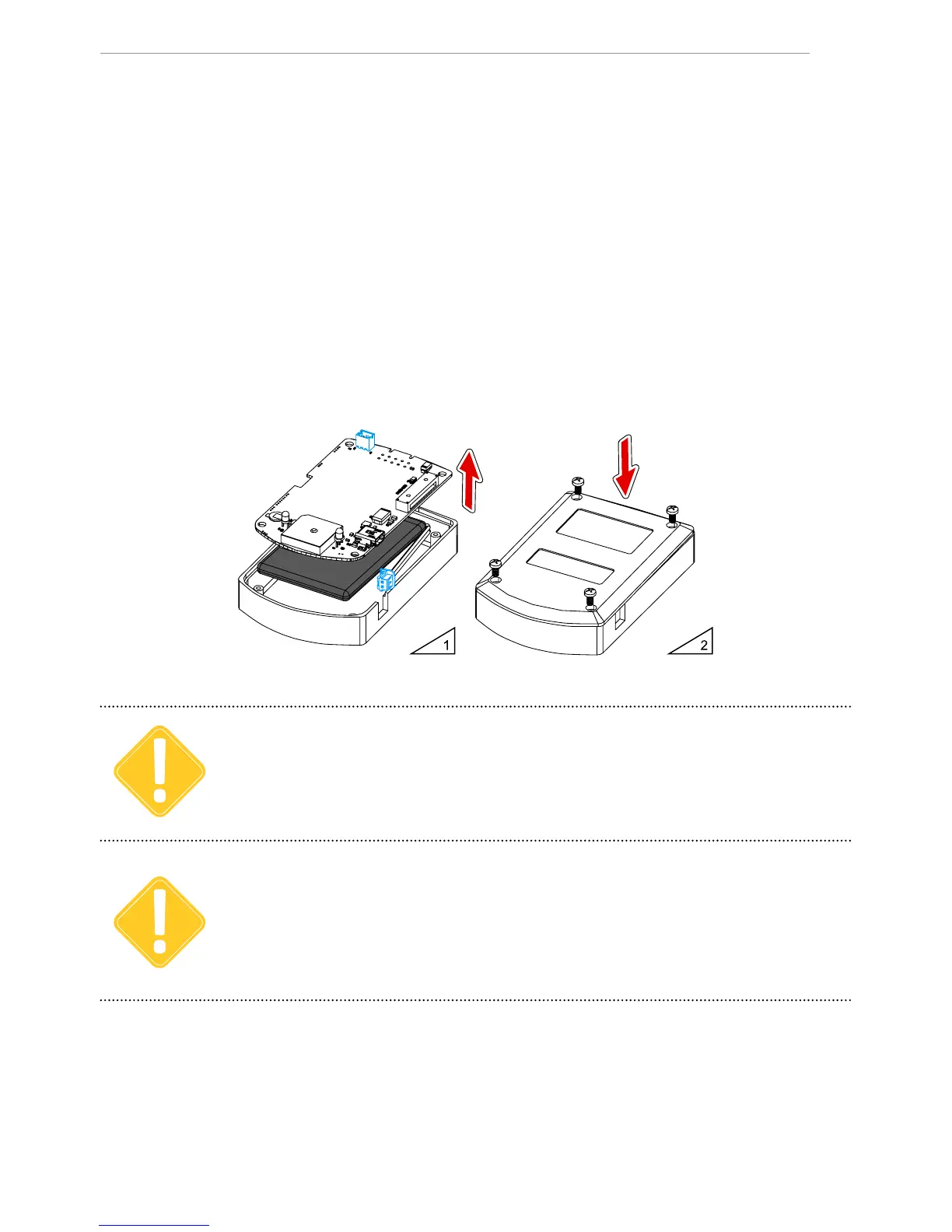
Inserting the battery
The AutoGRAPH-Mobile comes with a rechargeable Li-Ion battery. The trackers are supplied
with batteries of 1800 mAh capacity.
To insert the battery:
• Unscrew the four fastening screws and remove the back cover of the tracker.
• Remove the PCB from the case.
• Connect the battery to the Power connector located on the rear of the PCB (see g.1).
• Insert the PCB back into the case.
• If necessary, turn on the tracker following the steps described in the “Switching on / off”
section.
• Replace the back cover and tighten the four fastening screws (see g.2).
Before installation, check the battery for any damage. Do not use expired batteries. Use only the
battery supplied with the tracker.
IMPORTANT
To prevent incorrect connection, which can damage the tracker’s supply circuit with short-circuit
current, the battery’s connector (male) and the Power connector (female) on the PCB are keyed. Be
sure that the battery’s keying matches the key on the Power connector.
IMPORTANT


 To Next Page