Connection to PC
For conguration the tracker and reading the data, it is necessary to connect the AutoGRAPH-
Mobile to a PC. Use USB AM – USB microB 5pin data cable to connect the device to a PC.
To connect the device to a PC:
• Turn on the tracker.
• Connect the data cable to mini USB connector of the tracker.
• Connect the other end of the cable to the PC.
• If the device drivers have been installed previously, the system will automatically identify
the connected device.
• The tracker is now ready to operate with the MobileConf conguration program .
Care & Maintenance
Following simple instructions described below, you can maximize the tracker performance.
• Keep it away from extreme temperatures.
• Avoid excess moisture and exposure of chemical substances.
• Don’t drop it and keep it safe.
• Use only batteries and chargers, approved by the manufacturer. Using incompatible
batteries can damage the tracker.
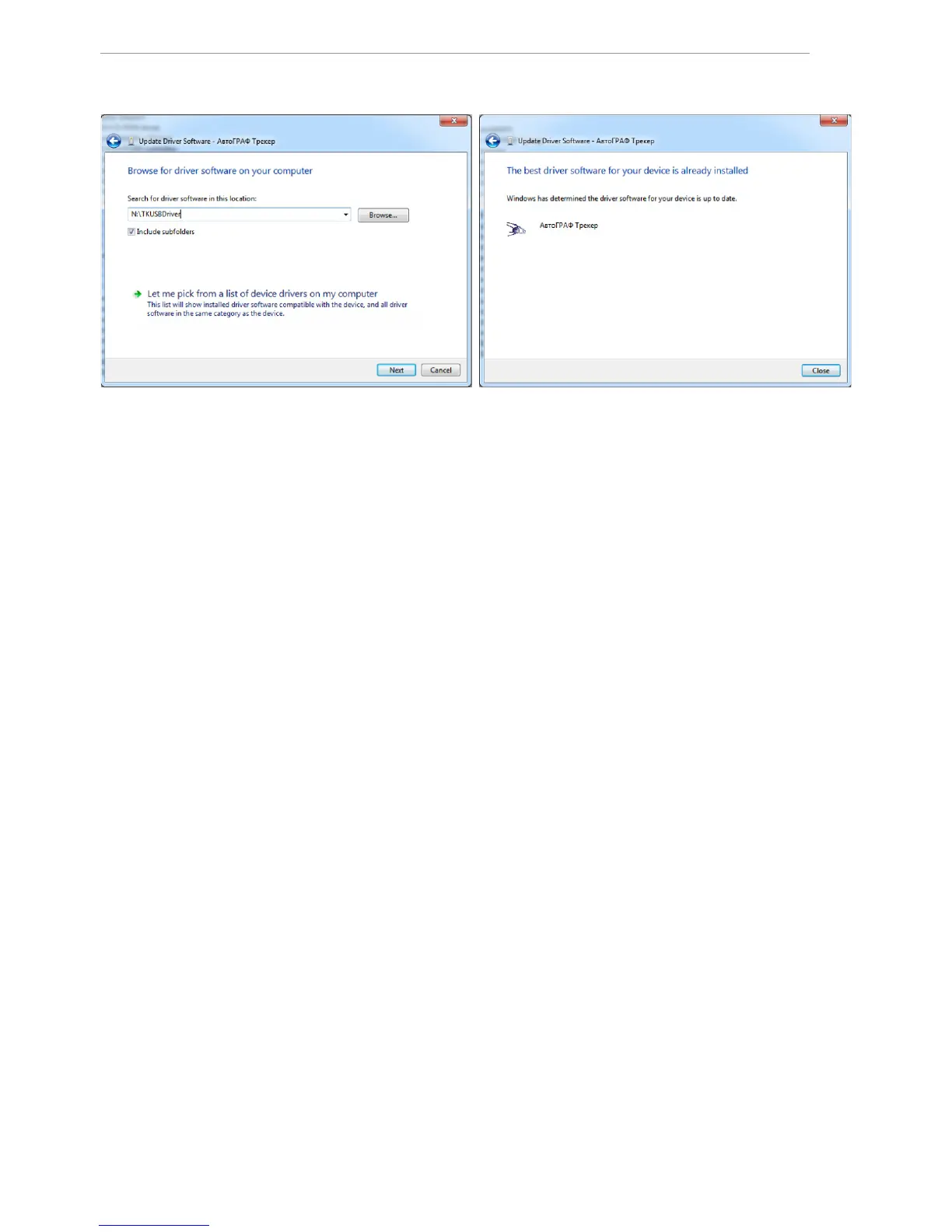
Fig.3. Fig.4.
8. Drivers for the AutoGRAPH-Mobile are successfully installed. The device is ready to
operate with troubleshooting utilities, dispatch software and other applications.


 To Next Page