HOW TO DOWNLOAD SOFTWARE FROM PC TO RECEIVER
1
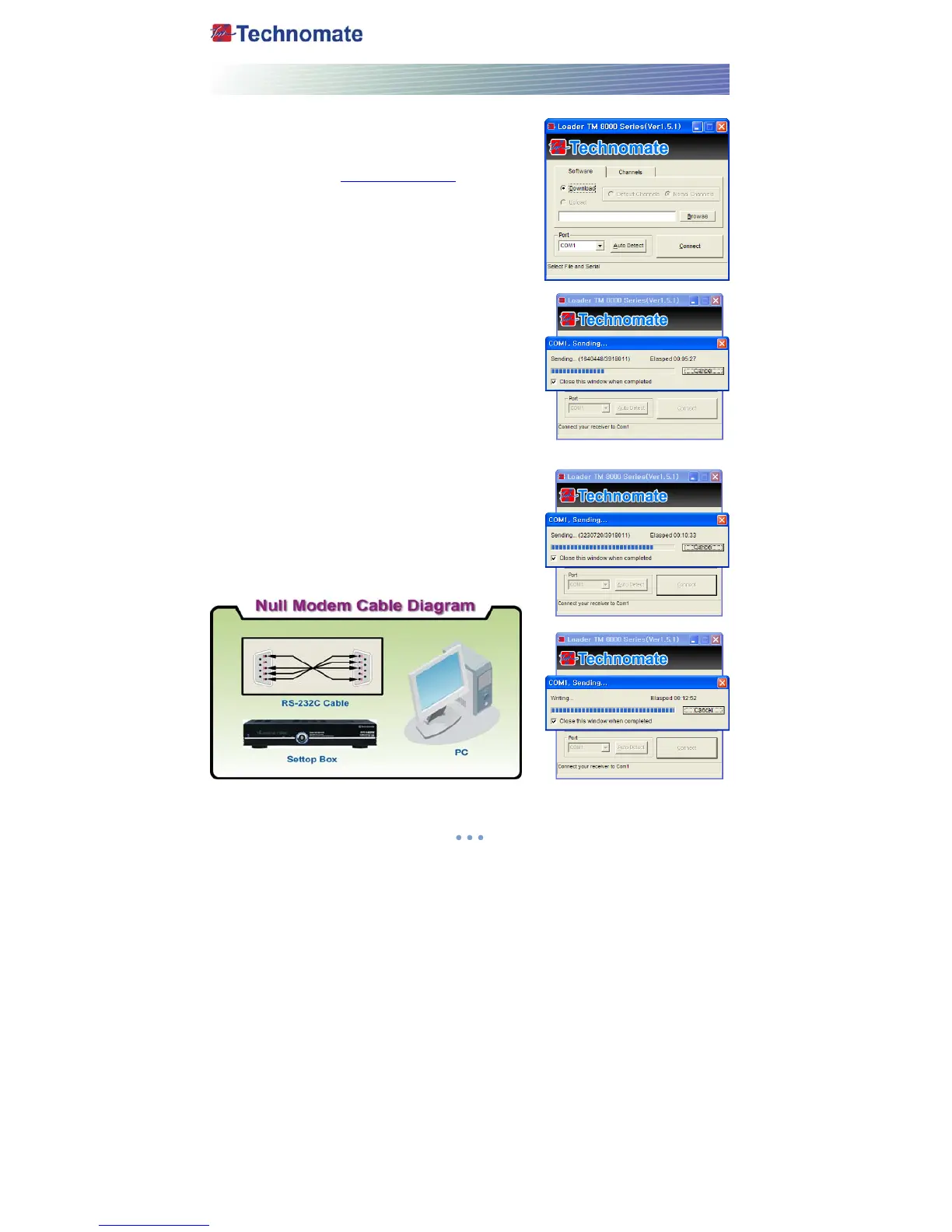
. Connect the null model cable to the RS-232C connection
on the back of the receiver and to your PC.
2. Download the latest version of the TM Loader from the
Technomate web site (www.technomate.com
)
3. Download the latest software(.TBN) of your receiver.
Ensure that the model number of the software is the same
as the receiver you have.
4. Click on Browse in the TM Loader.
5. Select the file from where you saved it when you
downloaded it from the Technomate web site.
6. Click on Connect on TM Loader.
7. Turn ON the satellite receiver.
8. The downloading status is displayed.
9. Once it displays 100% Finished (wait until it has completed
erasing), the software download has finished.
10. When it completes the writing of the new software,
disconnect the cable between the receiver and the PC.
A Factory Reset is required.
11. Go to System Information on the main menu and make sure that you have correct software
version.



 To Next Page