9
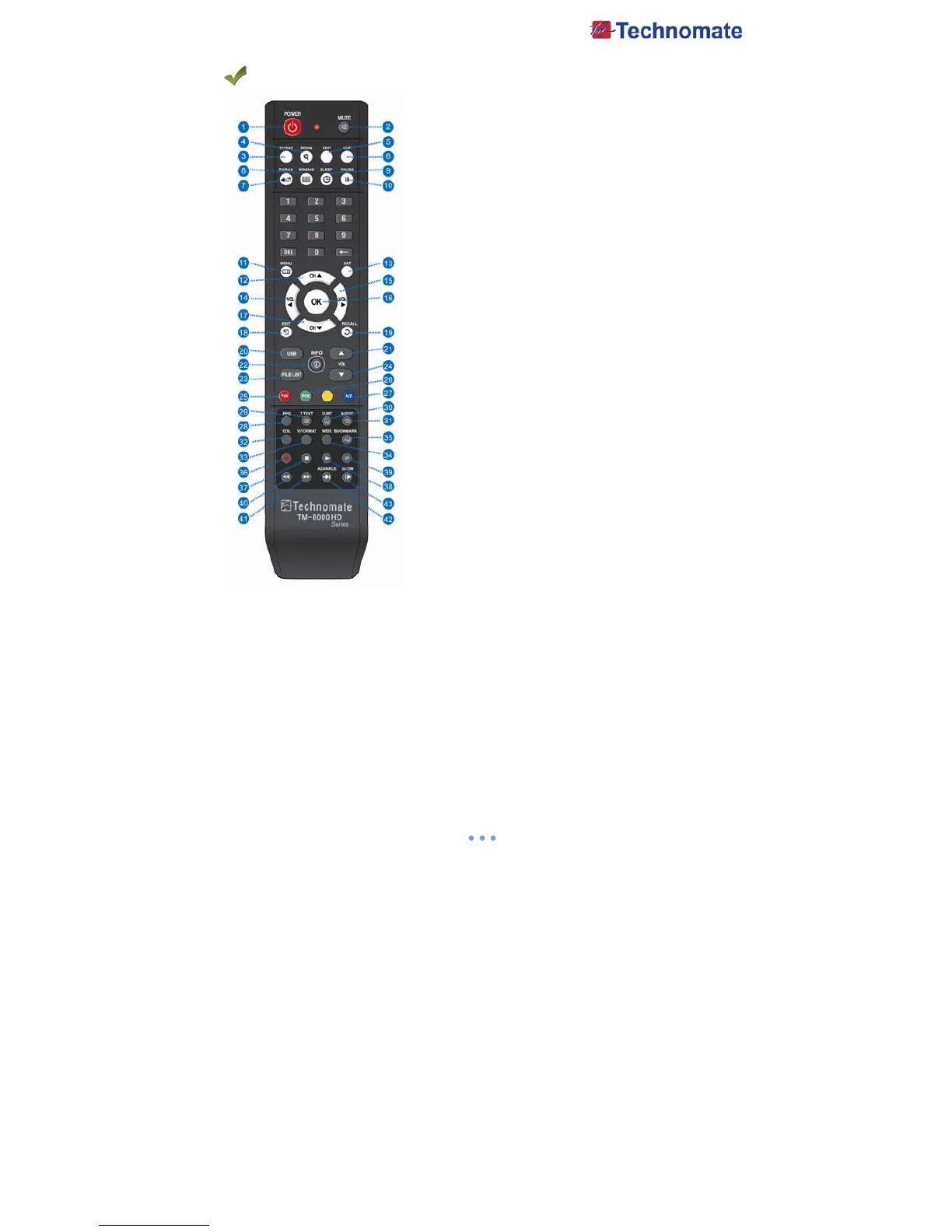
REMOTE CONTROL
1. POWER : To turn the receiver On/Off.
2. MUTE : To turn the Sound On/Off.
3.TV/SAT : To switch the TV output source between the
satellite input and the UHF/VHF antenna input.
4. ZOOM : To zoom In/Out.
5. EDIT : To go to Edit Channels Menu.
6. UHF : To adjust UHF channel. Use Volume key ◀/▶ to
control UHF Channel
7. TV/RADIO : To Switch between TV and Radio modes.
8. MOSAIC : To display multiple pictures.
9. SLEEP : To adjust the Sleep Timer.
10. PAUSE : To pause the video. Press again to resume the video.
11. MENU : To enter or exit the main menu.
12. CH
▲ : To change channels in non-menu mode and move
the cursor up in menu mode.
13. SAT : To show Satellite list.
14. VOL ◀ : To change the volume level in non-menu mode.
15. VOL▶ : To change the volume level in non-menu mode.
16. OK : To show the channel list in non-menu mode and select
an item or confirm in menu mode.
17. CH
▼ : To change channels in non-menu mode and move
The Cursor down in menu mode.
18. EXIT : To exit from the present menu and to go to the
previous menu.
19. RECALL : To go to the previous channel menu. Used for
special function in menu mode.
20. USB : To show the USB menu.
21. VOL UP : To change the volume level in non-menu mode.
22. INFO : To show information about the current program.
Press twice to show detailed information.
23. FILELIST : To display the filelist.
24. VOL DOWN : To change the volume level in non-menu mode.
25. FAV : To show favorite list in the favorite group.
26. POS : To show the DiSEqC motor view control.
27. A-Z : To sort channel list.
28. EPG : To show the TV/Radio program guide.
29. TEXT : To show the teletext contents if teletext is transmitted.
Used for special function in menu mode.
30. SUBTITLE : To show the subtitle contents if subtitle is
transmitted.
31. AUDIO : To show Multi-language audio track.
32. COLOR KEY : To adjust Color and Brightness and Contrast.
33. V.FORMAT : To change video output’s resolution and the stereo-mono mode and subtitle
information.
34. WIDE : To select a TV aspect ratio with Pan Scan or Letter-Box(4:3). Full screen or Pillar
box(16:9).
35. BOOKMARK : Set the bookmark position.
36. REC : Start recoding.
37. STOP : Stop Playback.
38. PLAY : Play Content.
39. PAUSE : Pause playback or start time-shift mode.
40. RWD : Rewind a file/ Arrow UP : To move to the previous page when many pages are
available.(It is worked when in Menu List)
41. FWD : Forward a file/ Arrow Down : To move to the next page when many pages are
available.(It is worked when in Menu List)
42. ADVANCE : Go to live channel at time-shift mode.
43. SLOW : Playback in show mode.



 To Next Page