CSBCryoEMFacilityTF20OperatingInstructionsSEC
05/02/16
Procedure:
During specimen insertion and retraction you should not need to use considerable force to load
specimens. Do not force or jam anything. It could damage the compustage and/or holder. Contact
the EM manager if you notice anything unusual (noises, smells, sounds, anything out of the ordinary
couldsignaltrouble.Whenindoubt,pleaseask).
1. MakesurethattheColumnValvesareclosed(SetupTab,ColumnValvesclosedisyellow).
2. Verifythattheredlightonthecompustageisoff.
3. Make sure the stage is at 0,0,0 in X, Y and Z by going to the Search Tab, Stage 2 menu, flaput
window,andclickonHolder.Thiswill'Home'thestage.
4. Turn on the Turbo pump on the Setup Tab (click on Turbo On, the button will go from grey to
orangeandwhentheturboisready,itwillbeyellow).
5. GettheRTholder,removetheplasticcoveringattheend.
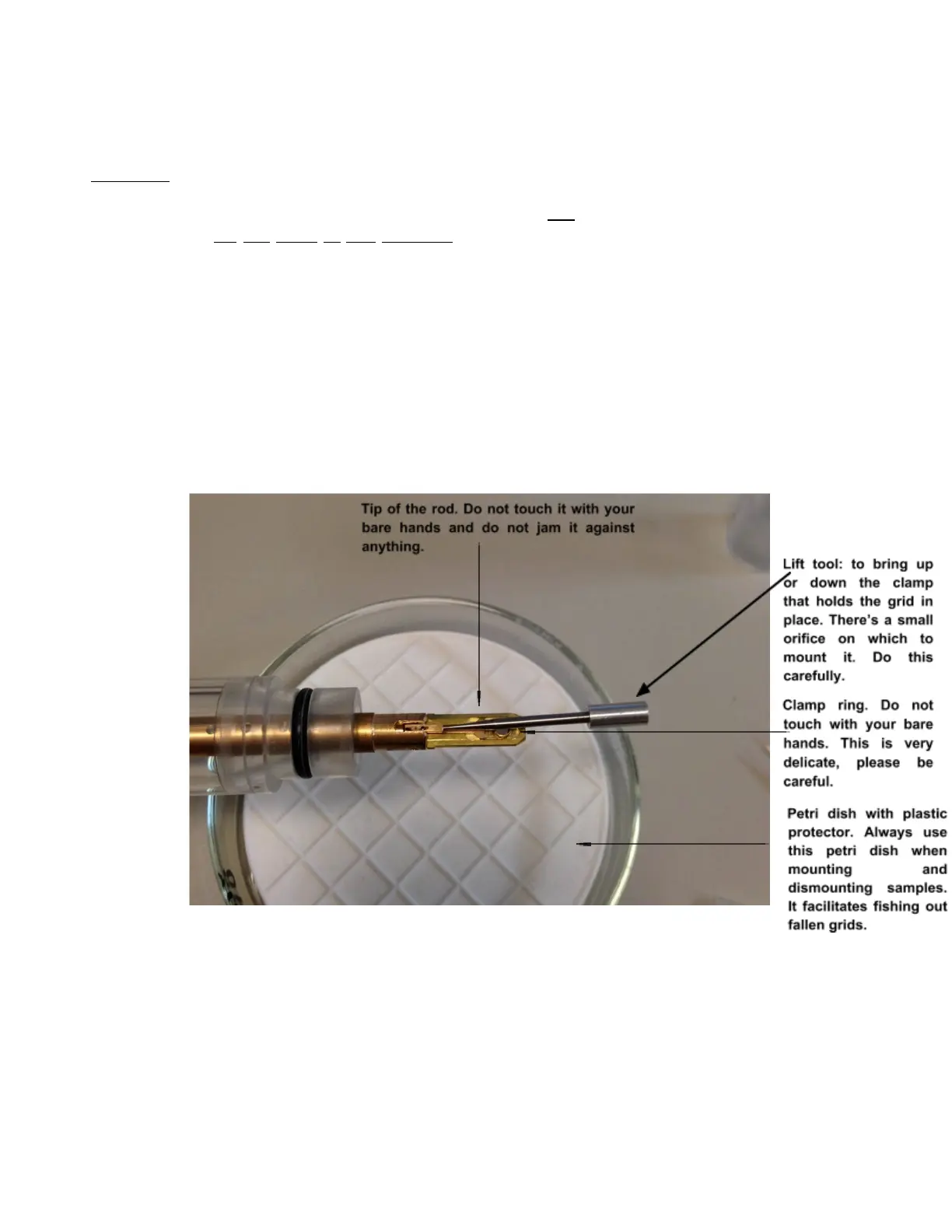
6. With the tool that's in the back part of the mounting station, place it in the small orifice in the tip
area(seepicture)andcarefullylifttheclamp(from3o'clockto12o'clock).



 To Next Page