1
Edition - Rev. 1
Section 9 - SUPPLEMENTS
S02 – GNC 255A UNIT
P-Mentor - Aircraft Flight Manual
Page S02-11
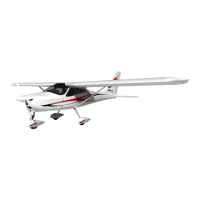
7.4. DISPLAY BRIGHTNESS
From the factory, the GNC 255A automatically adjusts its display brightness for the
current lighting conditions. A small sensor on the display is used for this function. A
manual adjustment is available for controlling the brightness level of the display as an
offset from the normal or zero position.
The GNC 255A will either control dimming based on the photocell or the lighting bus.
This is set in configuration mode during installation and is not selectable by the pilot.
1. Press FUNC
2. Turn the outer knob to SYS CONFIGURATION
3. Turn the inner knob to DSPL BRT
4. Press ENT
5. Turn the inner knob to set the value
6. Press ENT to save selected value
7. Press CLR to cancel change
Figure S02-5 – Display Brightness Page
7.5. DISPLAY CONTRAST
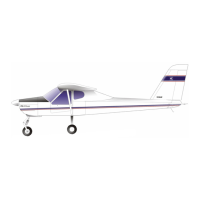
The display contrast has a range from -50 (low) and 50 (high) with 0 as the default. The
range can be adjusted using the inner knob.
1. Press FUNC
2. Turn the outer knob to SYS CONFIGURATION
3. Turn the inner knob to DSPL CONTRAST
4. Press ENT
5. Turn the inner knob to set the offset value
6. Press ENT to save selected value
7. Press CLR to cancel the change
Figure S02-6 – Display Contrast Page













 To Next Page