EV 10-50
39
22.0° Sistema OK
Wireless hybrid arm sy em
Wireless hybrid arm sy em
4 - THERMOSTATS
22.0° System ok
22.0° System ok
End with YES
- ACCESS -
Master
Access
Remotes
Access
Menu
Access
Thermostat 1
Thermostat 1
Deactivated
Thermostat 1
+23.0° C T1=22.0°_
22.0°_ System ok
22.0° System ok
Thermostat 1
+23.0° C T1=22.0°_
Thermostat 1
Deactivated
Thermostat
?
ON OFF
Thermostat 1
01:00 [hh:mm]
4-1 - Management of Thermostats
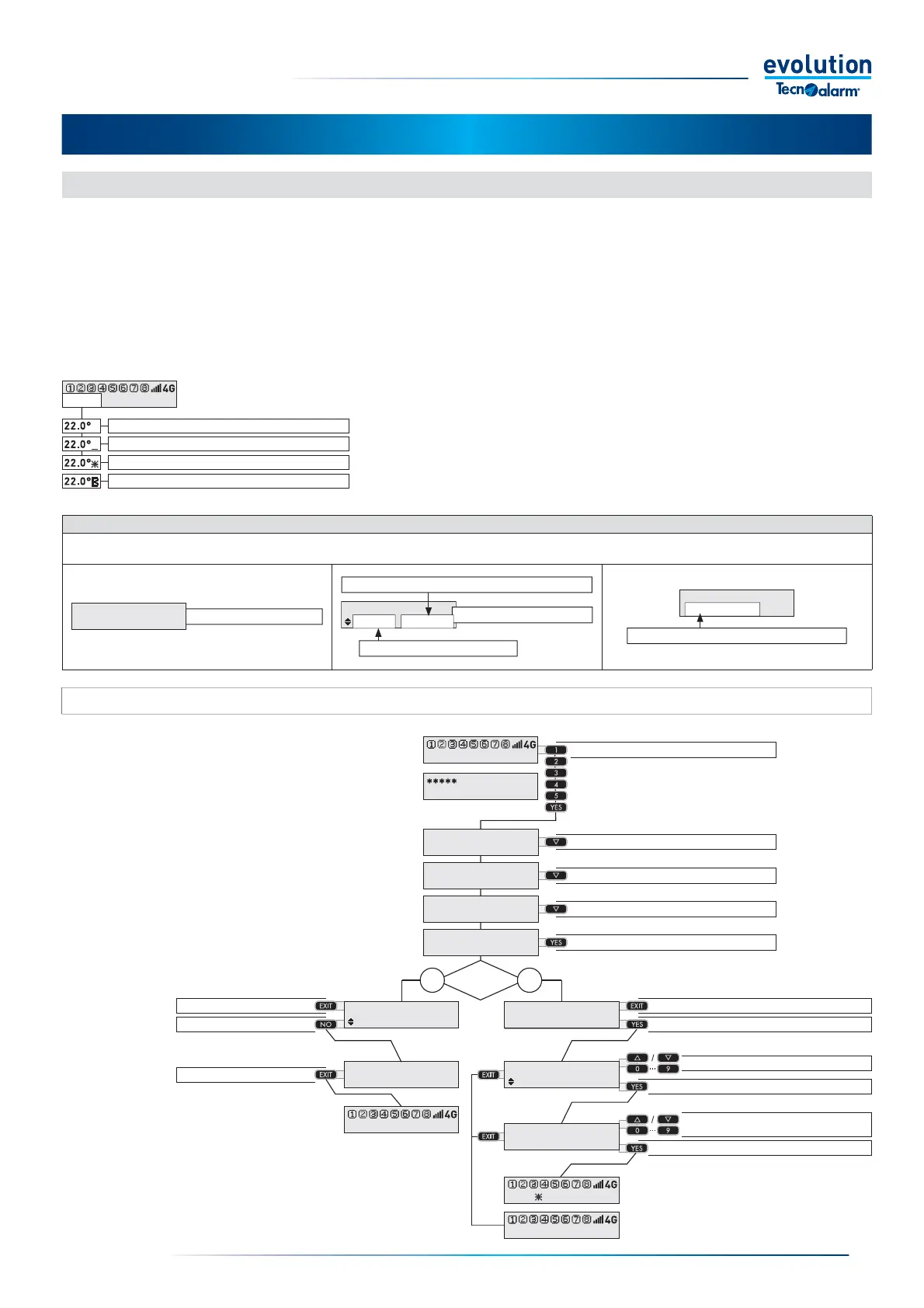
The EV 10-50 system is equipped with the Thermostats function, the function can independently manage up to 4 Thermostats.
The thermostat regulates the climate of the monitored rooms, turning the heating or air conditioning system on and off,
based on its programming and on the temperature and humidity detection of the associated EV TERM BWL climate sensor .
The user can access the Thermostats to change the automatic operation managed by the Thermostat, changing the temperature
and the holding time.
The access mode to the Thermostats varies according to the programming of the System, consequently Thermostat management
may require entering a code or it can be direct, in this case the management mode varies according to the enabling of the
" Shortcut menu remotes ".
Display of thermostat statuses
The console display shows the operating status of the Thermostat in the lower left
corner.
The display format is "Detected temperature + Thermostat status icon".
The operating statuses of the Thermostat are shown in the drawing to the below.
Thermostat off
Thermostat blocked
Thermostat on - climate control OFF
Thermostat on - climate control ON
Thermostat Management Elements
The Thermostat can be switched on or off as required. View the detected temperature, change the programmed temperature.
Define the holding time of the new programmed temperature.
Thermostat off
Thermostat on
Thermostat 1
Deactivated
Thermostat 1
+23.0° C T1=22.0°_
Thermostat 1
01:10 [hh:mm]
Temperature holding time
Change the temperature
Detected temperature and status of the Thermostat
4-1.1 - Thermostat management by code
Enter the Code
Select the next item
Select the next item
Select the Thermostat
Access the Thermostat
Exit without changing
Turn off the Thermostat
Exit without changing
Turn on the Thermostat
Exit the function
Adjusts the set-point temperature
Confi rm and proceed
Adjust the temperature
holding time
Confi rm and proceed
22.0°_ System ok
Procedure available based on the programming
Enter the access code.
Select the Thermostat menu with the DOWN button
Access the Thermostat with the YES button.
Display the status of the Thermostat
Turn the Thermostat off or on with the NO or YES
buttons.
If you want to exit the management without changing
the status of the Thermostat, press the EXIT button.
Adjust the temperature, confi rm with the YES button.
Program the holding time, confi rm with the YES button.


 To Next Page
 Loading...





