117
4
AUTO MODE
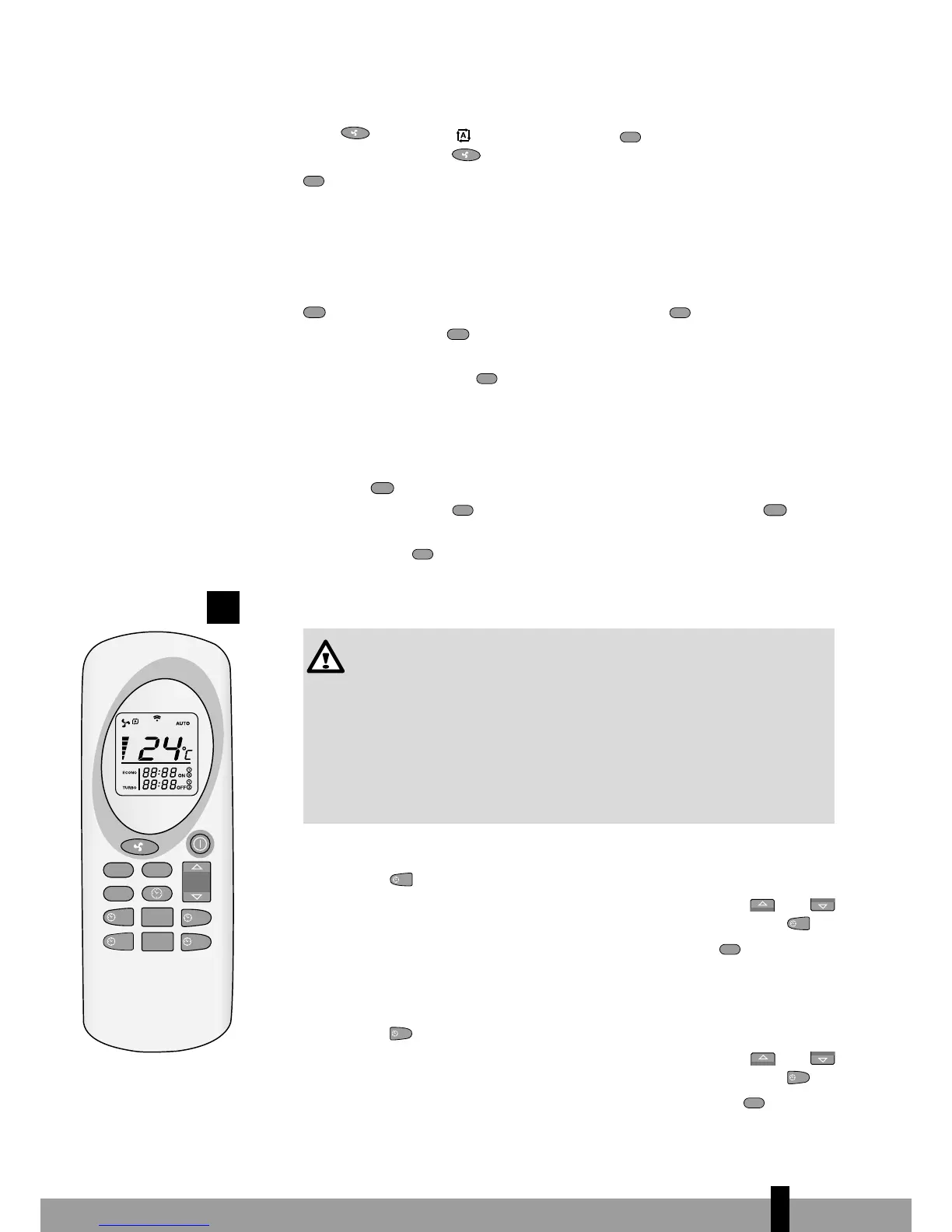
In this mode, the stove uses the difference between the desired temperature and
the room temperature itself to calculate the required output. To select auto mode,
press
ECONO
TURBO
SEND
OFF 2
ON 2
ON 1
AUTO
OFF 1
CANCEL
(1) until the symbol appears. Press
OFF 2
ON 2
ON 1
AUTO
OFF 1
CANCEL
(2) to confirm your choice. To
end auto mode, press
ECONO
TURBO
SEND
OFF 2
ON 2
ON 1
AUTO
OFF 1
CANCEL
(1) again, select the desired output and confirm with
OFF 2
ON 2
ON 1
AUTO
OFF 1
CANCEL
(2). See figure 7.
TURBO MODE
In Turbo mode, the stove operates at maximum power for 30 minutes. In Turbo
mode the temperature is pre-set to 30ºC. After 30 minutes, the stove returns to the
mode before the Turbo mode was activated. To select Turbo mode, hold down the
SEND
OFF 2
ON 2
ON 1
AUTO
OFF 1
CANCEL
button (1) for more than 2 seconds, and then push
OFF 2
ON 2
ON 1
AUTO
OFF 1
CANCEL
(3). To deactivate this
mode, hold down the
SEND
OFF 2
ON 2
ON 1
AUTO
OFF 1
CANCEL
button (1) for at least 2 seconds. The word Turbo (2) will
disappear from the remote control display and be replaced by the output level and
the set temperature. Press
OFF 2
ON 2
ON 1
AUTO
OFF 1
CANCEL
(3) to confirm your choice. See figure 8.
ECONO MODE
In Econo mode, the temperature remains constant. Every 10 minutes the stove
adjusts the power until heat output level 1 is reached. To select Econo mode, hold
down the
ECONO
TURBO
SEND
OFF 2
ON 2
ON 1
AUTO
OFF 1
CANCEL
button (1) for more than 2 seconds, until Econo appears in the dis-
play (2) and then push
OFF 2
ON 2
ON 1
AUTO
OFF 1
CANCEL
(3). To deactivate this mode, hold down the
ECONO
TURBO
SEND
OFF 2
ON 2
ON 1
AUTO
OFF 1
CANCEL
button
(1) for at least 2 seconds. The word Econo will disappear from the remote control
display (2). Press
OFF 2
ON 2
ON 1
AUTO
OFF 1
CANCEL
(3) to confirm your choice. See figure 9.
PROGRAMME 1 (ON1 AND OFF1)
1. The desired switch-on and switch-off timer must be set when the
remote control is switched off.
2. The stove retains the temperature and heat output settings it had
before being switched off.
3. The minimum period of time between switching off and switching on
is 20 minutes. This is the time needed for the stove to complete the
cooling-down phase.
4. After a brief power interruption, the timer mode will have to be set
again.
ACTIVATE AUTOMATIC MODE (ON1)
Press button
(1) to switch on the stove according to programme 1. The time
and ON1 symbol will flash on the remote control. Use the buttons
ECONO
TURBO
SEND
OFF 2
ON 2
ON 1
AUTO
OFF 1
CANCEL
ECONO
TURBO
SEND
OFF 2
ON 2
ON 1
AUTO
OFF 1
CANCEL
(2&3) to select the desired time (10-minute intervals). To confirm, choose
(1).
The desired activation time is shown in the remote control. Press
OFF 2
ON 2
ON 1
AUTO
OFF 1
CANCEL
(4) to confirm.
The display (5) on the stove will show Chrono. See figures 10 and 11.
DEACTIVATE AUTOMATIC MODE (OFF1)
Press button
ECONO
TURBO
SEND
OFF 2
ON 2
ON 1
AUTO
(1) to switch off the stove according to programme 1. The time
and OFF1 symbol will flash on the remote control. Use the buttons
ECONO
TURBO
SEND
OFF 2
ON 2
ON 1
AUTO
OFF 1
CANCEL
ECONO
TURBO
SEND
OFF 2
ON 2
ON 1
AUTO
OFF 1
CANCEL
(2&3) to select the desired time (10-minute intervals). To confirm, choose
ECONO
TURBO
SEND
OFF 2
ON 2
ON 1
AUTO
OFF 1
CANCEL
(1).
The desired deactivation time is shown in the remote control. Press
OFF 2
ON 2
ON 1
AUTO
OFF 1
CANCEL
(4) to con-
ECONO
TURBO
SEND
OFF 2
ON 2
ON 1
AUTO
OFF 1
CANCEL
4.



 To Next Page