K T
ROUBLE SHOOTING
Never try to repair or dismantle the air conditioner yourself. Incompetent repairs
result in loss of warranty and can endanger the user.
L GUARANTEE CONDITIONS
The air conditioner is supplied with a 24-month guarantee, commencing on the
date of pur
chase. All material and manufacturing defects will be repaired or
replaced free of charge within this period. The following rules apply:
1. We expressly refuse all further damage claims, including claims for collateral
damage.
2.
Repairs to or r
eplacement of components within the guarantee period will
not result in an extension of the guarantee.
3. The guarantee is invalidated if any modifications have been made, non
genuine par
ts ar
e fitted or r
epairs ar
e carried out by third parties.
4. Components subject to normal wear, such as the filter, are not covered by the
guarantee.
5.
The guarantee is valid only when you pr
esent the original, dated pur
chase
invoice and if no modifications have been made.
6. The guarantee is invalid for damage caused by neglect or by actions that
deviate fr
om those in this instr
uction booklet.
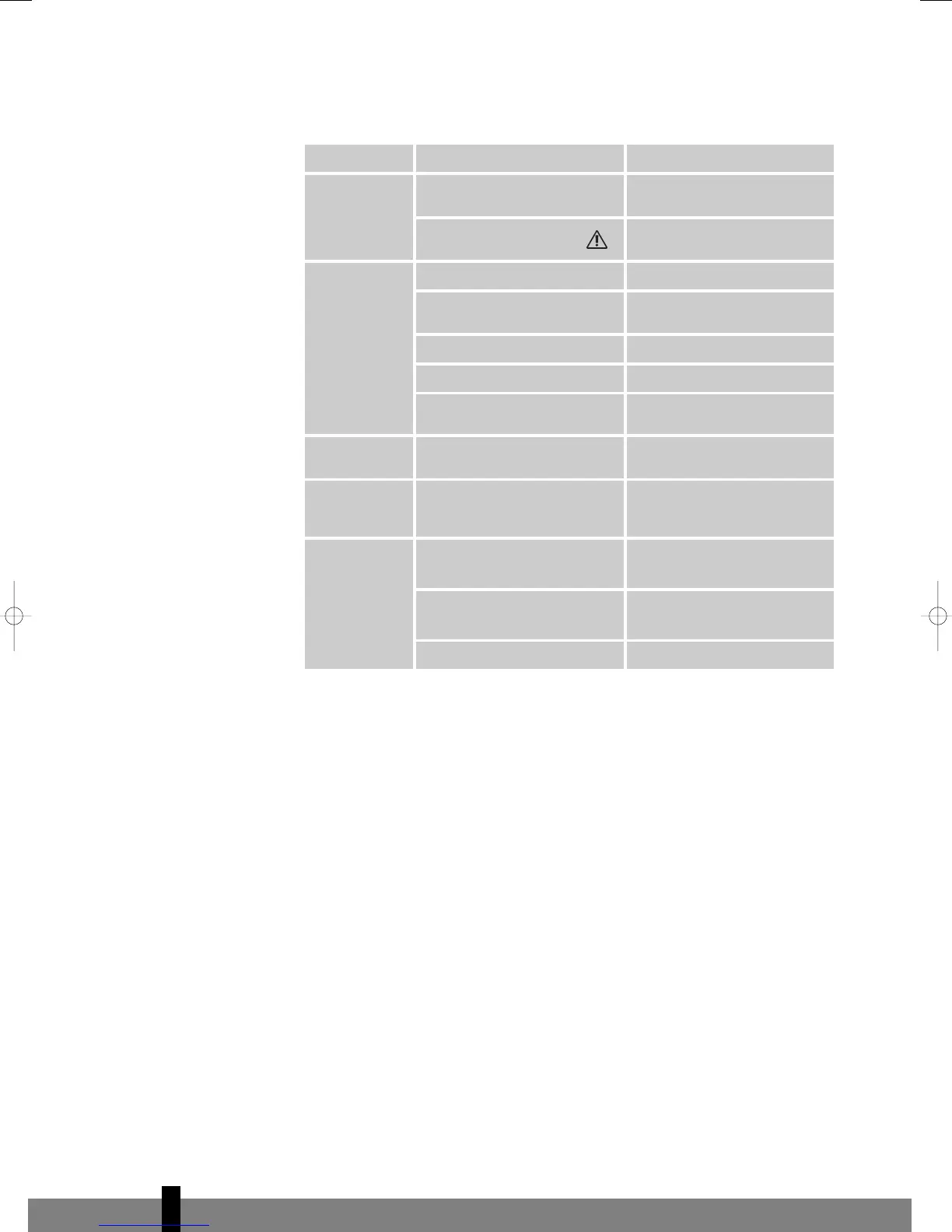
Problem Cause Solution
I
nsert the plug into a working
socket
Water tank indicator is on
E
mpty the internal water
container (refer to Chapter F)
In direct sunlight Close curtains
Windows or doors open, many
people or heat source in room
Close doors and windows, or
place an extra air conditioner
Air inlet or air outlet blocked Remove blockage
Room temperature lower than
selected value
Change temperature selection
The unit is noisy Unit stands uneven
Place on even surface (less
vibrations)
The compressor
does not work
Overheat protection probably
activated
Wait 3 minutes until the
temperature has decreased, and
turn on the unit again
Reduce the distance between
the remote control and the
control panel
Remote control signal not
detected by control panel
Make sure the remote control is
correctly aimed at the control
panel
Batteries empty Replace the batteries
The unit does
n
ot seem to
perform
The unit does
not function
Remote control
does not
function
4
74
man_TP020_1 09-02-2007 12:04 Pagina 74


 To Next Page