Page 3
www.theenergydetective.com
Page 3
v.3.3.1
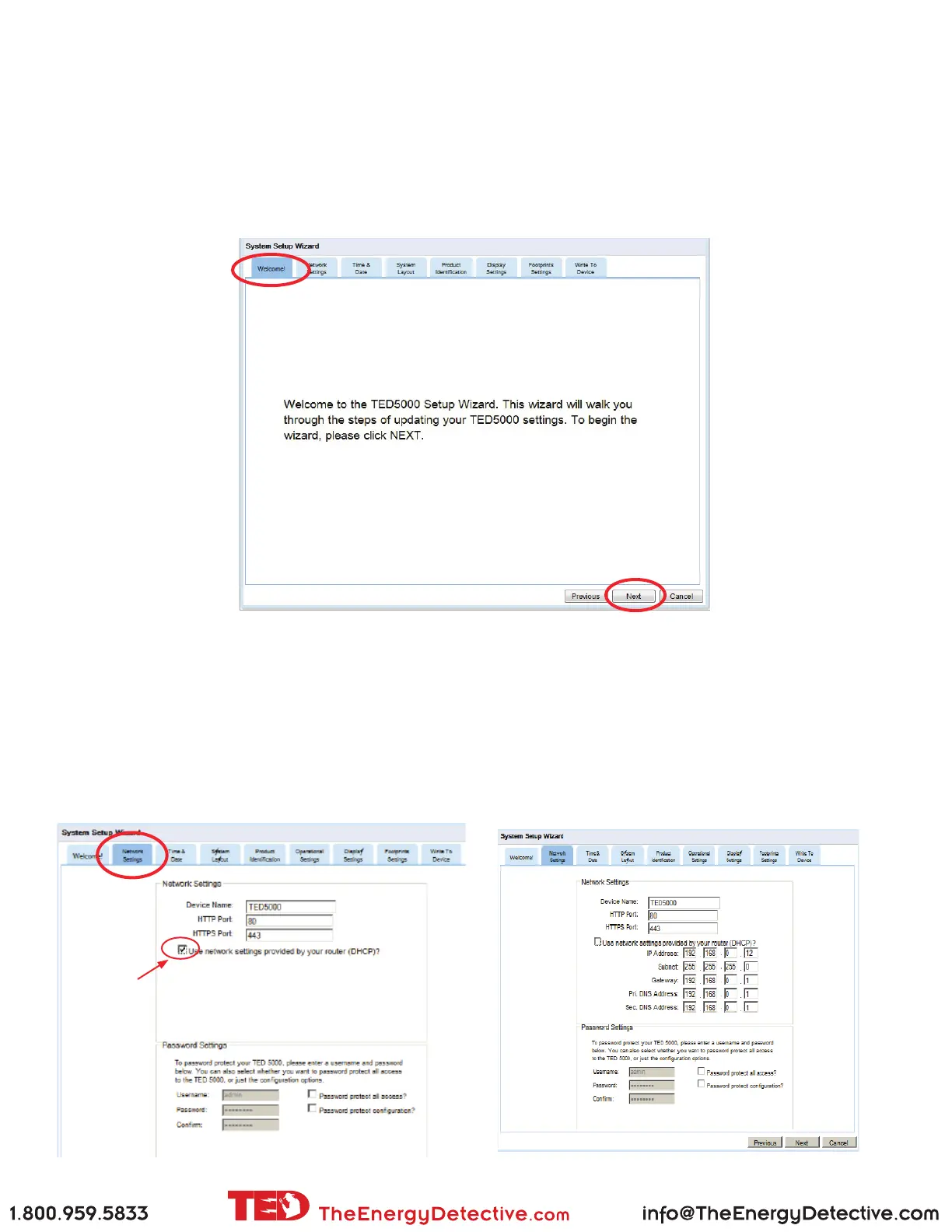
Next you will see the Welcome screen. You can move from screen-to-screen by pressing the next/previous but-
ton or by selecting the specic TAB you want. Let’s go through the screens one by one: Please note that for most
users the optimum settings are already set by default. Other than the Product IDs, we highly recommend that you
leave the settings as-is until you fully understand how it works and exactly what it is you want to change.
The System can be modied at any time simply by going through this System Setup Wizard.
Network Settings tab
If you are connected to a standard router, you should not need to change the
default settings at all.
The only change you should make is to UNCHECK the box indicated below.
This will make the IP address static as assigned by your router. All of the infor-
mation should auto-ll. Do not change any of these numbers.
If you are connecting di-
rectly to your computer
(not recommended) see
Appendix A.
Uncheck this box



 To Next Page