Page 5
www.theenergydetective.com
Page 5
v.3.3.1
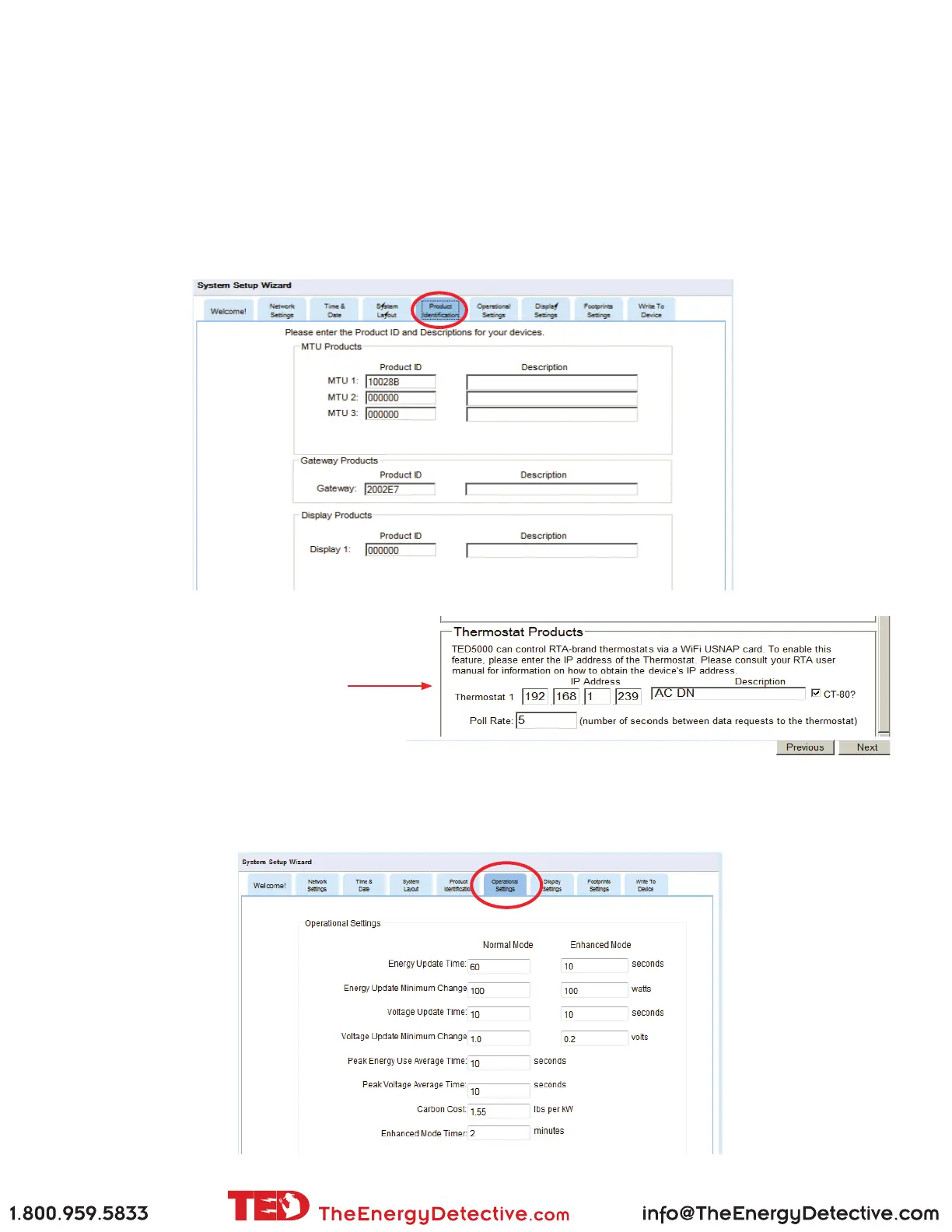
Product IDs (Extremely important)
Footprints will automatically read the Gateway ID from the Gateway. The IDs for the MTU and Display are ini-
tially set to 00 00 00. The Gateway will only communicate with MTUs and Displays with IDs that you list under
this tab. This is for security reasons. You don’t want to be displaying your neighbor’s energy use. Type in the
ID(s) from MTU(s) in format 10 12 34 (they are located on the sticker on the MTU). Next you will need to get
the ID of the Display(s). Press and hold the Display Button for 30 seconds and the ID will be shown. Type in
the ID(s) from the Display(s) in format 30 12 34.
The Description is not required, but you may ll in something meaningful if you have more than one. For ex-
ample, “Upstairs Display” and “Downstairs Display”
Operational Settings
These settings control how often information is updated in the system. It is recommended that these not be
changed.
After lling in this information, refer
to your RadioThermostat Instruction
Manual to sync your RadioThermostat
with TED.



 To Next Page