FIGURE 4
STORAGE
USER GUIDE
STORAGE POSITION
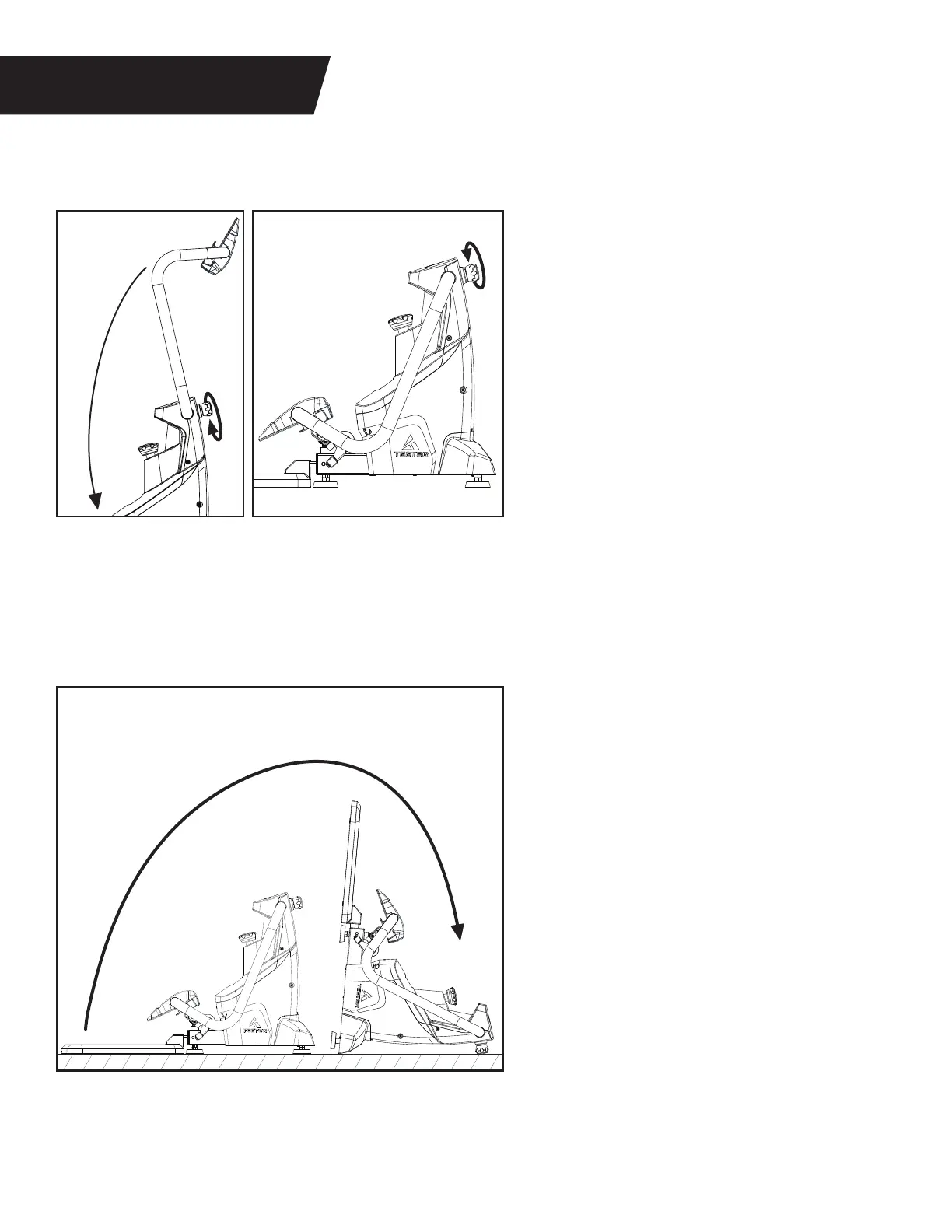
Figure 19a: Ensure the Cables are disengaged
from the Ready Position. Turn the Support
Handle Adjustment Knob counter‑clockwise
to release the Support Handle.
Lower the Support Handle until it reaches
the downward position.
Figure 19b: Turn the Support Handle
Adjustment Knob clockwise until the
knob is fully engaged and the Support
Handle is secure.
Figure 19c: Rotate the FitForm to the Storage
Position by pulling up on the Platform until
the front of the Main Body is resting flat on
the ground.
The Storage Position provides a smaller
footprint and prevents tripping or
entanglement while not in use.
Figure 19a
Figure 19b
Figure 19c
Storage Position
11


 To Next Page