Set Handle Rotation
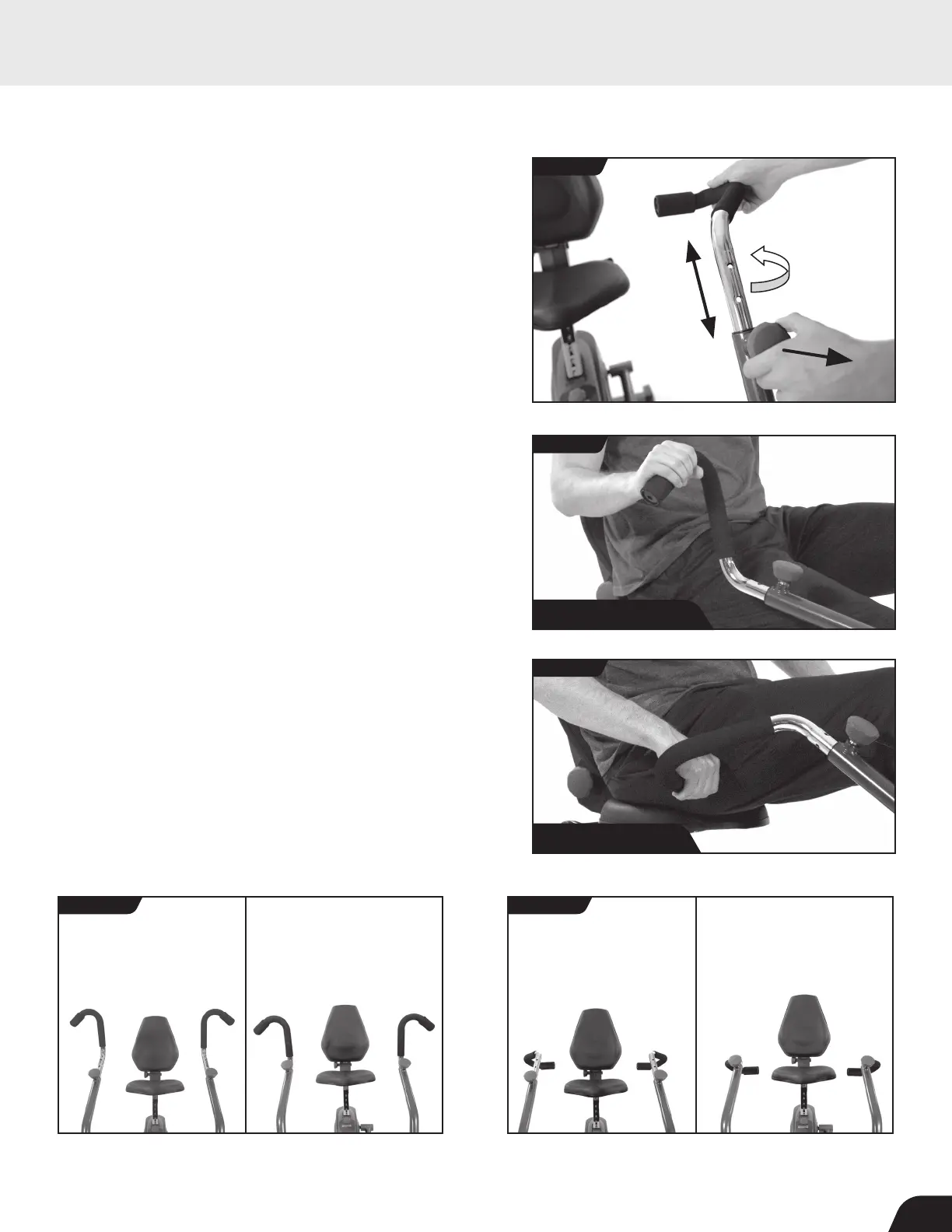
• The handles can be rotated to an Outward Setting or an
Inward Setting to target different muscle groups.
• To rotate the Handles, loosen the Handle Adjustment Knob
by turning it counter-clockwise. Release the auto-locking
mechanism by pulling outward on the Handle Adjustment
Knob, then rotate the handles as desired (Figure 42).
• Adjust the Handles to the Outward Setting to target biceps,
shoulders, and chest muscles with a forward pushing/pulling
motion (Figure 43).
• Adjust the Handles to the Inward Setting to target triceps,
forearms, and shoulder muscles with a downward pushing/pulling
motion (Figure 44).
• The Handles can be locked into outward and inward settings
with 4 height adjustments each, allowing up to 8 positions
(Figure 45a and Figure 45b).
• To secure the Handle at your selected height and rotation
setting, release the spring-loaded Handle Adjustment Knob,
so that it fully engages into a hole. ALWAYS turn the Handle
Adjustment Knob clockwise to tighten.
FIGURE 45a
FIGURE 45b
Highest Position Highest Position Lowest PositionLowest Position
FIGURE 42
OUTWARD SETTING INWARD SETTING INWARD SETTING OUTWARD SETTING
USER GUIDE
FIGURE 43
FIGURE 44
OUTWARD SETTING
INWARD SETTING
17



 To Next Page