
 Need help?
Do you have a question about the Teeter FreeStep LT3 and is the answer not in the manual?
Instructions for attaching the rear stabilizer to the base unit.
Instructions for attaching the pedals to the machine.
Instructions for assembling the seat, including model-specific options.
Instructions for installing the console front support bar.
Instructions for attaching upper front leg and pedal arm joint covers.
Instructions for installing and securing the main handles.
Instructions for attaching the resistance grip to the base.
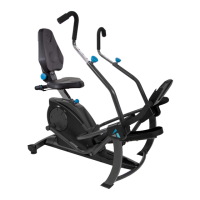
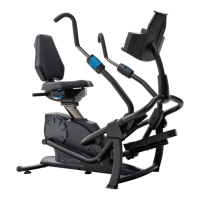
The Teeter FreeStep Recumbent Cross Trainer is a home-use exercise device designed to provide a comfortable, zero-impact workout for adults. It combines elements of an elliptical and a recumbent bike, offering a full-body workout that targets both upper and lower body muscle groups. The FreeStep is engineered to promote a healthier and more active lifestyle by minimizing stress on joints while maximizing caloric expenditure and muscle engagement.
The FreeStep operates as a recumbent cross trainer, allowing users to exercise in a seated, reclined position. This design reduces pressure on the back and joints, making it suitable for individuals seeking a low-impact workout. The device features synchronized arm and leg movements, enabling a comprehensive full-body workout. Users can engage their arms, legs, or both simultaneously, providing versatility in targeting different muscle groups and varying workout intensity.
The resistance system is adjustable, allowing users to increase or decrease the challenge of their workout. This feature is crucial for progressive training and accommodating different fitness levels. The console provides real-time feedback on workout metrics such as time, calories burned, distance, and speed, helping users track their progress and stay motivated.
The Teeter FreeStep is designed with several user-friendly features to enhance the workout experience:
Adjustable Seat Height: The seat height can be easily adjusted to ensure proper body alignment and prevent injury. Users are instructed to set the seat so that their knees have a slight bend when their legs are fully extended, and their toes are positioned towards the top of the pedals. This adjustment is made by loosening a height adjustment knob, pulling it outward, and then moving the seat handle up or down until it locks into a desired hole setting. Securing the knob by rotating it clockwise ensures stability during use.
Adjustable Seat Back Position: The seat back can be reclined to offer support for the lower back and to target different muscle groups. To adjust, users push in on the seat back adjustment knob and slowly pull back on the seat back until it snaps into a hole setting. A more upright position supports a straight posture, while a reclined position can engage glutes and quadriceps more effectively.
Adjustable Lower Seat Position (Model LT3 Only): For the LT3 model, the lower seat can be adjusted to a forward or back position, providing a larger surface area of support while seated. This adjustment requires an Allen wrench to remove and reassemble bolts, allowing users to customize their seating for optimal comfort and support.
Adjustable Handle Length: The length of the handles can be adjusted to accommodate different arm lengths and ensure proper posture. Users loosen a handle adjustment knob by turning it counter-clockwise, pull it outward to release the auto-locking mechanism, and then pull or push the handle to the desired length. The handle length should be set so that arms are fully extended, and the back and shoulders remain stabilized by the seat back. Securing the knob by rotating it clockwise locks the handle in place.
Adjustable Grip Position: The handles can be rotated to an Upright Grip or Lower Grip to target specific muscle groups. To change grip, users loosen the handle adjustment knob, pull it outward, and then rotate the handles.
Resistance Adjustment: The FreeStep features a resistance grip that allows users to easily dial up or down the workout intensity. Rotating the grip counter-clockwise decreases resistance, while rotating it clockwise increases it. The device ships preset to the highest resistance, so users are advised to start by dialing it to the lowest setting.
Console with Performance Metrics: The integrated console displays key workout data: time (TMR), calories burned (CAL), distance (DST), and speed (SPD).
Transport Wheels: Located on the back of the rear stabilizer, these wheels facilitate easy movement of the FreeStep. To transport, users lift the device from the console front support bar and then from the front crossbar, rolling it on the transport wheels.
Leveling Feet: Two leveling feet ensure the FreeStep remains stable on uneven surfaces. Users can rotate these feet clockwise to lower them until they firmly contact the ground, preventing wobbling during use.
Water Bottle Holder and Device Holder: For convenience, the FreeStep includes a water bottle holder and a smart device holder, allowing users to stay hydrated and entertained during their workouts.
While the manual primarily focuses on assembly and usage, some maintenance aspects are implied or directly stated:
Regular Inspection: Users are advised to always inspect the equipment prior to use, ensuring all fasteners are secure and adjustable settings are properly tightened. This helps prevent potential issues and ensures safe operation.
Cleaning: The FreeStep should be cleaned using a damp cloth. Abrasive soaps or solvents should be avoided as they can damage the machine's surfaces.
Component Replacement: In case of defective components, users are instructed to replace them immediately or keep the equipment out of use until repaired. This ensures the longevity and safe functionality of the device.
Warning Label Integrity: Users are reminded to review all warning labels on the product. If any label becomes lost, damaged, or illegible, Teeter Customer Service should be contacted for a complimentary replacement.
Battery Maintenance: For the console, users need to ensure the battery contacts and compartment are clean when installing batteries. The ability to remove and reinstall batteries is also part of the unit toggle process, implying regular battery checks and replacement as needed.
Indoor Storage: The FreeStep should always be stored indoors and on a level surface, protecting it from environmental elements and ensuring its stability.
The Teeter FreeStep is designed for ease of assembly, user-friendly adjustments, and a safe, effective workout, with clear instructions provided for optimal use and basic care.
 General
| Type | Recumbent Cross Trainer |
|---|---|
| Display | LCD |
| Weight Capacity | 300 lbs |
| Resistance Type | Magnetic |
| Transport Wheels | Yes |
| Dimensions | 54" L x 38" W x 52.5" H |
| Foot Pedals | Oversized |
| Warranty | 1-year warranty |
| Heart Rate Monitoring | No |
| Display Metrics | Time, speed, distance, calories |
| Handlebars | Moving and Stationary |
| Seat Type | Padded, contoured |
| Seat Adjustment | Adjustable |


 To Next Page
