STEP
2
Assemble Pedals
Pedal Installation
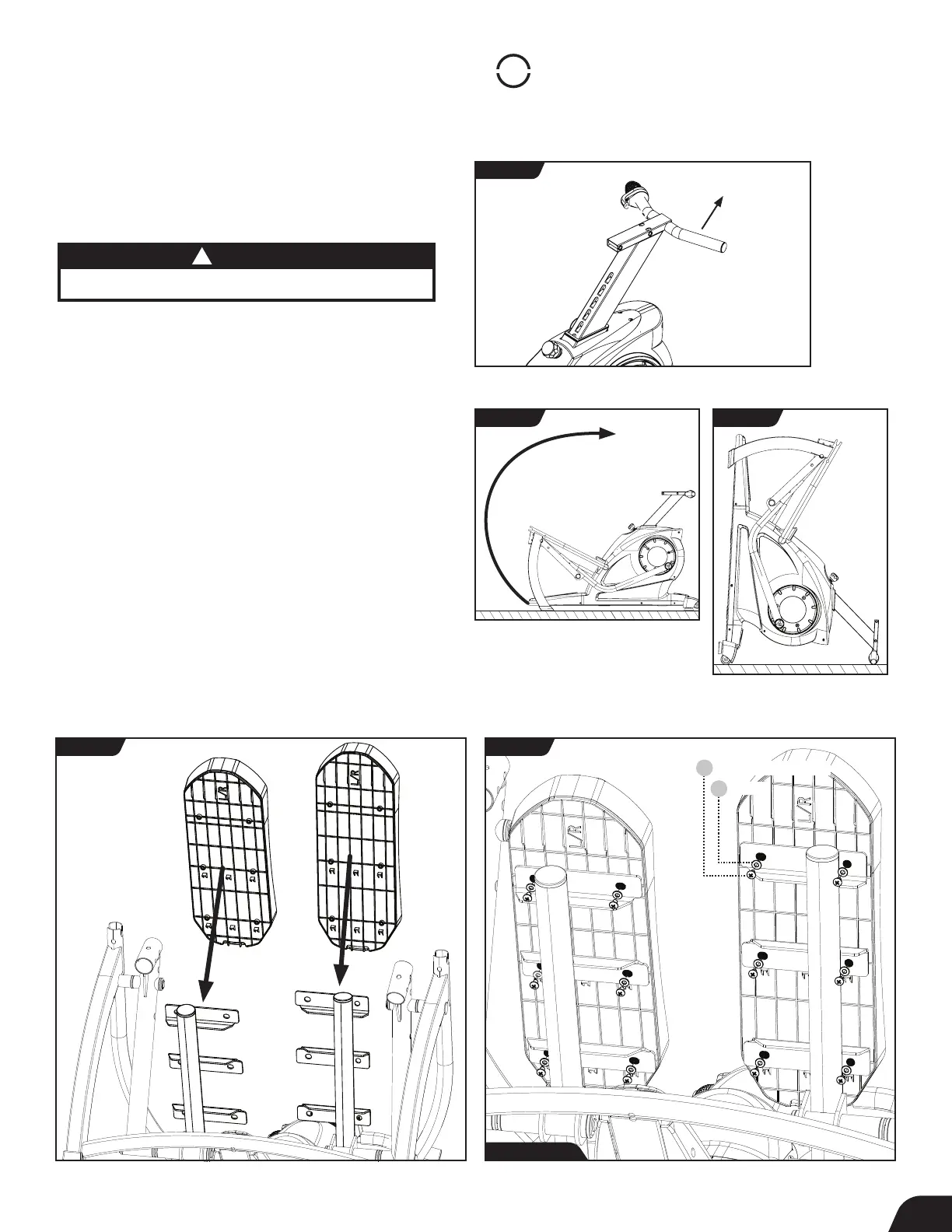
• Locate the Seat Post and raise it to the highest position
by pulling up on the Seat Handle (Figure 4).
• To have better access while installing the pedals, position
the FreeStep
™
to rest on its back side by lifting up on the
Front Crossbar and rotating on the Rear Stabilizer until the
Seat Post is resting on the ground (Figure 5 and Figure 6).
• Locate the Pedals, noting Right and Left markings.
Align each Pedal to the corresponding Base Pedal Arm
(Figure 7).
• Use the Step 2 Hardware Kit to attach the Pedals.
Hand tighten 12 × Phillips Head Screws with 12 × Washers
as shown (Figure 8).
• Proceed to fully tighten all the Phillips Head Screws with
the Phillips Head Screwdriver (Figure 8).
• Once the Pedals are installed, return the FreeStep
™
to
the upright position by lowering the Front Crossbar and
rotating on the Rear Stabilizer.
FIGURE 4
FIGURE 5
FIGURE 7 FIGURE 8
FIGURE 6
Pull Handle
Lift and Flip
Step 2 Hardware
CAUTION
!
Use caution to avoid tipping and when lifting heavy objects.
7
Washer
115
Phillips Head Screw
118



 To Next Page