9
It is normal to
see a small amount of
steam coming from
the steam vent at the
rear of your appliance.
Once the
“VITAMIN+” touchpad
light has come on, you
cannot switch it off
manually. The light
goes out automatically.
It is not
advisable to press the
“Vitamin +” button
more than once
during cooking.
Do not touch
the bowls or foods
during cooking as
they will be hot.
Steam cooking
Reduce your cooking time
with the "VITAMIN+"
touchpad
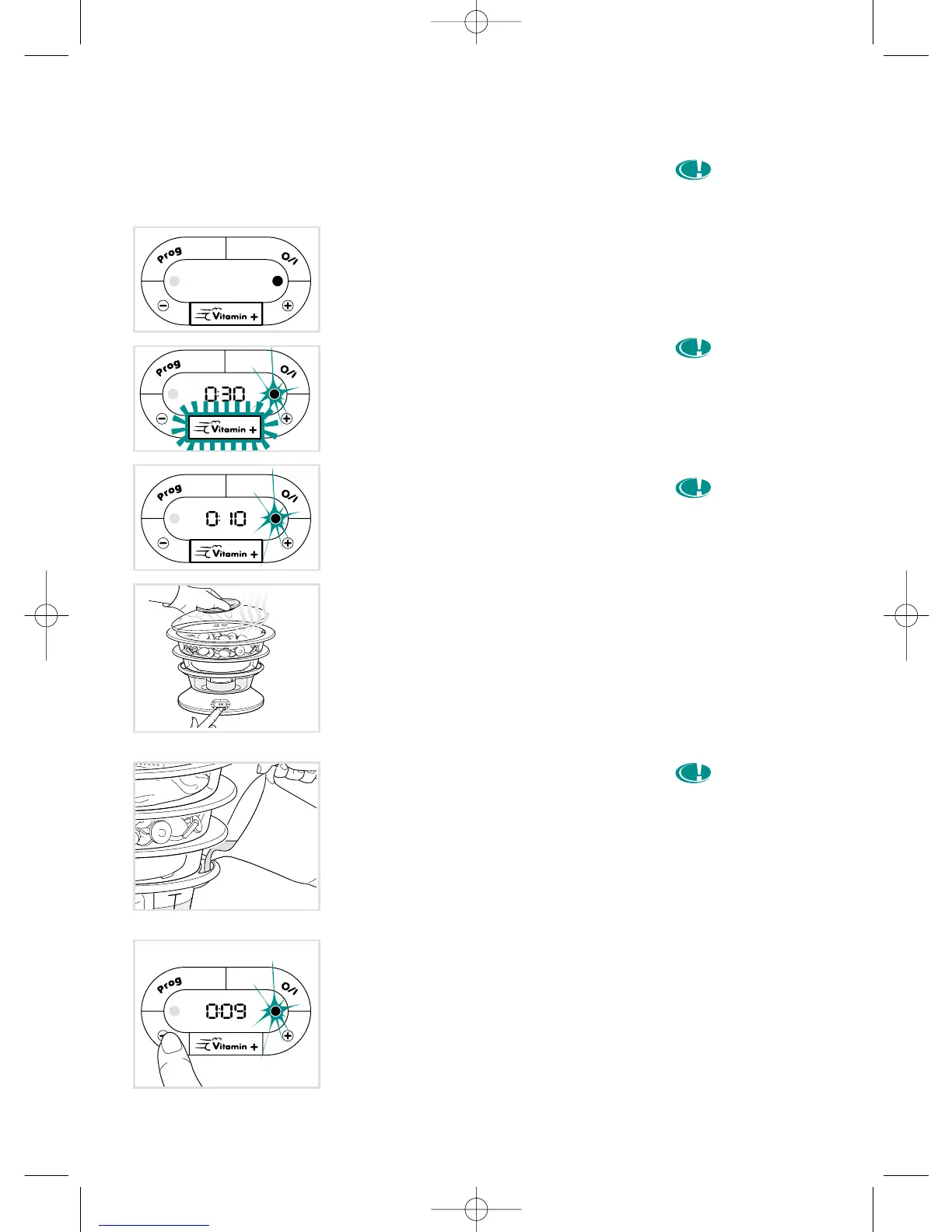
• Exclusive: your appliance is fitted with a
"VITAMIN+" touchpad which reduces
cooking time up to 50% compared with
classic steamers for a better preserva-
tion of vitamins.
• At the start of cooking, the "VITAMIN+"
touchpad comes on automatically (light
on). This allows a faster start to cooking,
thanks to a bigger steam outlet.
• Once the ideal temperature is reached,
the "VITAMIN+" touchpad light goes out
automatically.
• After opening the lid (e.g. : if adding more
food) you can press the "VITAMIN+"
touch pad again to quickly return the
steamer to the ideal temperature.
• In some cases, it is normal, when you
press the "VITAMIN+" touchpad for the
light to stay off or turn off very quickly.
This means that the ideal temperature
has been reached in the baskets.
During cooking
• Check the water level during cooking
using the external water level indicator.
• If necessary, put more water in through
the water inlets.
Changing the time during
cooking
• Press the -/+ touchpads to change the
remaining time as you wish.
• To confirm the new cooking time, release
the -/+ touchpad and wait for 2 seconds:
a signal sounds and the countdown
continues.
3529-5066184 ME VITAMIN M6 22/10/03 10:46 Page 9




 To Next Page