10
If you wish to
keep foods warm for
longer, add water.
Use oven
gloves to handle the
baskets, handle and
lid.
If there is no
more water, the applian-
ce switches off automa-
tically.
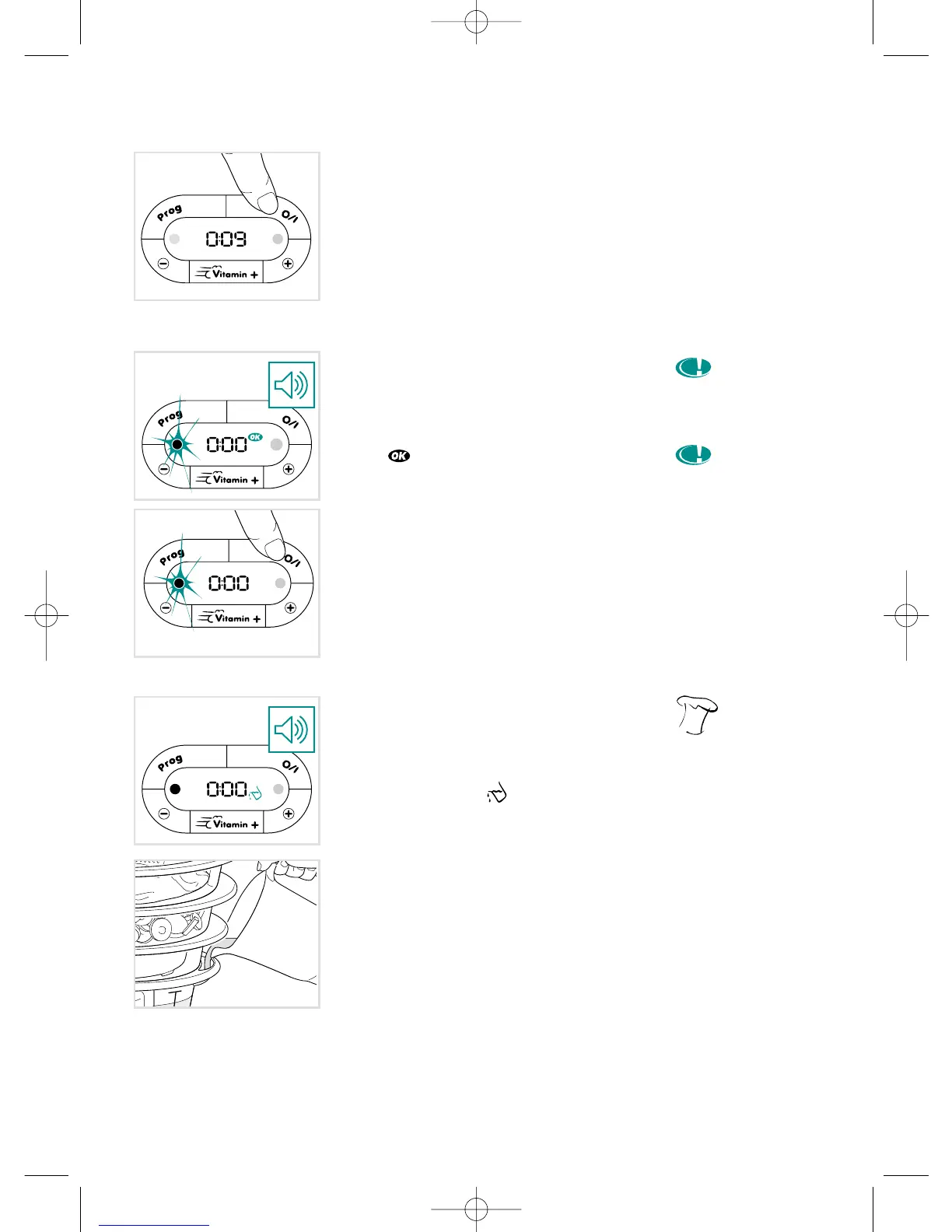
To suspend cooking
(pause for 2 minutes max)
• Press the O/I touchpad.
• Within 2 minutes, press the O/I touchpad
to resume cooking.
End of cooking and
keeping warm
• A signal sounds.
• The green keeping warm light turns on.
• The pictogram is displayed.
• Your steam cooker automatically
switches to keeping warm until the water
runs out.
• To stop the appliance during cooking or
keeping warm, press the O/I touchpad.
If there is not enough
water
• To tell you when there is not enough
water in the tank, a signal sounds for
2 minutes and the pictogram is dis-
played.
• Pour more water in through the water
inlets on the sides.
• Once the tank is full, the steamer auto-
matically restarts after a few seconds or
when you press the O/I touchpad.
• The timer keeps the remaining cooking
time in its memory.
Steam cooking
3529-5066184 ME VITAMIN M6 22/10/03 10:46 Page 10




 To Next Page