13
ENGLISH
12
End Cooking Time: To cook until a set time;
the oven turns itself off automatically when
the time finishes.
Cooking time and End Cooking Time: To cook
for a selected length of time and end at a set
time. When this function is set, the oven
comes on automatically at the time required in
order to cook for the set length of time
(Cooking time) and end automatically at the
indicated time (End Cooking Time)
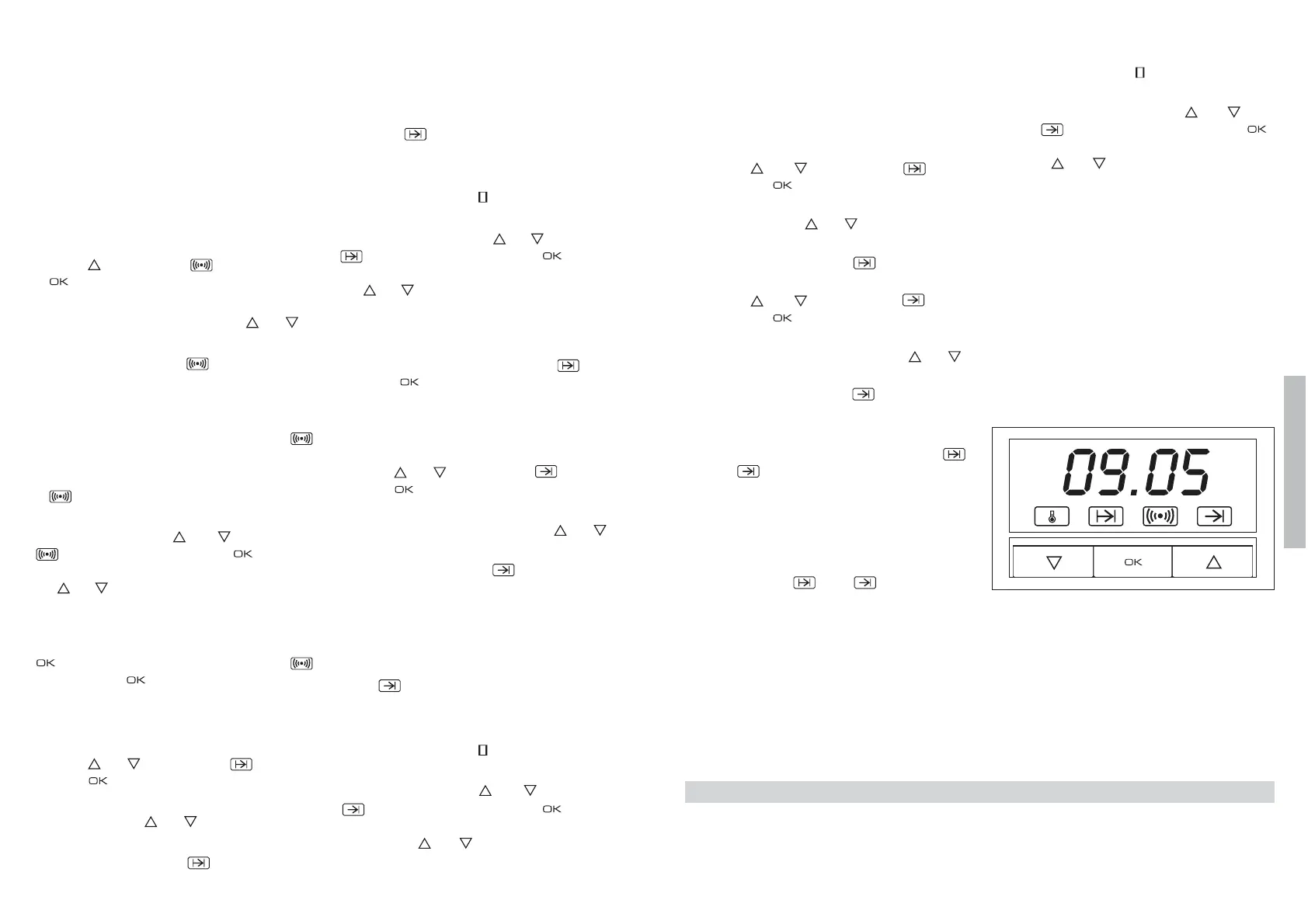
Programming the Alarm
1 Press until symbol lights up. Press
.
2 Set the period of time after which you wish
the alarm to sound by pressing or .
3 The clock beeps twice, the current time is
displayed and symbol lights up perma-
nently to indicate that the alarm has been
set.
4 When the set period of time comes to an
end, the alarm sounds and symbol
starts to flash.
5 Press any button to stop the alarm; symbol
goes out.
You can consult the remaining time at any
moment by pressing or until symbol
flashes and then pressing . You can
also modify the set time at this point by press-
ing or . The clock beeps twice to confirm
the change.
If you wish the remaining time to be displayed
until the end of the set period of time, press
and keep it pressed in. Symbol
flashes. Keep pressed in again to return
to the real time.
Setting the Cooking Time
1 Press
or
until symbol lights up.
Press .
2 Select the period of time you wish to cook
for by pressing or .
3 The clock beeps twice, the current time is
displayed and symbol lights up perma-
nently to indicate that the oven will turn
itself off automatically.
4 Select a cooking function and temperature.
5 When the cooking time comes to an end, the
oven turns itself off, the alarm sounds and
symbol flashes.
6 Press any button to stop the alarm and turn
the oven back on again.
7 Set the controls to to turn the oven off.
You can consult the remaining cooking time at
any moment by pressing or until symbol
flashes and then pressing . You can
also modify the set time at this point by press-
ing or . The clock beeps twice to confirm
the change.
If you wish the remaining time to be displayed
until the end of the set period of time, press
OK and keep it pressed in. Symbol flash-
es. Keep pressed in again to return to the
real time.
Setting the End Cooking Time
1 Press or until symbol lights up.
Press .
2 Select the time you wish the cooking
process to finish at by pressing or .
3 The clock beeps twice, the current time is
displayed and symbol lights up perma-
nently to indicate that the oven will turn
itself off automatically.
4 Select a cooking function and temperature.
5 When the set time is reached, the oven
turns itself off, the alarm sounds and sym-
bol flashes.
6 Press any button to stop the alarm and turn
the oven back on again.
7 Set the controls to to turn the oven off.
You can consult the end cooking time at any
moment by pressing or until symbol
flashes and then pressing . You can
also modify the end cooking time at this point
by pressing or . The clock beeps twice
to confirm the change.
This function can be used even when you are
already using the oven. To do this, follow the
instructions indicated above except point
number 4.
Setting the Cooking Time and the End
Cooking Time
1 Press or until symbol lights
up. Press .
2 Select the period of time you wish to cook
for by pressing or .
3 The clock beeps twice, the current time is
displayed and symbol lights up per-
manently.
4 Press or until symbol lights
up. Press .
5 Select the time you wish the cooking
process to finish at by pressing or .
6 The clock beeps twice, the current time is
displayed and symbol lights up per-
manently.
7 Select a cooking function and temperature.
8 The oven remains off with symbols
and lit up. Your oven is set.
9 When the time to start cooking is reached,
the oven starts up and cooks for the set
period of time.
10 When the set end cooking time is reached,
the oven turns itself off, the alarm sounds
and symbols and flash.
11 Press any button to stop the alarm and
turn the oven back on again.
12 Set the controls to to turn the oven off.
You can modify the end cooking time while cook-
ing is in progress by pressing or until
symbol lights up and then pressing .
You can now modify the end cooking time by
pressing or . The clock beeps twice to
confirm the change.
Important
In the event of a power cut, all the electronic
clock settings are deleted and the indication
00:00 flashes on the display. It is necessary
to set the time and programme the clock
again.
Technical Information
This oven has got a door temperature of below 60 K (as per EN60335-1/2-6).


 To Next Page
 Loading...