7. Call
A: To call the phone using the watch.
1) With your finger, slide the screen left or right, find the Phonebook area and click,
the numbers you have previously saved in the APP will be displayed (you can set up 10
numbers), click on the number you want to call.
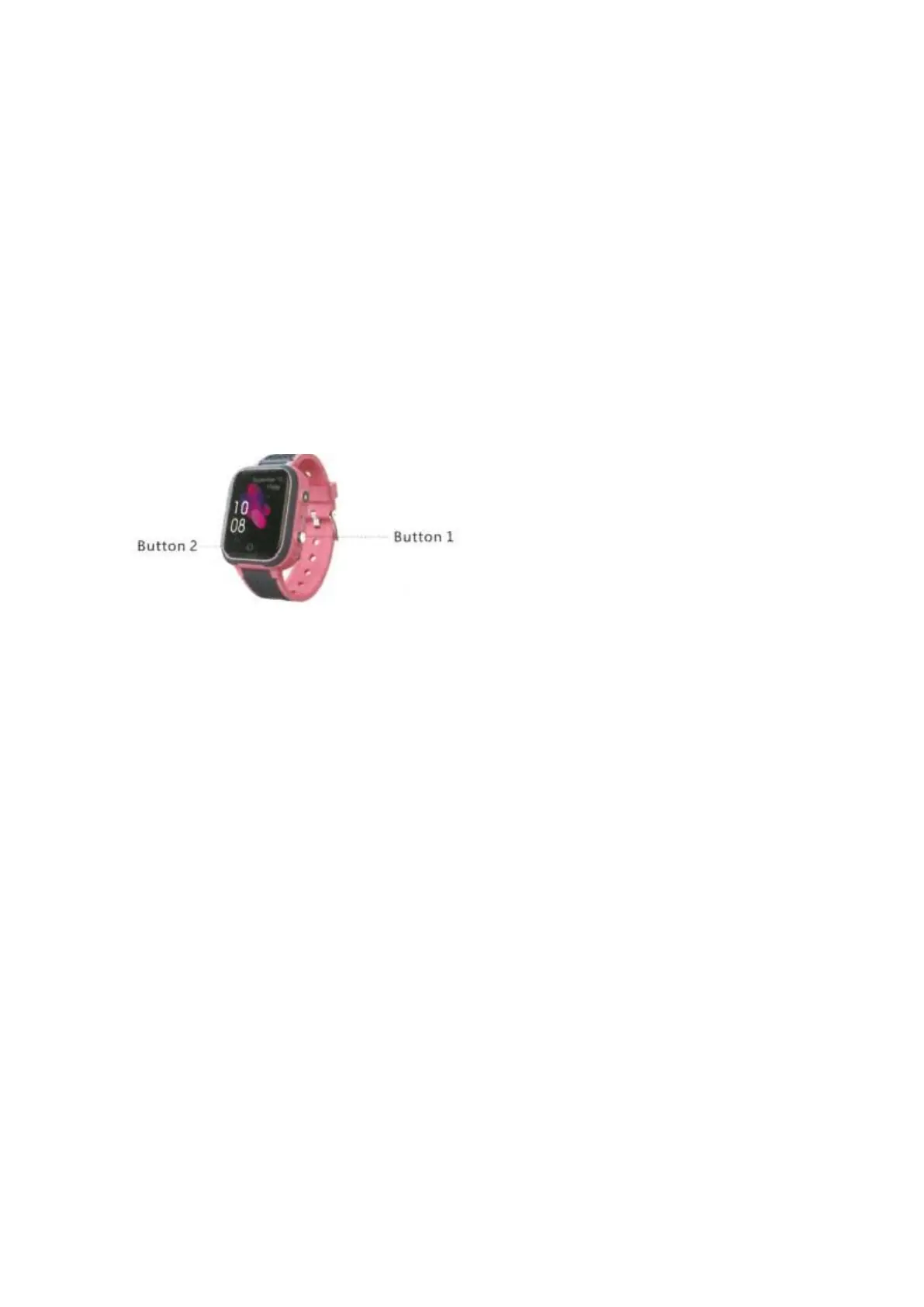
2) Press and hold button 1 for a few seconds, as shown in the picture below. It will call
the three SOS numbers one by one if the first or next one has not answered and will
not stop until the second round.
3) Press button 1 to cancel the call.
B: To call using the telephone. Simply dial the number you have saved in the APP.
When the watch receives a call, press button 2 to answer and button 1 to cancel.
8. Location
1): Turn on the watch and make sure it receives signal.
2): Open the map in APP, click on the location and it will show the real time position of
your child.
Notes: If the watch is indoors, it is usually positioned via LBS or WIFI, and the deviation
is inevitable as it depends on the distance between the watch and the base station and
the environment as well. If it is outdoors, it will automatically switch to GPS, the
deviation range will also reduce, but it will still be unstable when the watch moves,
which is normal, you can not consider it as quality problems, it will not be listed in
after-sales service.
9. Flashlight
Open the watch settings, find the flashlight, click on the flashlight pattern to turn on or
off.


 To Next Page