- 11 -
6. Display and pushbutton functions
Operating state indicator
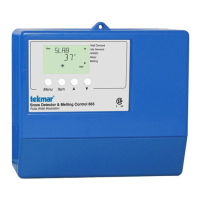
The display on the front shows the following operating states:
Green flashing System initialization
Green System in service
Green/red flashing System in service, at least one sensor faulty (alarm active)
Red flashing System not in service (alarm active)
Red System manually switched off
Pushbutton functions
Set:
general function "Select" or "Confirm"
go from home display to main menu
select the currently displayed submenu
select the currently displayed module number
select the currently displayed parameter for modification
save the current setting
" + " or " – ":
general function "Modify"
go to the previous/next menu item
modify the displayed sensor number
modify the displayed setting
activate or deactivate the heating system
" + " and "- " at the same time:
general function "Abort" (ESC)
return to the previous menu
return to the home display from the main menu
abort the current parameter modification without saving
Display symbols
The device communicates with the user with the help of a display with two rows of eight characters each. The
following symbols are used, independent of the current menu selection:
" - " Parameter value is being read
" –x– " Value is (currently) undefined
" –– " Sensor loop impedance too high, e. g. due to open loop
" –– " Sensor loop impedance too low, e.g. due to short circuit
" ... " Secure function; "Yes" needs to be selected in order to start the function
" OK" Secure function successfully completed
"Err" Secure function terminated
"act" Execution of current function still active
Within a display row a parameter which can currently be changed is displayed with a flashing cursor.
Menu operation will be terminated three minutes after the last pushbutton action and the home display will be
shown.
In order to indicate the operating or switching modes, the following symbols are used:
" " Mode = Off
" " Mode = On
" ! " Mode = On, slab being preheated (refer to "Slab idle temperature")
7. Operation, menu and error codes


 To Next Page