21 of 24 © 2005 D 420 - 06/05
Error Message Description
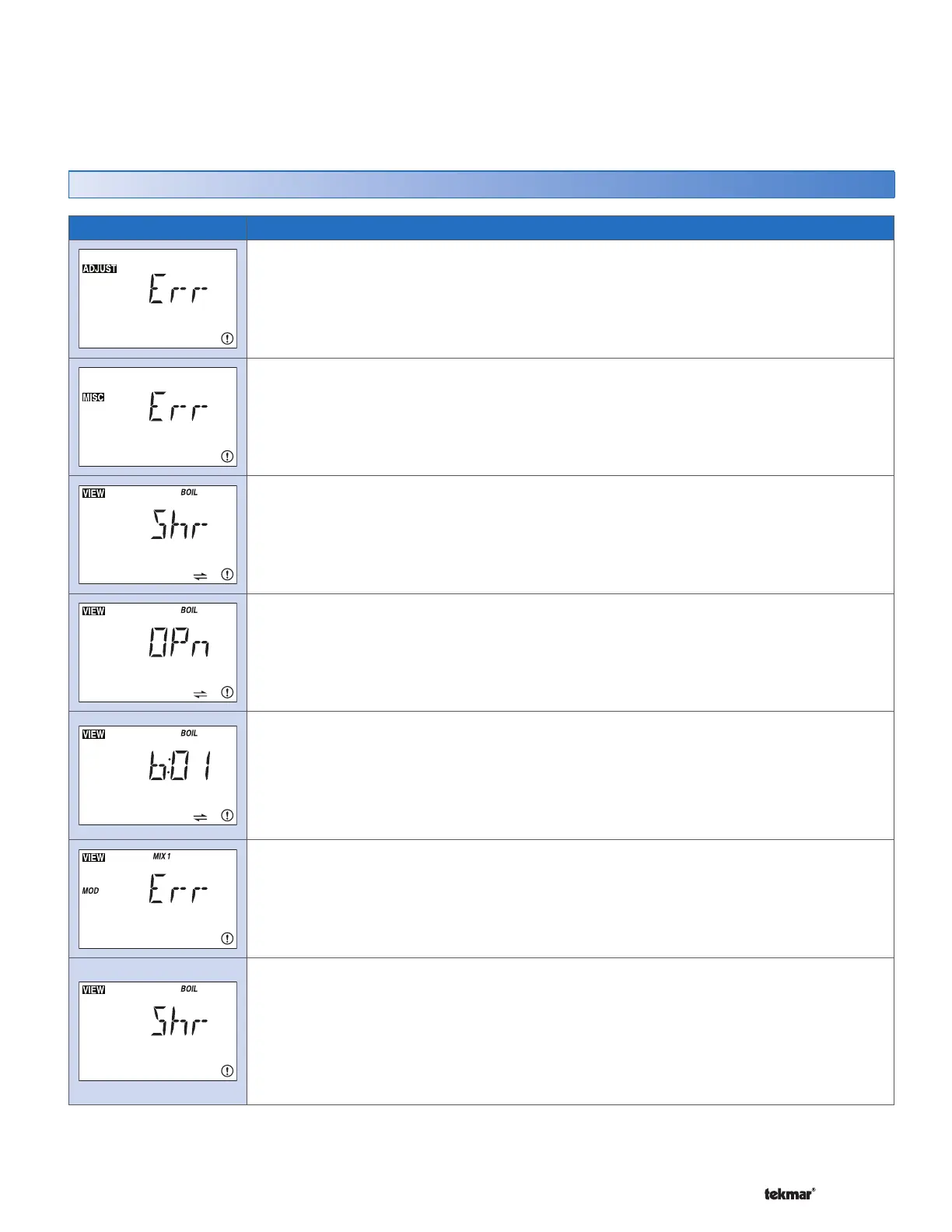
ADJUST ERROR
The control failed to read the Adjust menu settings, and reloaded the factory default settings.
Operation stops until you check the Adjust menu settings.
Note: To clear the error, the access level must be set to Advanced before checking the
settings.
MISCELLANEOUS ERROR
The control failed to read the Miscellaneous menu settings, and reloaded the factory default
settings. Operation stops until you check the Miscellaneous menu settings.
Note: To clear the error, the access level must be set to Advanced before checking the
settings.
BOILER BUS SHORT CIRCUIT
Due to a short circuit, communication is lost to all devices on the Boiler bus. Ensure the
wire polarity is correct for each tN4 device. Check the wires for damage. Once the error is
corrected, press any button to clear the error.
BOILER BUS OPEN CIRCUIT
Due to an open circuit, communication is lost to all tN4 devices on the Boiler bus. Ensure
there is power to the lost devices. Trace the wires from the control to each device looking for
loose or damaged wires. Once the error is corrected, press any button to clear the error.
BOILER BUS DEVICE LOST
Communication is lost to a tN4 device at address AA on the Boiler bus. The LCD on the lost
device displays Bus Boil OPn. Ensure that there is power to the lost device. Trace the wires
from the control to the lost device looking for loose or damaged wires. Once the error is
corrected, press any button to clear the control. If you deliberately remove a tN4 device, hold
the Up and Down buttons to clear the error.
MIX MODULE ERROR
A Mixing Module has been connected to the Boiler bus. Ensure that there is not a Mixing
Module on the Boiler bus. Once the error is corrected, press any button to clear the error.
BOILER SENSOR SHORT CIRCUIT
Due to a short circuit, the control failed to read the boiler sensor. When there is a call for heat,
the control no longer controls the boiler(s). Instead, the control provides a boiler enable to
the boiler’s aquastat or boiler control until the sensor is repaired. The control will not operate
the boiler contact if the Boil Minimum setting is less than 100°F (38.0°C). Locate and repair
the problem as described in the Data Brochure D 070. Once the error is corrected, press any
button to clear the error.
Error Messages (1 of 2)
When an error occurs, the warning symbol flashes and a
description of the error is displayed. Use the descriptions
listed below to identify and correct errors.
Once an error is corrected, press any button to clear
the error message from the control.
Error Messages


 To Next Page