7
5. POWER SUPPLY DESCRIPTION
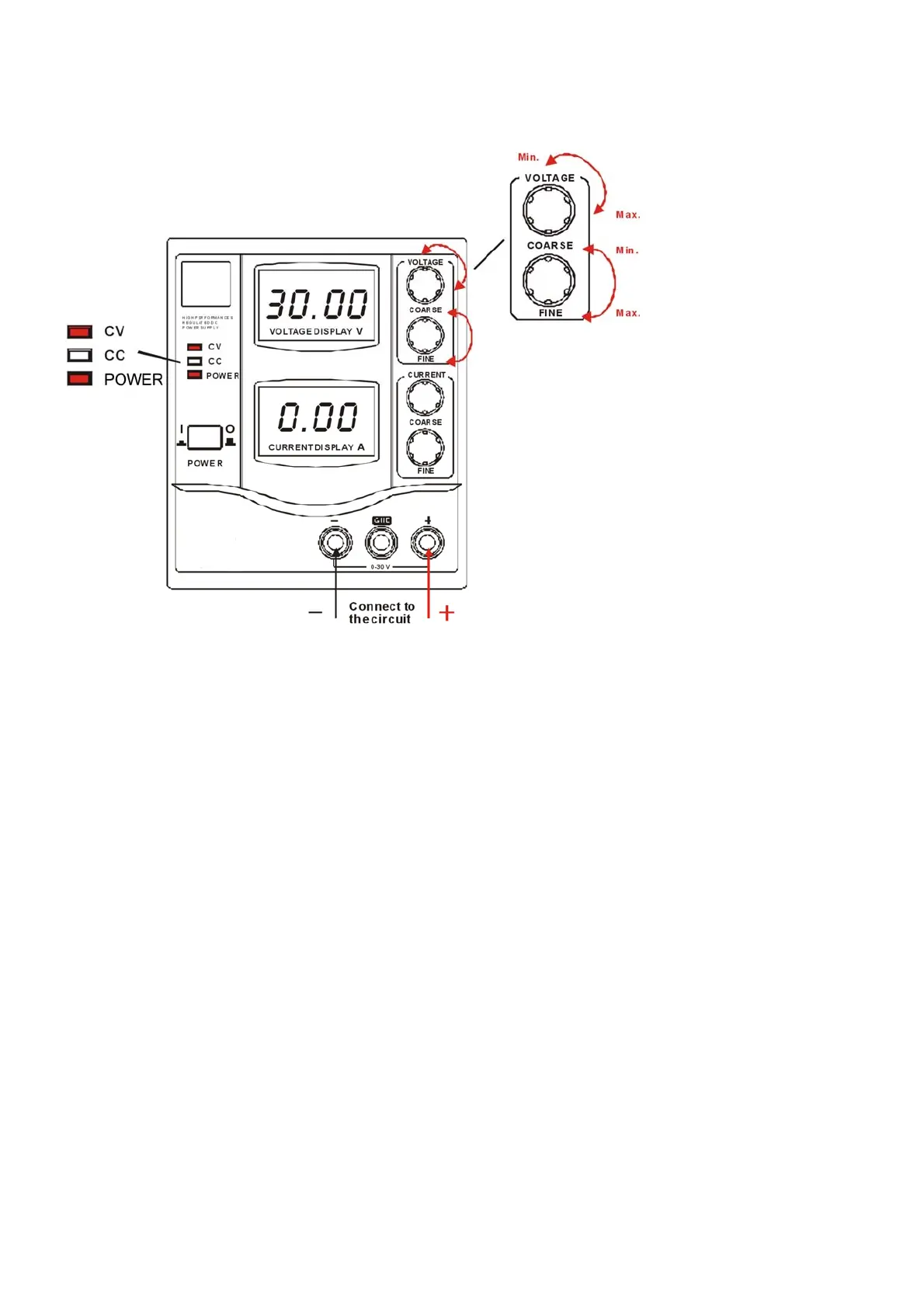
5.1 SETTING THE OUTPUT VOLTAGE
1 Connect the power supply to the power source.
2. Press the POWER SWITCH [1] to “I” position to turn on the power supply.
3. The CV INDICATOR [5] and POWER INDICATOR [3]* will on and the voltage value will be
displayed on the display.
4. Use the VOLTAGE COARSE TUNE KNOB [8] and VOLTAGE FINE TUNE KNOB [9] to adjust and
fine turn the voltage to give a desired output voltage.
5. Connect the circuit to the MAIN TERMINAL [12, 14].
6. When the CC INDICATOR [4] is on, adjust the CURRENT COARSE TUNE KNOB [10] and
CURRENT FINE TUNE KNOB [11] to give a suitable current.
Caution:
z Make sure the INPUT VOLTAGE SELECTOR [19] set to a correct position. Otherwise, it will
damage the power supply.
z Do not short the MAIN TERMINAL [12, 14] over 1 minute; it will damage the power supply.


 To Next Page